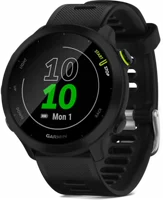
The Garmin Forerunner 55 is a five-key GPS running watch built for people new to running. It suits runners who want guided plans and long gaps between charges. Garmin lists up to 2 weeks in smartwatch mode and a 5 ATM swim rating Garmin.
Forerunner 55 at a glance
UP TO
2weeks
Smartwatch battery
UP TO
20hours
GPS battery
37g
Weight
5ATM
Water rating
Garmin lists these specs on its Forerunner 55 product page Garmin.
Smartwatch battery
Up to 2 weeks
GPS battery
Up to 20 hours
Weight
37 g
Water rating
5 ATM
Display
1.04 in (26.3 mm) memory-in-pixel (MIP), 208 x 208 pixels
Case size
42 x 42 x 11.6 mm
Fits wrists
126 to 203 mm around
Bands
20 mm quick release, silicone
Lens
Chemically strengthened glass
Satellites
GPS, GLONASS and Galileo
Connections
Bluetooth and ANT+
Memory
32 MB
Phones
iPhone and Android
What size is the Forerunner 55?
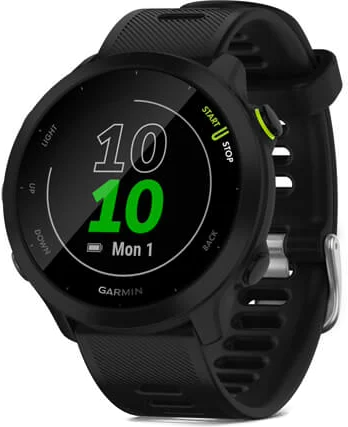
The Forerunner 55 case measures 42 x 42 x 11.6 mm, and the watch weighs 37 g Garmin. It fits wrists from 126 to 203 mm around. By our maths, that is about 5 to 8 inches (126 and 203 divided by 25.4).
Is the Forerunner 55 a touchscreen?
No, the Forerunner 55 works from five keys. The manual names them LIGHT, START, BACK, DOWN and UPmanual. Garmin's specs table for this watch lists no touchscreen row Garmin.
→You want songs stored on the watch: pick the vívoactive 5.
→You want training readiness: pick the Forerunner 70.
Good to know before you buy
!
The Forerunner 55 controls the music on your phone. Garmin's specs list smartphone music control, and no music storage, so carry your phone for songs Garmin.
!
Garmin lists a charging and data cable in the box, and no wall plug. Charge from a USB-C computer port or an AC adapter rated 5 W or more Garminmanual.
!
Safety features need emergency contacts, a paired phone and a data plan. Set up your contacts in the Garmin Connect app before you rely on them manual.
!
Garmin lists live event sharing for Android phones. iPhone users still get smart notifications, assistance and incident detection Garmin.
!
The swim profile is Pool Swimming, and the water rating covers surface use. Garmin's table lists 5 ATM for showering, swimming, diving into water and snorkeling GarminGarmin water ratings.
How the Forerunner 55 compares
Forerunner 55 vs 165
The Forerunner 55 lists more smartwatch battery and 2 g less weight. The Forerunner 165 adds a color AMOLED touchscreen, 4 GB of storage and Garmin Pay Garmin.
By our maths, 37 g against 39 g makes the Forerunner 55 about 5% lighter.
Forerunner 55 vs vívoactive 5
The Forerunner 55 lists a longer smartwatch battery and a wider wrist range. The vívoactive 5 adds a color touchscreen, music storage and a lighter case Garmin.
The Forerunner 70 is the newer entry model, announced on May 12, 2026 Garmin. It lists a touchscreen, longer GPS battery and training readiness. The Forerunner 55 lists the longer smartwatch battery and the lighter case Garmin.
Yes, Garmin gives the Forerunner 55 a water rating of Swim, 5 ATM manual. The manual says it withstands pressure equal to a depth of 50 m. Garmin's water rating table lists showering, swimming, diving into water and snorkeling for 5 ATM Garmin water ratings.
Before you start
Garmin asks you to avoid pressing the keys under water, and to rinse the watch with fresh water after chlorine, salt water, sunscreen or cosmetics manual.
Can I shower with my Forerunner 55?
Yes, showering is on Garmin's list of uses for a 5 ATM rating Garmin water ratings. Garmin lists high-speed water sports from 10 ATM upward.
Can you swim with a Forerunner 55?
Yes, the watch has a Pool Swim activity manual. Garmin lists pool metrics for lengths, distance, pace, stroke count and SWOLF Garmin.
Set the pool size first, because the watch counts distance by completed lengths manual. To change it, hold UP and select Pool Swim Settings›Pool Sizemanual.
Built for running
Does the Forerunner 55 have GPS?
Yes, built-in GPS tracks your time, distance, pace and speed Garmin. The watch can also use GLONASS and Galileo satellites. Garmin says a clear view of the sky takes 30 to 60 seconds to find signals manual.
Free Garmin Coach plans
Your Garmin Connect account holds an adaptive training plan and a Garmin coach manual. Answer a few questions, and the plan adjusts to your fitness, schedule and race date. Garmin says the plans come from expert coaches at no extra cost Garmin.
A Garmin Coach widget then joins the widget loop. Press UP or DOWN to open it, then select START›Do Workoutmanual.
Daily suggested workouts
The watch suggests a run when you start a running activity manual. Garmin says the suggestion updates with your training habits, recovery time and VO2 max. You need a VO2 max estimate first, and that takes a run of at least 10 minutes outdoors manual.
Training tools on the watch
Garmin names these running tools for the Forerunner 55 Garmin.
PacePro pacing guidance for a set course or distance.
Finish time, which shows an estimated time for your chosen distance.
Race predictor, built from your fitness level and training history.
Cadence alerts, which warn you outside your target range.
Recovery advisor, which says how long to rest after a workout.
A track run activity that records lap distances in meters.
Garmin also lists profiles for Pool Swimming, Biking, Treadmill Running, Walking, Yoga, Pilates, HIIT, Cardio and Stair Stepping Garmin.
Does the Forerunner 55 track sleep?
Yes, the watch detects your sleep and monitors your movement during your normal sleep hours manual. You get total hours of sleep, sleep stages and sleep movement. Set your normal sleep hours in your Garmin Connect account, and read the statistics there.
Note
Garmin says naps are not added to your sleep statistics manual.
Wrist heart rate every second, plus high and low heart rate alerts.
Body Battery energy monitoring, to help you plan activity and rest.
All-day stress tracking, with relaxation reminders and a breathing timer.
Respiration rate, fitness age and women's health tracking.
Safety and tracking features
Assistance and incident detection send your location to your emergency contacts Garmin. To ask for help by hand, hold LIGHT and release it after three vibrations manual.
Incident detection covers certain outdoor activities, and you switch it on under Safety›Incident Detectionmanual. Your contacts are told after 15 seconds, so there is time to cancel. Add contacts in the Garmin Connect app first manual.
Before you start
Garmin calls incident detection a supplemental feature, and says the Garmin Connect app does not contact emergency services for you manual.
Battery and charging
The Forerunner 55 lasts up to 2 weeks in smartwatch mode, and up to 20 hours in GPS mode Garmin. The manual puts the same figure as up to 14 days with smart notifications and wrist heart rate manual.
Garmin lists ways to stretch the battery further manual.
Shorten the backlight timeout, and lower the brightness.
Turn off Bluetooth when you are not using connected features.
Use a watch face that does not update every second, and limit notifications.
What charger does the Forerunner 55 use?
Garmin supplies a proprietary plug charger and a charging and data cable Garmin. Plug the marked end into the charging port, and the other end into a USB-C computer port or an AC adapter rated 5 W or more manual. A fully empty battery takes up to two hours manual.
Forerunner 55 bands and fit
The watch takes 20 mm wide, standard, quick-release bands manual. To change one, follow these steps.
Slide the quick-release pin on the spring bar to remove the band.
Insert one side of the new band's spring bar into the watch.
Slide the quick-release pin, and line up the spring bar with the other side.
Repeat for the other band.
How to set up and use it
Turn it on and pair your phone
Install and open the Garmin Connect app on your phone.
Bring your phone within 10 m (33 ft) of the watch.
The first time you turn on the watch, it is in pairing mode. Pair through the Garmin Connect app, not your phone's Bluetooth settings. If you skipped pairing, hold UP and select Phone›Pair Phone.
Garmin asks you to keep the watch clean and dry, and to skip sharp objects, chemical cleaners, solvents and insect repellents manual.
If it will not charge
Clean and dry the contacts and the area around them.
Plug the marked end of the cable into the charging port.
Plug the other end into a USB-C computer port or an AC adapter rated 5 W or more manual.
Charge between 32°F and 113°F (0°C and 45°C) manual.
If your phone will not connect
Turn off your phone and the watch, then turn them back on.
Turn on Bluetooth, and update the Garmin Connect app.
Remove the watch from the app and from your phone's Bluetooth settings.
Bring your phone within 10 m (33 ft) of the watch.
In the app, open the menu and select Garmin Devices›Add Device.
On the watch, hold UP and select Phone›Pair Phonemanual.
How to restart the Forerunner 55
Hold LIGHT for 15 seconds, until the watch turns off.
Hold LIGHT for one second to turn it on.
Garmin notes that a restart may erase your data or settings manual.
How to reset the Forerunner 55
Sync the watch with the Garmin Connect app to upload your activity data.
From the watch face, hold UP.
Select System›Reset.
Select Reset Default Settings to keep your history, or Delete Data and Reset Settings to erase it manual.
Forerunner 55 FAQ
When did the Forerunner 55 come out?
Garmin announced the Forerunner 55 on June 2, 2021, on Global Running Day Garmin. By our maths, that makes it 5 years and 4 months old in October 2026.
Is there a newer entry model?
Yes, Garmin announced the Forerunner 70 on May 12, 2026 Garmin. Garmin's US site now lists the Forerunner 55 under Previous Models Garmin.
Does the Forerunner 55 work with an iPhone?
Yes, Garmin lists iPhone and Android compatibility Garmin. The watch pairs over Bluetooth through the Garmin Connect app manual.
Where can I find the Forerunner 55 manual?
Garmin posts the owner's manual free online, and as a PDF manualmanual PDF.
The verdict
4/4 PASS
No. 080 · Garmin Forerunner 55
New runners who want simple, guided training.
The Forerunner 55 suits a new runner who wants simple, guided training and few charging stops. Garmin pairs built-in GPS with free Coach plans, up to 2 weeks of smartwatch battery and a 5 ATM swim rating.
 4/4 PASS