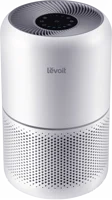
The Levoit Core 300 is a 3-stage air purifier for one room, with touch buttons and no app. It suits a bedroom or a home office where quiet matters most. Levoit lists a noise range of 24 to 54.5 dB and a CADR of 143 CFM Levoit.
Levoit Core 300 at a glance
24to 54.5 dB
Noise level
1066sq ft
Room size
6to 8 months
Filter life
2,4
Timer
Levoit lists these specs on its Core 300-P page and in the Core 300 series manual Levoitmanual.
Noise level
24 to 54.5 dB
Room size
1066 sq ft (1 ACH)
Filter life
6 to 8 months
Timer
2, 4, 6 or 8 hours
Room size at 4.8 ACH
222 sq ft
CADR
143 CFM
Filter stages
3 (pre-filter, main, carbon)
Fan speeds
3 (I, II and III)
Dimensions
8.7 x 8.7 x 14.2 in / 22 x 22 x 36 cm
Weight
7.9 lb / 3.6 kg
Rated power
56 W
Voltage
AC 120V, 60Hz
Ozone
Ozone free
Warranty
2-year limited
How big is the Levoit Core 300?
It stands 14.2 inches tall and 8.7 inches across, and weighs 7.9 lb Levoit. The manual asks for at least 15 inches of clearance on all sides manual. By our maths, that needs a space about 39 inches square (8.7 plus 15 plus 15).
Pick the Core 300 for buttons on the lid and a 2 to 8 hour timer. Pick the Core 300S-P for the VeSync app, an air quality sensor and a 1 to 24 hour timer Levoit.
→You want app control and an air sensor: pick the Core 300S-P Levoit.
→You want 358 sq ft at 4.8 ACH: pick the Core 400S-P Levoit.
→You want a desk unit with an aroma pad: pick the Core Mini-P Levoit.
Good to know before you buy
!
The filters are not washable. Clean the outer pre-filter with a soft brush or a vacuum hose, and leave the main and carbon layers dry manual.
!
Levoit lists the filter life as 6 to 8 months. Plan for a new Core 300-P-RF filter about twice a year Levoit.
!
It runs on standard US 120V, 60Hz outlets. The manual says to check compatibility if you use it outside North America manual.
!
It needs 15 inches of clearance on every side. Keep it off the wall and away from curtains, so air reaches the inlet manual.
!
Levoit rates it for humidity below 85% RH. In a damp room the filter surface can grow mold, so fix the moisture source first manual.
Note
Levoit posts a California Proposition 65 warning for this product, covering exposure to chemicals including lead Levoit.
How the Levoit Core 300 compares
Levoit Core 300 vs Core 200S
The Core 300 moves more air, at 143 CFM against 90 CFM, and covers a bigger room. The Core 200S-P is shorter and lighter, and adds the VeSync app Levoit.
Both are tower purifiers for one room, with close CADR numbers. Winix lists a 4-stage filter with PlasmaWave, a 12-month filter life and an auto mode with a sensor Winix.
The Core 300 is the smaller and lighter of the two, at 7.9 lb against 12.3 lb. Coway lists a higher CADR, a washable pre-filter and an auto mode with a pollution sensor Coway.
Levoit splits the job across 3 layers in one round cartridge Levoit:
The pre-filter traps hairs, dust and large particles.
The main filter removes 99.97% of ultrafine particles down to 0.3 microns.
The high-density activated carbon filter helps remove gases and odors.
Levoit says the filter suits homes with babies, pets, smokers and people who cook often. It lists wildfire smoke, seasonal pollen, vehicle exhaust and humidity-triggered odors Levoit.
What does Levoit say about HEPA?
Levoit's filter page says the filter helps the Core 300-P reach HEPA filtration efficiency during Sleep Mode. It adds that this was tested to IEST RP C001.7 by an independent lab Levoit. The product page itself uses the words "3-Stage Filtration" Levoit.
Which replacement filters fit?
The Core 300-P-RF Original Filter fits the Core 300-P, Core P350-P and Core 300-P-RAC Levoit. The manual lists 3 choices for this purifier manual:
Core 300-P-RF, the Original Filter
Core 300-P-RF-PA, the Pet Allergy filter
Core 300-P-RF-TX, the Toxin Absorber filter
The manual asks you to use official Levoit filters, so the Check Filter Indicator keeps working.
How quiet is the Levoit Core 300?
Levoit lists a noise range of 24 to 54.5 dB. QuietKEAP Technology takes the low end down to 24 dB Levoit. That figure is fan speed I. Fan speed III is the loudest, and cleans the air quickest manual.
Sleep Mode runs the lowest possible fan speed and drops every indicator to half brightness manual.
Tip
Levoit lists 26 dB or quieter and zero ozone emissions in Sleep Mode Levoit.
What room size does the Levoit Core 300 suit?
Levoit lists 1066 sq ft for one air change per hour Levoit. At 4.8 air changes per hour, the figure is 222 sq ft. The manual gives a second table: 222 sq ft at 5 air changes, and 511 sq ft at 2 manual.
The manual also notes that a room larger than 219 sq ft takes longer to clean manual. So the 222 sq ft figure is the one to plan around. Levoit's CADR for the unit is 143 CFM for smoke, 153 for dust and 167 for pollen.
Does the Levoit Core 300 have an app or WiFi?
No app or WiFi is listed on Levoit's Core 300-P page Levoit. You set it with the touch buttons on the lid.
Levoit lists the VeSync app, Amazon Alexa and Google Assistant on the Core 300S-P page Levoit. That model also adds the AirSight Plus air quality sensor.
Sleep Mode, the timer and the display lock
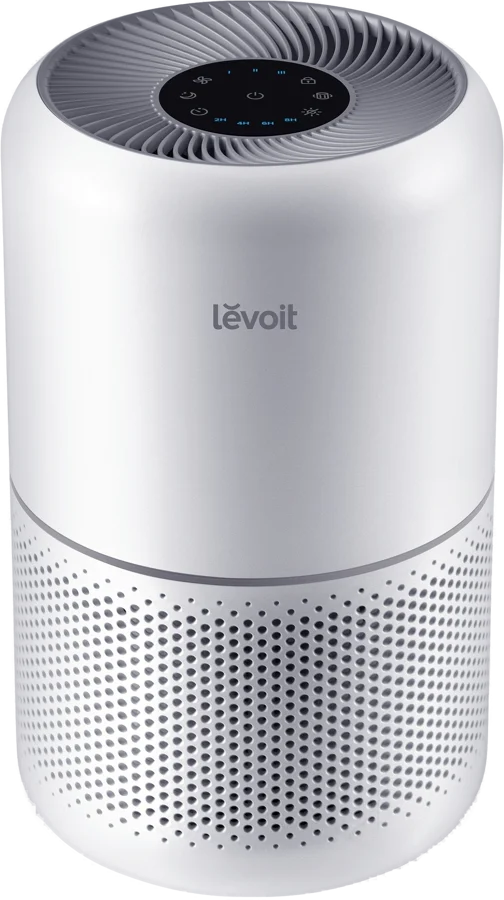
The lid holds 6 touch buttons and 2 rows of indicators manual:
On/Off turns the purifier on and off.
Fan Speed cycles through I (low), II (medium) and III (high).
Sleep Mode turns Sleep Mode on and off.
Timer cycles through 2, 4, 6 and 8 hours.
Display Lock holds your settings.
Display Off turns the lights off.
The indicators are not buttons, so tapping them changes nothing. Tap any button except On/Off to bring the display back on. Hold Display Lock for 3 seconds to lock or unlock the panel.
The purifier remembers the last fan speed when you plug it back in. It does not remember timers or Sleep Mode manual.
How to set up and use it
Flip the air purifier over, twist the filter cover counterclockwise and lift it off.
Take the filter out and pull off its plastic wrap.
Put the filter back with the handle facing up.
Refit the cover and twist it clockwise until it snaps shut.
Stand the purifier on a flat, stable surface with the display facing up.
Leave at least 15 inches / 38 cm of clearance on all sides.
Plug it in and tap On/Off. The fan starts on level I.
Tap Fan Speed to move between I, II and III manual.
For a specific problem such as smoke, the manual suggests level III for 15 to 20 minutes first. Then drop to a lower speed. Keep windows and doors closed while it runs.
To set the timer, tap Timer until the hours you want light up blue. The timer starts on its own, and the purifier switches off at the end. Tap Timer again until all the indicators are off to cancel it.
Care and quick fixes from the manual
How to clean the Levoit Core 300
Unplug it before you start.
Wipe the outside with a soft, dry cloth.
For marks, wipe the housing with a damp cloth, then dry it at once.
Levoit says not to clean it with abrasive chemicals or flammable cleaning agents.
How to clean the filter
Clean the outer pre-filter every 2 to 4 weeks manual. Use a soft brush or a vacuum hose to lift off hair, dust and large particles. Levoit says this keeps the airflow up and extends the life of the filter.
Before you start
Do not clean the filter with water or any liquid, and do not clean the main or activated carbon layers manual.
How to replace the filter
Unplug the purifier, flip it over and remove the filter cover.
Take out the old filter.
Vacuum any dust or hair left inside the housing, with no water.
Unwrap the new filter and drop it into the housing.
Refit the cover. The purifier will not power on until the cover sits correctly.
The Check Filter Indicator lights up as a reminder to look at the filter, usually within 6 to 8 months. After you fit a new filter, turn the purifier on and hold Check Filter Indicator for 3 seconds. The light goes out once the reset works manual.
If you changed the filter before the light came on, the steps differ:
Hold Check Filter Indicator for 3 seconds. This turns the light on.
Look over the power cord, and stop using it if the cord is damaged.
Try a different outlet.
Contact Levoit support if it still does not respond manual.
Levoit lists support at support@levoit.com and 1-888-726-8520, Monday to Friday.
If there is a smell
Clean the filter, or replace it if it needs it manual. The manual also asks you to keep the purifier out of high humidity, and away from essential oil diffusers. Contact Levoit support if the smell stays.
If the fan sounds unusual
Check that the filter is in place with its packaging removed.
Stand the purifier on a hard, flat, even surface.
Replace the filter.
Stop using it and contact support if the noise continues manual.
Levoit Core 300 FAQ
Can you add essential oils to the Core 300?
No. Levoit says oil damages the filter and the filter then releases an unpleasant smell. The manual also asks you to keep oil diffusers away from the purifier manual.
Can you use the Core 300 outdoors?
No. The manual says to use it indoors, in household use, and not for commercial use manual. It also says to keep it away from water and damp areas.
Does the warranty cover the filter?
No. Levoit's 2-year limited warranty lists filters under normal wear and tear, along with batteries and cleaning brushes manual.
What colors does the Core 300 come in?
Levoit lists the Core 300-P in white and black Levoit. Levoit also lists it as CARB compliant, FCC certified and ETL listed.
Where can I find the Core 300 manual?
Levoit posts the Core 300 series user manual as a PDF manual. It covers the Core 300 and Core 300-RAC models.
How much is the Levoit Core 300?
See today's price with the link above.
The verdict
4/4 PASS
No. 012 · Levoit Core 300
Quiet, clean air in a bedroom.
The Levoit Core 300 suits one room where quiet counts, such as a bedroom or a small office. Levoit rates the 3-stage filter at 99.97% down to 0.3 microns. It is ozone free, and runs as low as 24 dB. Plan the room around the 222 sq ft figure, and a new filter every 6 to 8 months.
 4/4 PASS