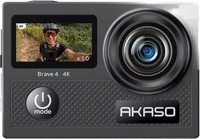
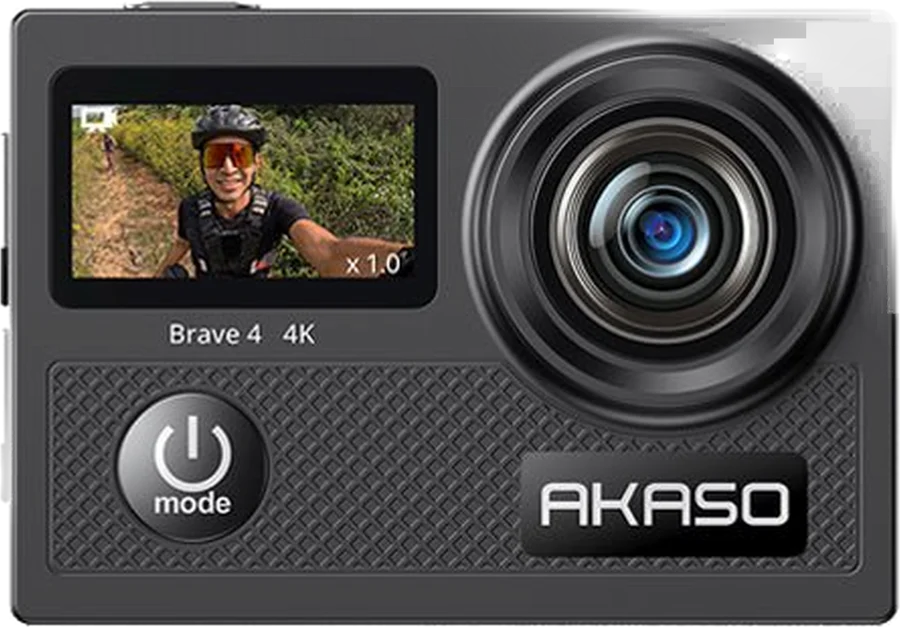
The AKASO Brave 4 is an action camera that records up to 4K at 30 frames per second, with 20 megapixel photos manual. It suits riders, skaters and snorkelers who want one small camera for wet days. Inside the housing in the box, it dives to 132 feet manual.
Akaso Brave 4 at a glance
UP TO
4K at 30fps
Video
UP TO
20megapixels
Photos
UP TO
132feet in the case
Waterproof depth
UP TO
90minutes of 4K30
Battery
AKASO lists these figures in its Brave 4 specifications article and in the user manual AKASOmanual.
A brand name microSD card rated U3, up to 256GB, in FAT32 format manual. AKASO asks for a sustained write speed of at least 30MB/s for 4K video AKASO. FAT32 stops each file at 4GB, so a long ride arrives as several clips.
Does the Akaso Brave 4 come with a memory card?
No. Buy the card with the camera. The box holds the camera, the waterproof housing, 2 batteries, a battery charger and a USB cable manual. It also holds a remote and strap, a spanner, a lens cloth and a guide. The mounts cover 2 helmet mounts, a handlebar clamp and a clip set.
How big is the Akaso Brave 4?
AKASO gives the body as 59.5 x 41.8 x 30.3 mm and the weight as 160 grams, or 0.35 pounds AKASO.
Akaso Brave 4 or Brave 4 Pro?
Both record up to 4K at 30 frames per second, and both zoom 5x. The Pro adds a touch screen and a larger battery, and AKASO rates it for 110 minutes of 4K recording AKASO.
→You want a touch screen: pick the Brave 4 Pro AKASO.
→You want the camera itself water resistant: pick the Brave 7, which AKASO rates to 10 meters AKASO chart.
→You want Bluetooth: pick the Brave 8 or the Brave 8 Lite AKASO chart.
Good to know before you buy
!
The camera body is not waterproof on its own. Put it in the waterproof housing from the box for any wet use. It then dives to 40 meters, or 132 feet manual.
!
The camera does not record sound inside the waterproof housing. Use the housing for water and mud. Take the camera out of it when you want the microphone manual.
!
No memory card comes in the box. Add a brand name microSD card rated U3, up to 256GB. Format it in the camera before the first use manual.
!
Image Stabilization arrives switched off. Turn it on in the video and photo settings for riding, skating and handheld shots. AKASO measures the 90 minute run time with it off manual.
!
AKASO lists the remote as splashproof, and it runs on a CR2032 cell. Keep it out of the water. A screwdriver opens the back cover when the cell needs changing manual.
Before you start
AKASO says a card above 256GB can go unrecognized, or leave the camera unresponsive.
How the Akaso Brave 4 compares
Akaso Brave 4 vs Akaso EK7000
Both record up to 4K at 30 frames per second, and both dive to 40 meters inside the housing. The Brave 4 adds a front screen, a 5x zoom, Diving Mode and Driving Mode AKASO chart.
Both record up to 4K at 30 frames per second, with 20 megapixel photos. The Brave 7 adds a touch screen, voice control and a body AKASO rates to 10 meters. The Brave 4 keeps the micro HDMI port and Diving Mode AKASO chart.
No. AKASO states that the camera body is not waterproof, and that the waterproof housing in the box is what takes it into water manual. With the camera closed inside the housing, AKASO rates it to 40 meters, or 132 feet.
AKASO asks you to test the empty housing in shallow water first. Check the rubber seal for damage, and clear anything trapped around it before you shut the back door.
Diving Mode is the setting that goes with it. AKASO built it to correct the blue and green cast that water puts on a picture manual.
Tip
AKASO says to rinse the housing in fresh water after every use, then dry it in a ventilated place before you store it.
Battery and charging
Two batteries and a battery charger come in the box. AKASO gives one battery up to 90 minutes at 4K30, with Image Stabilization off and Screen Saver on manual. A full charge takes about 2 hours with the camera turned off.
Charge the camera through the USB Type-C port with the cable in the box, from a USB adapter or a computer. The charging light stays red while it charges, and it goes out when the battery is full.
To stretch a charge, AKASO says to turn Wi-Fi off, record at a lower resolution or frame rate, and use the Screen Saver setting manual. For long storage, AKASO asks for a 50 to 60 percent charge.
Does the Akaso Brave 4 have Wi-Fi and an app?
Yes. Hold the OK button on the preview screen, and the camera makes its own Wi-Fi network manual. It pairs with the free AKASO GO app on iOS and Android. The network name starts with AKASO-Brave 4-C1- and the password is 1234567890.
The app works as a remote shutter, previews what the lens sees, plays files back, downloads them to your phone and installs firmware updates.
The camera's Wi-Fi carries no internet, so your phone pauses its data. That Wi-Fi also switches itself off after 3 minutes with no app connected.
AKASO lists no Bluetooth and no live streaming on the Brave 4 AKASO. Webcam mode is supported AKASO chart.
What can the Akaso Brave 4 record?
The camera carries 6 modes: Video, Photo, Burst Photo, Time Lapse Photo, Time Lapse Video and Settings manual. Press the MODE button to move between them.
Video has 9 settings, from 4K 30fps down to 720P 240fps, taking in 2.7K 30fps and 1080P at 120fps, 60fps or 30fps. Photos run 20MP, 16MP, 13MP or 8MP.
Burst Photo takes up to 10 shots in a second. Loop Recording writes over the oldest clip once the card fills, in 2, 3 or 5 minute files. Time Lapse Video builds frames into a short clip with no audio.
The picture settings cover exposure, ISO, WDR, white balance, sharpness, metering and 8 filters manual. The 4 angle steps are Super Wide, Wide, Medium and Narrow, which AKASO gives as 170, 140, 110 and 70 degrees AKASO.
What is Driving Mode on the Akaso Brave 4?
Driving Mode turns the Brave 4 into a dash cam. With it on in Video Mode, the camera starts recording as soon as it gets power. It saves the file when the power stops manual. Once the card fills, it deletes the oldest recordings to keep going.
AKASO asks you to keep the camera out of places hotter than 45C, such as a parked car in summer.
Does the Akaso Brave 4 record sound?
Yes. The camera has a built in microphone and a speaker manual. AKASO notes that the camera stops recording sound once it is inside the waterproof case.
You can add an external microphone through the USB Type-C port. Set Microphone to External in the system settings, then plug it in. Set it back to Built-in when you take the microphone off manual. AKASO sells that microphone apart from the camera AKASO.
How to set up and use it
These steps follow the Getting Started pages of the manual manual.
Open the battery cover, drop a battery into its slot and close the cover.
Charge it over USB Type-C until the red light goes out, about 2 hours.
With the camera off, slide a U3 microSD card into the card slot until it clicks.
Hold the power button for 3 seconds. The camera beeps and the light turns blue.
Format the card in Settings›System Settings›Format Card, then choose Yes.
Set the clock in Settings›System Settings›Date & Time.
Press MODE to pick Video, Photo, Burst Photo, Time Lapse Photo or Time Lapse Video.
Press the SHUTTER button to start, and press it again to stop.
Press UP or DOWN on the preview screen to zoom, 0.5x at a time, up to 5x.
Hold UP to swap screens, and hold DOWN to open playback.
Turn stabilization on in Settings›Video & Photo Settings›Image Stabilization for riding and handheld shots.
AKASO shows the camera mounted on a helmet and on a handlebar with the parts in the box. Fit the waterproof housing first for any dive manual.
The remote pairs on its own within 10 meters when you turn the camera on. Press its video button to record, or its photo button to shoot, with the camera in the matching mode.
Care and quick fixes from the manual
How to clean the Akaso Brave 4 and its lens
Wipe the lens with a soft, lint free cloth, and keep your fingers off the glass manual. Push nothing into the gap around the lens, and keep the camera away from high heat and direct sun.
For the housing, AKASO asks for 5 to 10 minutes in clean water with a gentle shake. Wipe it inside and out with a soft cloth, then air dry it in a ventilated place.
Before you start
AKASO says to keep hair dryers and other heat sources away from the housing, because heat can spoil the waterproof seal.
If the Akaso Brave 4 will not connect to Wi-Fi
Check that the camera's Wi-Fi is on. Hold OK on the preview screen, and the Wi-Fi light flashes yellow.
Join the network named AKASO-Brave 4-C1- in your phone's Wi-Fi list, with the password 1234567890.
Allow the AKASO GO app to use your Location and your Local Network.
Tap Research in the app if the camera's Wi-Fi does not appear.
Turn the camera's Wi-Fi on again if 3 minutes passed, because the camera drops it.
A "No Internet Connection" or "Weak Security" message on your phone is expected, because the camera's Wi-Fi carries no internet manual.
If the camera stops recording or will not read the card
Start with the card manual. Fit a brand name U3 card of 256GB or less. Move what you want to keep onto a computer, then format the card in Settings›System Settings›Format Card.
How to reset the Akaso Brave 4
Settings›System Settings›Reset puts every setting back to its default value manual. Choose Confirm to run it.
If the date and time keep resetting
The clock resets whenever you take the battery out of the camera manual. Set it again in Settings›System Settings›Date & Time. The AKASO GO app also syncs the clock from your phone.
How to move videos to a computer
Put the card in a card reader and copy the files across manual. Or plug the camera into the computer and pick USB Storage when it asks. A charging cable with no data wires will not do it.
Akaso Brave 4 FAQ
Does the Akaso Brave 4 have a touch screen?
No. AKASO lists the 2 inch main screen as IPS and not a touch screen, so the buttons do the work AKASO. The Brave 4 Pro is the version with a touch screen AKASO chart.
Is the Akaso Brave 4 remote waterproof?
AKASO lists the remote as splashproof, not waterproof manual. It is an RF 2.4G remote that needs no pairing, and it takes a CR2032 cell AKASO.
What is WDR on the Akaso Brave 4?
WDR stands for Wide Dynamic Range. AKASO says it brings out detail in the dark and the bright parts of one picture, which helps in high contrast scenes manual. It arrives switched off.
Can you live stream with the Akaso Brave 4?
No. AKASO lists live streaming as not supported on the Brave 4 AKASO. The AKASO GO app handles live preview, playback and downloads over the camera's own Wi-Fi.
How much does the Akaso Brave 4 cost?
See today's price with the link above.
Where can I find the Akaso Brave 4 manual?
AKASO posts the Brave 4 user manual as a PDF on its Brave 4 support page, next to its firmware and memory card answers AKASO support.
The verdict
4/4 PASS
No. 028 · AKASO Brave 4
Filming your wildest days, underwater too.
The Akaso Brave 4 suits someone who wants 4K video from a small camera on a helmet, a handlebar or a snorkel trip. AKASO pairs 4K30 video and 20 megapixel photos with a housing for 132 feet, 2 batteries and a charger, a 5x zoom and a front screen. Add a U3 microSD card of 256GB or less, and turn Image Stabilization on for anything that shakes.
 4/4 PASS