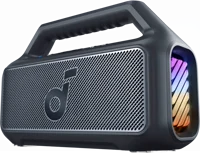
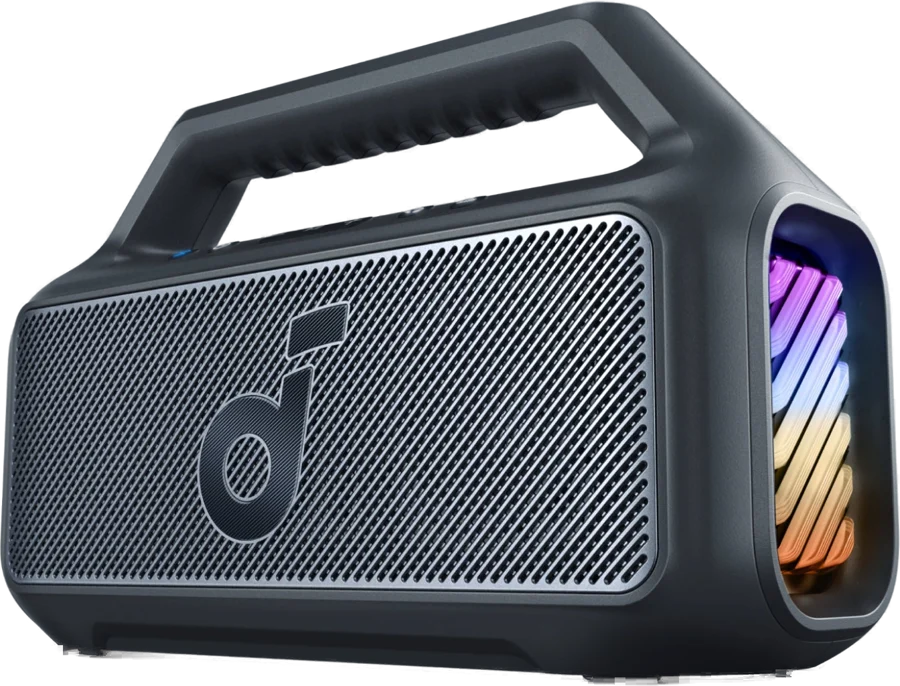
The soundcore Boom 2 is an outdoor Bluetooth speaker with one woofer, two tweeters and a light show built into both sides. It suits pool days, backyard parties and camping, where loud sound and water both matter. soundcore lists 60W as standard, and up to 80W in BassUp 2.0 mode soundcore.
soundcore Boom 2 at a glance
80W
Output power
UP TO
24hours
Playtime
IPX7
Waterproof rating
3.7lbs
Weight
soundcore lists these specs on its Boom 2 product page, its Boom 2 FAQ and the Boom 2 user guide, model A3138 soundcoremanual.
Output power
80W (60W standard, up to 80W in BassUp 2.0)
Playtime
Up to 24 hours
Charging time
5.5 hours
Battery capacity
4900 mAh / 7.3V
Drivers
90 x 120 mm woofer, two 20 mm tweeters
Frequency response
48Hz to 20kHz
Waterproof rating
IPX7, and the speaker floats
Weight
3.7 lbs
Charge out
5W USB-A output (5V / 1A)
Bluetooth version
6.0
Bluetooth range
100 m / 328 ft
Light effects
7 presets
Multi-speaker
TWS and Auracast
In the box
Speaker, 60 cm USB-C to C cable, quick start guide
How many watts is the soundcore Boom 2?
The Boom 2 runs at 60W as standard, and reaches up to 80W when you switch on BassUp 2.0 soundcore. The user guide lists the audio output power as 80W manual.
Does the soundcore Boom 2 have an aux port?
No, soundcore answers "No" to an AUX jack on the Boom 2 soundcore. Music goes in over Bluetooth, with the SBC codec. The larger Boom 2 Plus does list an aux input soundcore.
What Bluetooth version does the Boom 2 use?
The current user guide and the product spec table both list Bluetooth 6.0, with a range of 100 m / 328 ft manualsoundcore. soundcore's older FAQ still lists Bluetooth 5.3 for earlier units soundcore.
Boom 2 or Boom 2 Plus?
Pick the Boom 2 for 80W in a 3.7 lb box you carry by the handle. The Boom 2 Plus is the bigger version: 140W, an aux input and a shoulder strap, at 8.4 lbs soundcore.
soundcore's US store sells two sizes of this speaker: the Boom 2 and the Boom 2 Plus soundcore. Both use BassUp 2.0, IPX7 waterproofing and a floating body. The table above lists what the Plus adds.
Who the soundcore Boom 2 is for
Good fit if
You want loud music outdoors.
You play music near water.
You want a light show.
You want a full day of playtime.
You want to top up your phone.
Pick another model if
→You want 140W and an aux input: pick the Boom 2 Plus soundcore.
→You want a dustproof IP68 body: pick the Boom 3i soundcore.
→You want a 1.7 lb speaker with a strap: pick the Boom 3i soundcore.
Good to know before you buy
!
Seal the waterproof cover tightly before the speaker goes in water. soundcore states this in the same answer as the IPX7 rating, so check the cover every time soundcore.
!
The box holds the speaker, a 60 cm USB-C to C cable and a quick start guide. soundcore notes that the wall charger is not included, and recommends a certified 5V / 3A (15W) charger soundcore.
!
The 24 hour figure comes from lab testing at 50% volume, with BassUp and the light effects off. Turn both off and keep the volume down for the longest playtime soundcore.
!
soundcore lists no aux jack on the Boom 2. Plan to play over Bluetooth, or pick the Boom 2 Plus for a wired input soundcore.
!
New Auracast units will not link with older PartyCast speakers. soundcore says it upgraded the hardware to Auracast, and the manual says to read the 7th digit of the serial number, where "C" marks the new version soundcoremanual.
How the soundcore Boom 2 compares
soundcore Boom 2 vs Boom 3i
The Boom 2 lists more power and longer playtime: 80W and up to 24 hours. The Boom 3i is the small, rugged one, at 1.7 lbs with an IP68 dust and water rating and saltwater resistance soundcore.
The Boom 2 lists 80W, a light show and a floating body. The JBL Charge 6 lists 45W RMS, an IP68 rating, drop-proofing from 1 meter and a 3 hour charge JBL.
These two sit at different sizes. The Boom 2 lists 80W, 24 hours and a 5W charge-out port, while the Bose SoundLink Flex is a 1.291 lb speaker with 12 hours of battery and an IP67 rating Bose.
Yes, soundcore lists an IPX7 waterproof rating and a floating body for the Boom 2 soundcore. IPX7 covers water, and soundcore does not list a dust rating for this model. soundcore says the speaker handles the beach, the pool and the rain soundcore.
Before you start
Seal the waterproof cover tightly before you put the Boom 2 in water soundcore.
How loud is the soundcore Boom 2?
soundcore rates the Boom 2 at 60W as standard, and up to 80W with BassUp 2.0 switched on soundcore. The sound comes from a 90 x 120 mm woofer and two 20 mm tweeters, across 48Hz to 20kHz manual.
soundcore calls the layout 2.1 channel, and says smart crossover technology balances the highs and the deep bass soundcore.
How do I get better sound out of it?
soundcore lists four steps: stand the speaker on a flat surface away from corners with nothing in front of it, play a FLAC or WAV source, switch on BassUp 2.0, and change or customize the EQ in the soundcore app soundcore.
The app ships four EQ presets: soundcore Signature, Voice, Balance and Xtra Bass manual.
Battery life and the built-in power bank
soundcore lists up to 24 hours of playtime, measured at 50% volume with BassUp and the light effects off soundcore. The battery holds 4900 mAh at 7.3V, and a full charge takes 5.5 hours with a certified 5V / 3A (15W) charger manual.
The USB-A port works as a power bank, with a 5W output soundcore. By our maths, 5V at 1A gives 5W, which matches the DC output in the user guide.
Note
The Boom 2 powers off by itself after 20 minutes with no audio, and you can change that timer under Settings›Auto Power Off in the soundcore app soundcore.
The light show, TWS and Auracast
The LED lights on both sides change with the rhythm of the music, and soundcore lists 7 preset light effects soundcoremanual. You pick the mode in the soundcore app.
Two Boom 2 speakers pair in TWS mode for stereo, one as the left channel and one as the right soundcore. Auracast goes further: the manual says you can press the Auracast button on up to 100 soundcore speakers with the Auracast function to sync audio and light manual.
soundcore lists the Auracast partners as the Boom 2 Plus, the Boom 2 (Auracast version), the Boom Go 3i, the Rave 3S and the Rave 3 soundcore.
How to set up and use it
Charge the speaker with the included USB-C to C cable and a certified 5V / 3A (15W) charger.
Watch the light: flashing red is low battery, steady red is charging, steady white is full.
Press Power, or hold it for 2 seconds, to turn the speaker on.
Press Bluetooth to enter pairing mode, then pick "soundcore Boom 2" in your phone's Bluetooth list.
Press BassUp to turn BassUp 2.0 on or off.
Press Play/Pause once to play or pause, twice for the next track, three times for the previous track.
Press and hold Play/Pause for 2 seconds to start your voice assistant manual.
The manual lists two light controls: press twice to turn the lights on or off, and press and hold for 2 seconds to switch the light effect manual.
How do I pair two Boom 2 speakers?
Turn on both speakers, and connect one of them to your phone.
Press and hold Bluetooth for 2 seconds on both speakers to enter TWS pairing mode.
Wait for the indicator to flash white, then for the pairing sound.
Check the lights: steady blue on the main speaker, steady white on the second one.
To leave TWS mode, press and hold Bluetooth for at least 2 seconds manual.
Care and quick fixes from the manual
How to look after the battery
Recharge before the battery runs flat.
Recharge as soon as the low-battery light comes on.
Stop charging once the battery is full.
Keep the speaker away from very hot and very cold places.
Recharge it once every 3 months if you are not using it soundcore.
If it will not charge
Check the charging port for anything blocking it.
Use the included cable with a 5V / 3A (15W) charger.
Unplug the cable and plug it back in, then check the indicator light.
Check whether the speaker shut down after 20 minutes with no audio.
Move away from walls, pillars, appliances and the Wi-Fi router.
Keep the speaker close to the phone.
Reset the speaker with the steps below.
On a PC, try a different device, because soundcore lists PC Bluetooth modules as a cause of dropouts soundcore.
How to reset the Boom 2
Press and hold Bluetooth and Volume + at the same time. The user guide says at least 4 seconds, and soundcore's support article says 5 to 10 seconds manualsoundcore. You hear a prompt, and the speaker restarts.
A reset clears the old pairing records, which is soundcore's fix when the speaker keeps connecting to somebody else's phone soundcore.
If your phone cannot find the speaker
Keep the speaker inside Bluetooth range of the phone.
Short-press Bluetooth on the speaker, then refresh the Bluetooth search on the phone.
Reset the speaker if it still does not appear soundcore.
soundcore Boom 2 FAQ
What colors does the Boom 2 come in?
soundcore lists the Boom 2 in Phantom Black, Explorer Blue and Adventure Green soundcore.
Does the soundcore Boom 2 have a microphone?
Yes, soundcore says the Boom 2 has a built-in microphone soundcore. The manual lists a press on Play/Pause to answer or end a call, and a 2 second hold to reject one manual.
Can you turn off the start-up sound?
Yes, open the soundcore app, connect the Boom 2, then go to Settings›Speaker Prompts and switch the prompts off soundcore.
Can the Boom 2 play music from two phones at once?
No, the manual says the speaker plays from one mobile device at a time. Pause the active device first, then play from the other one manual.
How much is the soundcore Boom 2?
See today's price with the link above.
Where can I find the Boom 2 manual?
soundcore posts the Boom 2 User Guide for model A3138 on its support site, with a PDF download manual.
The verdict
4/4 PASS
No. 009 · soundcore Boom 2
Pool days, backyard parties and loud outdoor music.
The soundcore Boom 2 suits people who play music outdoors, near water, and want a light show with it. soundcore pairs an 80W BassUp 2.0 mode with up to 24 hours of playtime, an IPX7 floating body and a 5W port that tops up a phone. Pick the Boom 2 Plus instead if you need 140W or an aux input.
 4/4 PASS