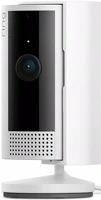
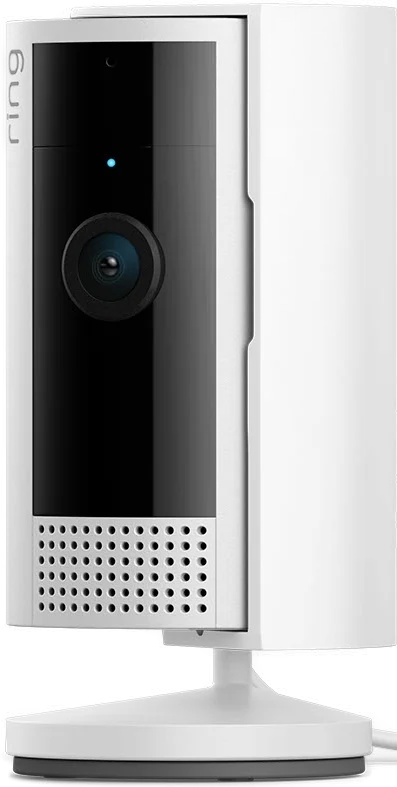
The Ring Indoor Cam is a small plug-in camera for one room, with 1080p HD video and a swivel lens cover. It suits pet owners who want to look in and talk back from a phone. Ring lists a 143 degree diagonal view and two-way audio with noise cancellation Ring.
Ring Indoor Cam at a glance
1080p HD
Video
143degrees diagonal
Field of view
6.5ft Micro USB cable
Power cable
1.93 x 1.93 x 3.81in
Dimensions
Ring lists these specs on its Indoor Cam product page Ring.
Video
1080p HD, Live View, Night Vision
Field of view
143 degrees diagonal, 115 horizontal, 59 vertical
Power cable
6.5 ft Micro USB cable, plus a 10W adapter
Dimensions
1.93 x 1.93 x 3.81 in (49.02 x 49.02 x 96.77 mm), including stand
Audio
Two-way audio with noise cancellation
Motion detection
Customizable Motion Detection
Siren
Remote-Activated Siren
Power source
Plug-In, standard power outlet
Wi-Fi
802.11 b/g/n at 2.4GHz, Wi-Fi 4
Upload speed needed
2 Mbps minimum
Operating conditions
-4F to 113F (-20C to 45C)
Available colors
White, Black
Generation
Indoor Cam (2nd Gen), 2023 release
Warranty
One-year limited warranty
How big is the Ring Indoor Cam?
It stands 3.81 inches tall and 1.93 inches square, stand counted in, which is 96.77 mm by 49.02 mm Ring. Ring does not list a weight.
Does the Ring Indoor Cam have a battery?
No. Ring lists the power source as Plug-In, and the setup requirement as a standard power outlet Ring. It has no on and off button, so unplugging the cord is how you cut the power Ring Help.
You supply one tool: a Phillips-head screwdriver Ring Help.
Ring Indoor Cam or Indoor Cam 2K?
Pick the Indoor Cam for 1080p HD video and a 2 Mbps upload speed. Pick the Indoor Cam 2K for 2560 x 1440 video and motion zones, with a 5 Mbps upload speed Ring.
→You want the lens to turn: pick the Pan-Tilt Indoor Cam Ring.
→You want a camera outside: pick the Outdoor Cam Ring.
Good to know before you buy
!
Ring says the Indoor Cam and its accessories are for indoor use. Keep it away from steam, heat sources and cold, and inside the -4F to 113F range Ring Help.
!
The cable in the box is 6.5 ft, and a 10 ft one is sold separately. Measure from your shelf to the outlet before you choose the spot Ring.
!
It joins a 2.4 GHz Wi-Fi network and wants 2 Mbps upload. Ring lists 802.11 b/g/n at 2.4GHz, so a 5 GHz network will not hold it Ring.
!
Video history needs a Ring Protect subscription, sold separately. Without one you still get real-time notifications and Live View, and you can see, hear and speak in real time Ring.
!
The device may get warm in normal use. Ring asks you to stand it on a heat-resistant surface Ring Help.
How the Ring Indoor Cam compares
Ring Indoor Cam vs Pan-Tilt Indoor Cam
Both cameras plug in and share the same 143 degree static view. The Pan-Tilt Indoor Cam adds 360 degree pan and 169 degree tilt, a longer cable and a wall bracket. It also stands about 2 inches taller Ring.
The two cameras match on the lens: both list a 143 degree diagonal view and 1080p video. Ring adds a remote siren and a swivel privacy cover. Blink lists a weight, and an IP65 rating with its weather-resistant adapter Blink.
IP65 with the Blink weather resistant adapter, sold separately
Operating temperature
-4F to 113F
-5F to 113F
Does the Ring Indoor Cam have night vision?
Yes. Ring lists Night Vision in the Indoor Cam tech specs, alongside 1080p HD and Live View. Ring's own product description for the camera calls it Color Night Vision Ring.
Ring also lists HDR, or high dynamic range. Ring says it gives detail in the brightly lit parts of a photo or a video Ring. The 143 degree diagonal view breaks down as 115 degrees across and 59 degrees up and down.
What changed from the Indoor Cam (1st Gen)
The privacy cover comes in the box with the 2nd Gen. Ring sells a Privacy Kit separately for the 1st Gen Ring Help. The mount differs too. On the 2nd Gen you pivot the base to the back and slide it into the plate. The 1st Gen base unscrews, then screws back on with the UP arrow pointing up.
Two-way talk and the siren
Ring lists Two-Way Talk, and two-way audio with noise cancellation. You listen in and answer from the Ring app Ring. The light above the lens pulses slowly in blue while talk or the speaker is on Ring Help.
Ring also lists a Remote-Activated Siren, which you set off from the app. The light flashes quickly in blue while the siren sounds.
The privacy cover and privacy settings
The Indoor Cam ships with a manual, removable privacy cover. Slide it across the lens and the camera turns off the audio, the video recording, Live View and motion detection Ring Help. Swivel it back to the side to switch the camera on again.
You do not have to remember how you left it. Ring says you can check the state of the camera in the app at any time Ring.
Tip
The cover lifts off. Twist it so the unlock symbol lines up with the mark on top of the camera, then pull it away from the top down Ring Help.
Switch motion alerts, motion or audio recording off.
Set a motion schedule for the hours you are usually home.
Black out part of the view with a Privacy Zone.
Modes, which set the camera to Disarmed, Home or Away, need a subscription.
Does the Ring Indoor Cam record all the time?
No, not as it comes. Ring lists 24/7 Continuous Recording for this camera. That feature needs a Ring Protect subscription, plus a 24/7 Recording add-on for each camera Ring Help.
Ring keeps those continuous recordings in the cloud for up to 14 days. It caps the feature at 10 devices in one location, and the camera must be on continuous power. The plug-in Indoor Cam meets that.
Two points are worth knowing before you turn it on. Ring switches Pre-Roll and Snapshot Capture off while 24/7 Recording runs. The feature also does not work with end-to-end encryption, or with local storage on a Ring Edge microSD card.
Can you use the Ring Indoor Cam outside?
No. Ring states that the Indoor Cam and its accessories are for indoor use Ring Help. Ring's compare table lists the camera as not weather resistant Ring.
Ring answers this on the product page. It calls the Indoor Cam an indoor-only camera that plugs in for nonstop power. The Outdoor Cam is the weather resistant one, with battery, plug-in, solar and Power over Ethernet options Ring.
How to set up and use it
Download the Ring app, then create a Ring account or sign in.
Open the app to the main dashboard and tap Set Up a Device.
Find the QR code on the device and scan it with the app.
Press the setup button on top of the camera when the app asks you to.
Select your wifi network, type the password and tap Continue.
Pick a preset name for the camera, or tap Custom to write your own.
Watch the light above the lens and listen for the audio messages Ring Help.
Ring gives an average install time of 5 to 10 minutes Ring. The camera arrives with the base fitted for a flat surface, such as a table or a shelf. Choose a spot with the view you want, within reach of an outlet Ring Help.
To mount it on a wall or a ceiling:
Slide the mounting plate down and off the base of the camera.
Hold the plate against the wall or ceiling and mark the screw holes.
Point the UP arrow up for a wall, or away from the area you want to watch for a ceiling.
Fix the plate, then pivot the base to the back of the camera.
Slide the camera down into the mounting plate.
Push the USB cable into the back of the camera and plug the adapter into the outlet.
Open Live View in the app, and rotate the camera on its base until the view is right Ring Help.
Before you start
Use the adapter and cable that came in the box, or ones sold for this camera. Ring says third-party accessories can affect how the camera works, and in some cases damage it Ring Help.
Watch for the blue light to flash quickly for 5 seconds, then stay solid for 5 seconds. That means the factory reset finished Ring Help.
To power cycle it instead, unplug the camera for 10 seconds and plug it back in Ring Help.
If it will not connect to wifi
The light above the lens tells you which part failed Ring Help:
One quick blue flash between two slow flashes: the wifi password went in wrong.
Three blue flashes, then nothing: the camera is too far from the router, or the network name holds special characters.
Four quick blue flashes, then a half second pause: setup failed for another reason.
Move the camera nearer the router, retype the password, and start setup again. A slow blue flash means the camera is in setup mode and ready.
What the light patterns mean
The light sits above the camera lens on every version of the Indoor Cam Ring Help:
Solid blue: the camera is starting up, or it is recording.
Blue flashing slowly: the camera is in setup mode.
Blue pulsing slowly: two-way talk or the speaker is on.
Blue flashing quickly: the siren is on.
Two blue flashes, then 2 seconds on: a firmware update is running.
If the picture looks blurry
Check for protective film left on the camera after install.
Look for dust, debris or any damage on the lens, and wipe the lens gently with a dry cloth.
Look for moisture inside the lens, which can point to damage.
Check that Live View is switched on in the app.
Test the wifi signal and the internet speed, because a weak signal lowers the video quality.
Restart your phone, turn any VPN off, update the Ring app, then restart the router and the camera Ring Help.
Ring Indoor Cam FAQ
Does the Ring Indoor Cam work with Alexa?
Yes. Ring lists Works with Alexa for the Indoor Cam, along with Real-Time Notifications, Live View and Multi-Cam Live View Ring.
Can you mount the Ring Indoor Cam on a ceiling?
Yes. Ring lists flat surface, ceiling and wall as the mounting options Ring. For a ceiling, point the UP arrow on the mounting plate away from the area you want to watch.
Does the Ring Indoor Cam keep my videos?
With a Ring Protect subscription, motion event videos stay in your account for up to 180 days. Photos stay for up to 7 days. Without a subscription you can watch real-time video, but nothing is kept Ring.
Where does Ring ship the Indoor Cam?
Ring ships it to the United States, leaving out Alaska and Hawaii, and to Canada, leaving out certain areas Ring.
How much is the Ring Indoor Cam?
See today's price with the link above.
The verdict
4/4 PASS
No. 021 · Ring Indoor Cam
Pet owners who want to watch from anywhere.
The Ring Indoor Cam suits one room with a spare outlet, and pet owners in particular. Ring lists 1080p HD video, Night Vision, a 143 degree diagonal view, two-way audio and a remote siren. The body stands under 4 inches tall, and the swivel cover shuts off audio, video and motion detection by hand. Plan for a 2.4 GHz network, and a Ring Protect subscription if you want video history.
 4/4 PASS