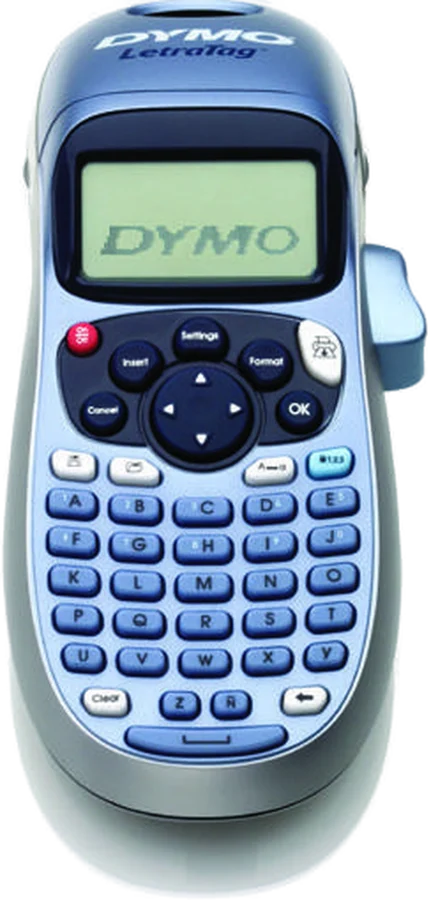
The DYMO LetraTag 100H is a handheld label maker with a graphical display manual. The font, style and border you pick show on screen before you print. It suits anyone labeling shelves, folders, jars and cables at home.
DYMO LetraTag 100H at a glance
5
Font sizes
6
Font styles
9labels
Label memory
2minutes
Automatic power off
Every number below comes from DYMO's own LetraTag 100H User Guide and the LT-100H Quick Reference Guide.
Font sizes
5
Font styles
6
Label memory
9 labels
Automatic power off
2 minutes
Display
Graphical LCD that shows your formatting
Lines per label
2 maximum
Characters per label
Up to 100
Borders
1 underline and 8 box styles
Tape cassettes
DYMO LetraTag (LT) 12 mm
Tape materials
Paper, plastic, metallic, magnetic, iron-on
Power
6V DC from 4 AA alkaline batteries (not included)
Date stamp
Yes, from the Insert key
Cutter
Button on the unit, with a blade you can clean
Warranty
1 year from the date of purchase
What batteries does the DYMO LetraTag 100H take?
It takes four high-capacity AA alkaline batteries, 1.5 V each manual. DYMO lists the batteries as not included, so add a pack to your order. The guide asks you to keep old and new batteries apart, and to keep alkaline, carbon-zinc and rechargeable types apart.
What tape fits the LetraTag 100H?
It uses DYMO LetraTag (LT) 12 mm cassettes, which is half an inch quick guide. DYMO lists LT cassettes in paper, plastic, metallic, magnetic and iron-on materials, in a range of colors.
How much text fits on one label?
You can enter up to 100 characters and spaces per label, and print a maximum of two lines manual. The display shows a small part of that text at a time, so long labels scroll.
Who the DYMO LetraTag 100H is for
Good fit if
Good fit if:
You label shelves, jars and folders
You want the label on screen first
You want a keypad, not an app
You reprint the same labels often
You want iron-on tape for clothing
Pick another model if:
You want to design labels on your phone: pick the DYMO LetraTag 200B, which prints over Bluetooth from the LetraTag Connect app.
You want narrow tape as well as 12 mm: Brother lists 3.5, 6, 9 and 12 mm widths for the P-touch PT-D210.
Good to know before you buy
!
The four AA batteries come separately. DYMO's electrical ratings page lists them as not included manual. Buy a pack of four AA alkaline cells with the label maker.
!
It takes DYMO LetraTag (LT) 12 mm cassettes, in one width. DYMO's safety page asks you to use DYMO-branded LT cassettes in this label maker manual. Check the box says LT before you order refills.
!
A label prints a maximum of two lines. That limit sits in the two-line section of the guide manual. Split longer wording across two labels.
!
The warranty covers DYMO-branded labels. DYMO states that the 1 year warranty does not cover a fault caused by third-party labels quick guide. Keep your proof of purchase with it.
!
Keep liquids away from the body. DYMO's safety list rules out liquid contact and asks you not to take the label maker apart manual. For repair or adjustment, DYMO points you to Customer Support.
Before you start
DYMO warns that the cutter blade is extremely sharp. Avoid direct contact with the blade when you clean it.
How the DYMO LetraTag 100H compares
Dymo vs Brother label maker
The LetraTag 100H puts your formatting on a graphical display and keeps nine labels in memory. Brother builds the PT-D210 around TZe tape in four widths, with 617 symbols and 98 frame types.
These two are near twins in DYMO's own guides. Both give five font sizes, six font styles, two lines, nine memory slots and the same two-minute power off. The tape list and the number keys differ.
It shows the formatting, not just the letters. DYMO calls it an exclusive graphical display, and says any formatting you add is visible instantly manual. The guide uses italic text inside a rounded border as its example.
Feature indicators run along the top of the screen. They show the font size, the number of lines, CAPS mode and Num Lock manual.
You can also scroll the whole label before you commit tape to it. Press Settings›Preview and the text runs across the display manual. A two-line label previews as one line with a break character between the halves.
How to change the font size and style
Both live under the Format key. Five font sizes are available: Extra Small, Small, Medium, Large and Extra Large manual. Pick one with Format›Size, and it applies to every character on that label.
Six font styles follow the same path: Normal, Bold, Italic, Outline, Shadow and Vertical manual. Choose one with Format›Style. A style applies to all characters, and works with letters, numbers and some symbols.
Borders sit in the same menu. Format›Borders offers an underline plus eight box styles: Edged, Square, Train, Pointed, Sweet Hearts, Rounded, Flowers and Crocodile manual. A label takes an underline or a box, and one box encloses both lines.
How the 9-label memory works
It stores the text of up to nine labels you print often, ready to recall manual. Press the memory save key, move through the nine fields with the arrow keys, pick a slot and press OK.
To print one again, press the memory recall key and pick the label you want manual. To empty a slot, recall the label first, then press Clear.
Tip
The guide says you can store new text in any of the nine memory locations, so you do not have to fill them in order.
Battery life and the 2-minute power off
The label maker switches itself off after two minutes of no activity, to save power manual. Your work survives it. DYMO says the last label created is remembered and displayed when the power comes back, with the style settings restored.
DYMO rates the unit at 6V DC and powers it with four AA alkaline cells at 1.5 V each manual. The guide asks you to take the batteries out if the printer will sit unused for a long period.
A "Battery low" message means the cells are almost flat, and the fix is new batteries manual.
Is the DYMO LetraTag 100H waterproof?
No, DYMO's safety list asks you not to let any liquid come into contact with the label maker manual. The same list rules out blocking the label exit slot and taking the unit apart.
The labels get their own guidance. DYMO asks you to clean the surface before you stick a label down, and to keep labels away from extreme heat and sunlight manual.
How to set up and use it
These steps follow DYMO's getting started and printing sections manual.
Remove the battery compartment cover. Fit four AA alkaline batteries to the polarity markings (+ and -), then replace the cover.
Press and release the label cassette cover to open the label compartment.
Insert an LT 12 mm cassette with the label between the print head and the pinch roller. Press firmly until it clicks into place.
Close the cassette cover and press power to switch it on.
Choose your language with Settings›Language. The language you pick sets the character set and the date format.
Set the clock with Settings›Set Date. Move across month, day and year with the left and right arrows, change each value with the up and down arrows, then press OK and set the time the same way.
Type your text. CAPS mode is on by default, and Num Lock puts the numbers on the A to J keys.
Set the look with Format›Size, Format›Style and Format›Borders.
Add a symbol, a second line or today's date with the Insert key.
Check the whole label with Settings›Preview.
Press PRINT.
Press the cutter button to cut the label. Peel the paper backing off and press the label onto a clean surface.
Care and quick fixes from the manual
How to clean the cutter blade
Clean it each time you change the label cassette manual. The same steps free a blade that has stuck in the forward position.
Remove the label cassette.
Put the tip of a ball-point pen or pencil on the black post, and press the post down.
Hold the post down, then press and hold the cutter lever to expose the blade.
Clean both sides of the blade with a cotton ball and alcohol.
Release the cutter lever.
How to clean the print head
The print head needs DYMO's special cleaning tool, which you request from Customer Support manual. Some older label makers keep one inside the label compartment cover.
Take the cassette out, then wipe the padded side of the cleaning tool gently across the print head manual.
If the display stays blank
Check the power is on, then put fresh batteries in manual. Remember the two-minute automatic power off, which blanks the screen on its own.
If the print quality drops
DYMO lists four steps in order manual. Replace discharged batteries, make sure the cassette is seated properly, clean the print head, then fit a new cassette.
You can also fine tune the darkness. Settings›Set Contrast holds the print contrast settings manual.
If you see "Tape Jam"
That message means the motor has stalled on a jammed label manual. Take the jammed label out, fit a new label cassette, then clean the cutter blade.
If the cutter struggles
Poor cutter performance points back to the blade manual. Clean it with the five steps above.
If you see "Too many characters"
The label has gone past the 100-character buffer manual. Delete some or all of the text, then type a shorter label.
How to change the tape cassette
Press and release the cassette cover, then lift the old cassette out manual. Seat the new LT cassette with the label between the print head and the pinch roller, press until it clicks, and close the cover.
DYMO LetraTag 100H FAQ
Does the DYMO LetraTag 100H have Bluetooth?
No, on the 100H you type on the keypad and press PRINTmanual. Bluetooth and the LetraTag Connect app belong to the LetraTag 200B, which has no keypad of its own 200B manual.
How do I reset the LetraTag 100H?
DYMO's guide lists no reset command. The Clear key clears all label text and formatting, and Cancel backs out of a menu without making a selection manual.
Can it print accented letters?
Yes, the label maker holds the extended Latin character set through RACE technology manual. Hold a letter key for longer than a second and the variations scroll past, the way a phone keypad works. Release the key on the character you want.
Can it print the date?
Yes, press Insert, select Date, and the date goes onto the label manual. US English units use the MMM DD, YY format, and other languages use DD MMM YY.
What supplies does it need?
Two things: DYMO LetraTag (LT) 12 mm cassettes and four AA alkaline batteries manual. See today's price with the link above.
Where is the serial number?
Inside the back cover of the label maker manual. You need it to register the warranty at DYMO's registration page.
The verdict
4/4 PASS
No. 026 · DYMO LetraTag 100H
Labeling the house and the home office.
The LetraTag 100H fits the person who wants to label a house or a home office from a keypad, with no phone and no software in the way. Its graphical display, five font sizes, six font styles and nine memory slots cover the jobs most people buy a handheld label maker for. Plan for four AA batteries and DYMO LT 12 mm cassettes, because both come separately.
 4/4 PASS