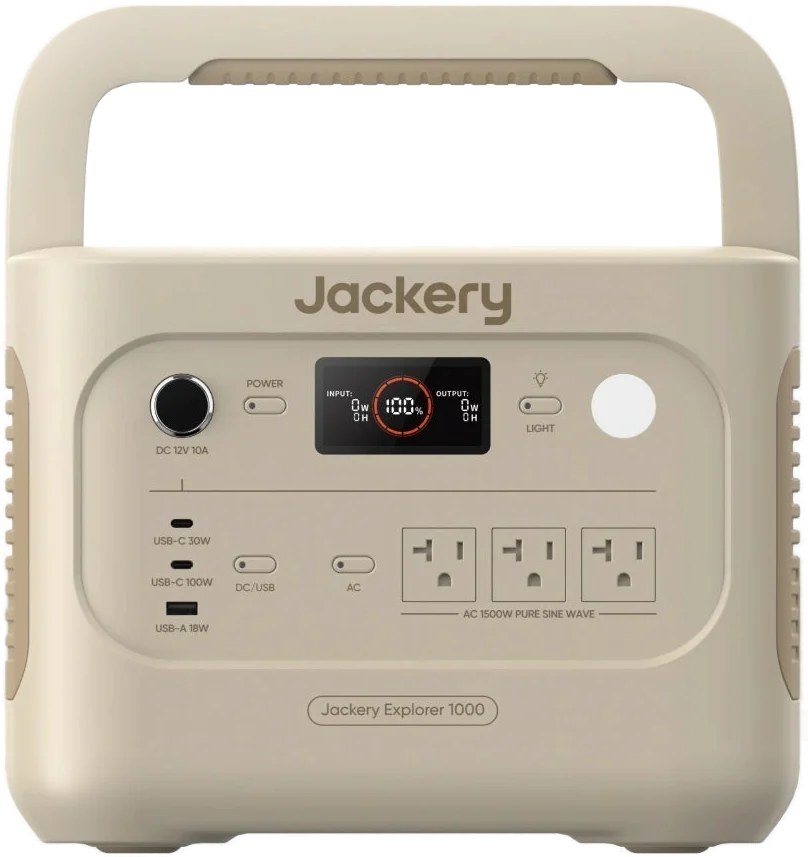
The Jackery Explorer 1000 v2 is a 1,070 Wh portable power station with three 120 V outlets. It suits camping trips and home power cuts, at around 23.8 lbs. Jackery rates the AC outlets at 1,500 W, with a 3,000 W surge peak Jackery.
Jackery Explorer 1000 v2 at a glance
1,070Wh
Capacity
1,500W rated
AC output
1.58hours from a wall outlet
Full charge
23.8lbs
Weight
Jackery lists these figures in the Tech Specs table on the Explorer 1000 v2 page Jackery.
Capacity
1,070 Wh
AC output
1,500 W rated, 3,000 W surge peak
Full charge
1.58 hours from a wall outlet
Weight
23.8 lbs (10.8 kg)
Battery
30.4 Ah at 35.2 V, LiFePO4
Cycle life
4,000 cycles to 70%+ capacity
AC outlets
3, at 120 V 60 Hz
USB ports
1 x 100 W USB-C, 1 x 30 W USB-C, 1 x 18 W USB-A
Car port
12 V, 10 A
Solar input
2 x DC 8 mm ports, 21 A or 400 W max together
Emergency charge
1 hour, 0 to 100%
Car charging
12 hours
Size
12.87 x 8.82 x 9.72 in (32.7 x 22.4 x 24.7 cm)
Warranty
3 years, plus 2 years when you register
How big is the Jackery Explorer 1000 v2?
Jackery lists the Explorer 1000 v2 at 12.87 in long, 8.82 in wide and 9.72 in high. In metric that is 32.7 x 22.4 x 24.7 cm Jackery.
How much does the Jackery Explorer 1000 v2 weigh?
Jackery lists the weight at around 23.8 lbs, or 10.8 kg Jackery.
→You want to add battery packs: pick the Explorer 1000 Plus, which expands to 5 kWh Jackery.
→You want 800 W of solar input: pick the Explorer 1000 Plus Jackery.
→You want a 10 ms switchover: pick the HomePower 1000 v2 Jackery.
Good to know before you buy
!
Jackery rates the three outlets at 1,500 W together, with a 3,000 W surge peak. Add up the wattage of your gear before you plug it in Jackery.
!
The US model puts out 120 V at 60 Hz, and charges from a 100 to 120 V outlet. Jackery sells a separate 230 V 50 Hz edition for Europe manual.
!
The manual marks the Explorer 1000 v2 for indoor use. It names an RV, a tent or an off grid cabin. Keep it away from rain and snow, and take a dry box when you camp manual.
!
The 1 hour charge comes from Emergency Charging Mode, which you switch on in the Jackery app. Normal wall charging takes 1.58 hours. Jackery suggests the fast mode when you need it, rather than every day Jackery.
!
The switch to battery power takes up to 20 ms, so it is not a 0 ms UPS. Jackery asks you to keep data servers and medical gear off it. Test your own device a few times first manual.
How the Jackery Explorer 1000 v2 compares
Jackery Explorer 1000 v2 vs Anker SOLIX C1000
The Anker SOLIX C1000 lists six AC outlets, 1,800 W of output and 600 W of solar input. The Explorer 1000 v2 holds a little more energy and weighs about 4.6 lbs less Anker.
BLUETTI lists 1,024 Wh, 1,800 W of output and 1,000 W of solar input for the Elite 100 V2. Both makers quote 30 dB and a LiFePO4 pack rated for 4,000 cycles BLUETTI.
It runs any mains device that draws up to 1,500 W, with headroom to 3,000 W for a surge. Jackery names kitchen gear, a home office, RV trips, van life and boats on the product page Jackery.
The pack holds 1,070 Wh. A 100 W load from 1,070 Wh works out at about 10.7 hours before conversion losses, by our maths. Jackery's own runtime calculator turns any wattage you type into hours.
Note
Jackery asks you not to run medical devices, life support gear or data servers from any of its power stations.
How long does the Jackery Explorer 1000 v2 take to charge?
From a wall outlet it takes 1.58 hours, or 1 hour in Emergency Charging Mode Jackery. From a 12 V car socket it takes 12 hours.
Emergency Charging Mode is switched on and off in the Jackery app. The ring of light around the battery percentage blinks faster while it runs manual.
Can you charge it with solar panels?
Yes. It has two DC8020 input ports. Each one takes a 100 W or a 200 W panel directly, and together they accept 21 A, or 400 W manual.
A Jackery Solar Panel Connector is needed to put two 100 W panels on one port manual.
Tip
Jackery says solar charge times follow the weather, so put the panel where it gets the most direct sun.
Does it work during a power cut?
Yes, with a short gap. Plug the station into the wall and your device into the station. The mains then feeds the device straight through, in what Jackery calls Bypass Mode manual.
When the mains drops, the station switches to its battery within 20 ms Jackery. The manual says this is not a 0 ms switch, and asks you to test the handover first.
How loud is the Jackery Explorer 1000 v2?
Jackery quotes 30 dB, and compares that to a whisper Jackery. That suits a tent or a bedroom at night.
The app also holds a Quiet Charging Mode, which lowers the charging power and cuts the noise manual.
Is the Jackery Explorer 1000 v2 expandable?
No. Jackery's Tech Specs table for the Explorer 1000 v2 lists no expansion port Jackery. The capacity stays at 1,070 Wh.
The Explorer 1000 Plus is the model built for growth. Its spec table lists a DC expansion port, and three battery packs take it to 5 kWh Jackery.
How to set up and use it
Jackery sets out these steps in the user manual manual.
Charge it fully before the first use. Connect the AC charging cable to the AC input, then to a wall outlet.
Press the Main Power Button. The working indicator lights up and the LCD screen comes on.
Press the AC Button to turn on the three AC outlets, then plug in your mains gear.
Press the DC/USB Button to turn on the USB ports and the car port.
To charge from the sun, connect a 100 W or 200 W panel to each DC8020 input port.
To charge in a vehicle, start the engine first, then connect the 12 V car charger.
Press and hold the Main Power Button to turn the station off.
To pair the app, install "Jackery" from the App Store or Google Play. Long press the POWER button until the Wi-Fi and Bluetooth icons flash, then add the device.
Energy Saving Mode is on by default, and turns all outputs off after 12 hours of light use. To switch it off, long press the AC Button and the Main Power Button together.
Care and quick fixes from the manual
How to store the Explorer 1000 v2
Use and store the unit in a clean, dry place, upright rather than on its side manual. The one year storage range is 0°C to 25°C, or 32°F to 77°F.
A pack left flat for 3 to 6 months loses performance and may stop taking a charge. Top it up before you put it away.
How to clean a Jackery solar panel
Jackery answers this on the Explorer 1000 v2 page Jackery:
Wipe the dust and dirt off the surface with a soft cloth.
Go over the module again with a damp cloth.
Remove any bird mess or sticky marks as soon as you see them.
If a fault code shows on the screen
The system uses codes F0 to FE. For F8, remove the load or unplug the charging plug, and the unit recovers by itself manual.
For F9, remove the load and the unit recovers by itself. For any other code, contact Jackery after sales service.
If a temperature warning shows
A high temperature warning clears once the battery cools manual. A low temperature warning clears once the room warms up.
If it will not charge
Check the temperature first. Jackery lists a charging range of 0°C to 45°C, or 32°F to 113°F Jackery. Outside that range the unit limits or stops charging. In a car, start the engine before you plug in the 12 V charger.
If the app will not connect
Wi-Fi and Bluetooth turn themselves off 5 minutes after start up when no app connects manual. Press and hold the DC/USB Button and the AC Button to turn both radios back on.
Jackery Explorer 1000 v2 FAQ
How long is the Jackery Explorer 1000 v2 warranty?
Jackery gives 3 years of standard warranty and 2 more years of extended warranty Jackery. The extension starts once you register the product or contact customer service.
Where can I find the Jackery Explorer 1000 v2 manual?
Jackery posts the user manual as a PDF for model JE-1000D manual. It covers the LCD icons, charging, fault codes and the warranty.
Does the Explorer 1000 v2 come with a solar panel?
The basic pack holds the station and an AC charging cable Jackery. Jackery also sells a bundle with a SolarSaga 200W panel and a solar charging cable.
Can you leave the Jackery plugged in all the time?
The manual gives no time limit for mains power. It does ask you to unplug the power plug when the product is not in use, and in a storm manual.
How much does the Jackery Explorer 1000 v2 cost?
See today's price with the link above.
The verdict
4/4 PASS
No. 031 · Jackery Explorer 1000 v2
Camping trips and home power cuts.
The Jackery Explorer 1000 v2 suits campers and households who want one box of mains power they can carry. Jackery rates it at 1,070 Wh and 1,500 W across three outlets. The pack fills in 1 hour and takes 4,000 charge cycles. At 23.8 lbs and 30 dB it stays easy to move and quiet enough for a tent.
 4/4 PASS