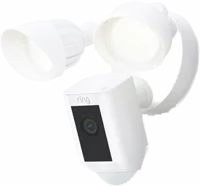
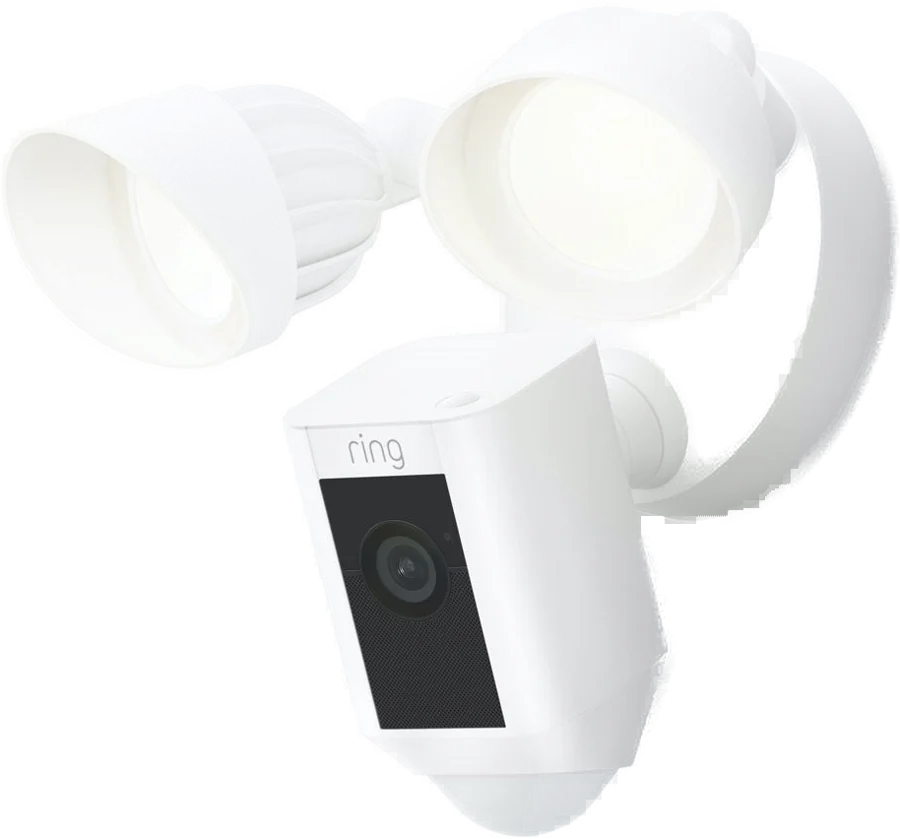
The Ring Floodlight Cam Wired Plus is an outdoor camera with two floodlights built into the fixture. It suits a home with a floodlight box already over the driveway, path or back yard. Ring lists two 3000 Kelvin, 2000 lumen floodlights and a remote-activated 105 dB siren Ring.
Floodlight Cam Plus at a glance
Two 3000 Kelvin with 2000 Lumen floodlights
Lighting
1080p HD
Video
140degrees horizontal
Field of view
Remote-activated 105 dB
Siren
Ring lists these specs on its Floodlight Cam Plus product page Ring.
Lighting
Two 3000 Kelvin with 2000 Lumen floodlights
Video
1080p HD, Live View, Color Night Vision
Field of view
140 degrees horizontal, 80 degrees vertical
Siren
Remote-activated 105 dB, measured at 4 in (10 cm)
Audio
Two-way audio with noise cancellation
Motion
Advanced Motion Detection with Customizable Motion Zones
Power, wired
Hardwired (110-240V)
Power, plug-in
Plug into standard power outlet, 20 feet of cord
Wifi
802.11 b/g/n wifi connection @ 2.4GHz
Size
11.7 in x 7.03 in x 9.67 in
Mounting bracket
4.7 in diameter
Operating conditions
Minus 5°F to 122°F (minus 20°C to 50°C), Weather Resistant
Install time
15 minutes
Colors
Black, White
How many lumens is the Ring Floodlight Cam?
Ring lists two 3000 Kelvin floodlights with 2000 lumens for the Floodlight Cam Plus Ring. The 3000 Kelvin number describes the color of the light, which reads as a warm white.
How big is the Floodlight Cam Plus?
Ring lists the fixture at 11.7 in x 7.03 in x 9.67 in Ring. The base and mounting bracket measure 4.7 in across, so the fixture covers a standard round box.
Is the Floodlight Cam Plus wired or wireless?
Ring lists the wired version as hardwired at 110-240V Ring. Ring also sells a plug-in version, which plugs into a standard power outlet and comes with 20 feet of cord. Both versions send video over wifi.
Floodlight Cam Plus Wired or Plug-In?
Pick the wired version when a floodlight box already sits where you want the camera. Pick the plug-in version when you have an outdoor outlet and would rather skip the wiring RingRing.
→You want 2K video and HDR: pick the Floodlight Cam Pro Ring.
→You want a battery or solar option: pick the Spotlight Cam Plus Ring.
→You want 5 GHz wifi: pick the Floodlight Cam Pro Ring.
Good to know before you buy
!
The wired version mounts on a 4 inch round UL listed weatherproof electrical box. Check what box is behind your current floodlight before you order manual.
!
The install puts you in contact with mains wiring. Ring says to disconnect power at the fuse or circuit breaker first, and to hire a licensed electrician if the work is new to you manual.
!
The manual says not to connect this light fixture to a dimmer switch or timer. Wire it to a plain switched circuit, and use the app for schedules instead manual.
!
Weatherproof silicone caulk is not included. Ring says to seal around the outside where the camera meets the junction box, so add a tube to your basket manual.
!
Reviewing past motion events needs a Ring subscription. The camera ships with a free 30 day trial, and without a plan you can view live video and respond to alerts as they happen manualRing.
!
The wifi radio is 2.4 GHz 802.11 b/g/n. Name a 2.4 GHz network during setup, and add a Chime Pro or mesh router if the camera sits far from the router RingRing.
How the Floodlight Cam Plus compares
Ring Floodlight Cam Plus vs Pro
Both list the same two 3000 Kelvin, 2000 lumen floodlights. The Pro adds 2K video with HDR, a 110 dB siren, 3D Motion Detection with Bird's Eye View, and wifi on both bands Ring.
Advanced Motion Detection with Customizable Motion Zones
3D Motion Detection; 270 degree, 30-foot Customizable Motion Zones
Wifi
802.11 b/g/n @ 2.4GHz
802.11 b/g/n @ 2.4GHz and 5.0GHz
Size
11.7 in x 7.03 in x 9.67 in
12.82 in x 7.77 in x 8.5 in
Operating conditions
Minus 5°F to 122°F
Minus 5°F to 120°F
Power, wired
Hardwired (110-240V)
Hardwired (100-240V)
Ring Floodlight Cam Plus vs Spotlight Cam Plus
The Floodlight Cam Plus brings two 2000 lumen floodlights and a 105 dB siren. The Spotlight Cam Plus lists 1080p video with HDR, 2 LED spotlights, and a choice of battery, wired, solar or plug-in power Ring.
Ring lists two floodlights at 2000 lumens and 3000 Kelvin Ring. The lights sit on arms you rotate, so you aim each one at the part of the yard you care about. The camera mount is adjustable too, with the 140 degree field of view.
Can you use the floodlights as a regular light?
Yes, you can turn the lights on from the app, and you can set a schedule. In the Ring app, open your camera and use the Lights toggle for a manual switch Ring.
For hands-off lighting, go to Device Settings›Light SettingsRing. Ring lists these controls there:
Motion-Activated Lights: the lights come on when motion is detected at night.
Light Schedules: Keep Lights On or Keep Lights Off, starting at dusk or a custom time, on the days you pick.
Automatic shut-off timer: 30 seconds up to 15 minutes.
Light Brightness, which Ring lists for the Floodlight and Spotlight Cam Plus and Pro.
Light Sensitivity, a slider for how far away motion turns the lights on.
Video, night vision and the 140 degree view
Ring lists 1080p HD video with Live View and Color Night Vision Ring. The view covers 140 degrees across and 80 degrees up and down, which takes in a driveway and the path beside it.
Does the Floodlight Cam Plus have night vision?
Yes, Ring lists Color Night Vision for this camera Ring.
Tip
The floodlights are the light source here, so point one at the area you most want to see in color.
The siren and two-way talk
Ring lists a remote-activated 105 dB siren, measured 4 inches (10 cm) from the camera Ring. You set it off yourself from the Ring app, so it is a deliberate action rather than an automatic alarm.
The camera also lists two-way audio with noise cancellation Ring. That lets you hear the yard and speak back through the camera from your phone.
Motion detection and motion zones
Ring lists Advanced Motion Detection with Customizable Motion Zones Ring. You draw the zones in the app, so a busy road or a neighbor's path need not set off an alert.
The light sensitivity slider in Device Settings›Light Settings sets how far away motion turns the lights on Ring.
Is the Ring Floodlight Cam waterproof?
No, Ring rates the Floodlight Cam Plus as Weather Resistant, for minus 5°F to 122°F (minus 20°C to 50°C) Ring. That covers rain, snow and heat in the open air, and it is a different claim from waterproof.
The install adds to that seal. Ring says to apply a weatherproof silicone caulk or sealant, which is not included, around the outside where the camera meets the junction box manual.
Before you start
Ring says do not install this fixture near combustible or flammable surfaces manual.
Recording, alerts and the Ring subscription
Without a plan, you can view live video and respond to alerts as they happen Ring. Ring says all its subscriptions give you the ability to review past motion events, and that motion event videos are stored in the cloud for up to 180 days from the recording date.
The camera comes with a free 30 day trial of Ring Protect, which lets you review, save and share your video and photo history manual. The manual notes the trial does not apply at an address that already has a Ring Protect subscription.
How to set up and use it
Ring lists a 15 minute install for the wired version Ring. These steps come from the setup guide and Ring's install article manualRing.
Shut off power to the floodlight circuit at the breaker or fuse box.
Rotate the lights out of the way. For a wall, rotate the camera into position. Under an eave, it is already in position.
Remove your existing floodlight, disconnect the wires, and take off any metal bracket on the junction box.
Choose a set of screws from the bags marked A through F that fit your box. Save a screw from bag B or C.
Attach the metal mounting bracket, with the FRONT text facing outwards.
Free the plastic mounting plate, feed the power wires through the opening, and center it over the bracket. On a wall the UP arrow points up. Under an eave it points towards the wall. Tighten a bag B or C screw into the center hole.
Loop the nylon strap buckle on the back of the fixture over the hook on the mounting plate, and check it is secure.
Connect green to the ground wire, white to the neutral wire and black to the hot wire, with the wire nuts from bag G. Give each one a gentle tug.
Tuck the wires into the box, slide the fixture onto the threaded posts, and secure it with two hex cap nuts from bag G.
Apply weatherproof silicone caulk around the outside, where the camera and the junction box meet.
Restore power at the breaker. The lamps flash once the camera powers on.
Open the Ring app, select Set Up a Device, scan the code in the setup guide, and follow the in-app instructions.
Care and quick fixes from the manual
How to clean the lens
Check for protective film left on the device after installation.
Start with the cleaning steps above Ring. Ring says condensation inside the lens points to physical damage, so contact Ring support if the fog sits behind the glass.
If the picture is black and white
Ring explains that the camera switches to night vision in low light, which gives a grayscale picture Ring. Adding more light to shaded areas, or moving the device to a brighter location, helps keep the video in color.
If you cannot hear anything
Turn up the volume on your phone or tablet, then try another device.
Allow the Ring app to use your device's microphone in your phone settings.
Turn on Audio Streaming and Recording under Device Settings›Privacy Settings.
In Live View, unmute the microphone and speaker Ring.
If it will not connect to wifi
Connect to your 2.4 GHz network. Ring says some of its devices support 2.4 GHz networks.
In your phone's wifi settings, tap Forget Network for your network, then reconnect with your password.
Add a wifi extender, such as Chime Pro, or a mesh router when the camera sits far from the router Ring.
How to reset it
Hold the setup button for 20 seconds, then release Ring. On this camera the setup button sits on top of the device. After a factory reset you might need to set up the device again in the Ring app.
If the lights do not come on with motion
Open Device Settings›Light Settings and check that Motion-Activated Lights is on Ring. Then move the Light Sensitivity slider, which sets how far away motion turns the lights on. Check your Light Schedules as well, in case one holds the lights off.
Ring Floodlight Cam FAQ
Does the Floodlight Cam Plus work with Alexa?
Yes, Ring lists Works with Alexa for the Floodlight Cam Plus Ring.
What colors does it come in?
Ring lists the Floodlight Cam Plus in Black and White Ring.
What is in the box?
Ring lists the Floodlight Cam Plus, a mounting bracket, installation tools and screws, a user manual and a security sticker Ring. The setup guide also lists wire nuts and hex cap nuts in bag G, and a screwdriver with a reversible bit manual.
What warranty comes with it?
Ring lists a one-year limited warranty Ring. The setup guide points to ring.com/legal for the warranty, theft protection and plan terms.
How much is the Ring Floodlight Cam?
See today's price with the link above.
Where can I find the manual?
Ring posts the Floodlight Cam Wired Plus setup guide as a PDF, in English, French and Spanish Ringmanual.
The verdict
4/4 PASS
No. 043 · Ring Floodlight Cam Wired Plus
Lighting up a dark driveway at night.
The Floodlight Cam Plus suits a home with a floodlight box already aimed at a driveway, path or back yard. Ring pairs two 3000 Kelvin, 2000 lumen floodlights with 1080p color night vision, a 140 degree view and a 105 dB siren you set off from your phone. Plan for mains wiring, a 2.4 GHz network and a tube of silicone caulk.
 4/4 PASS