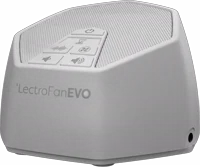
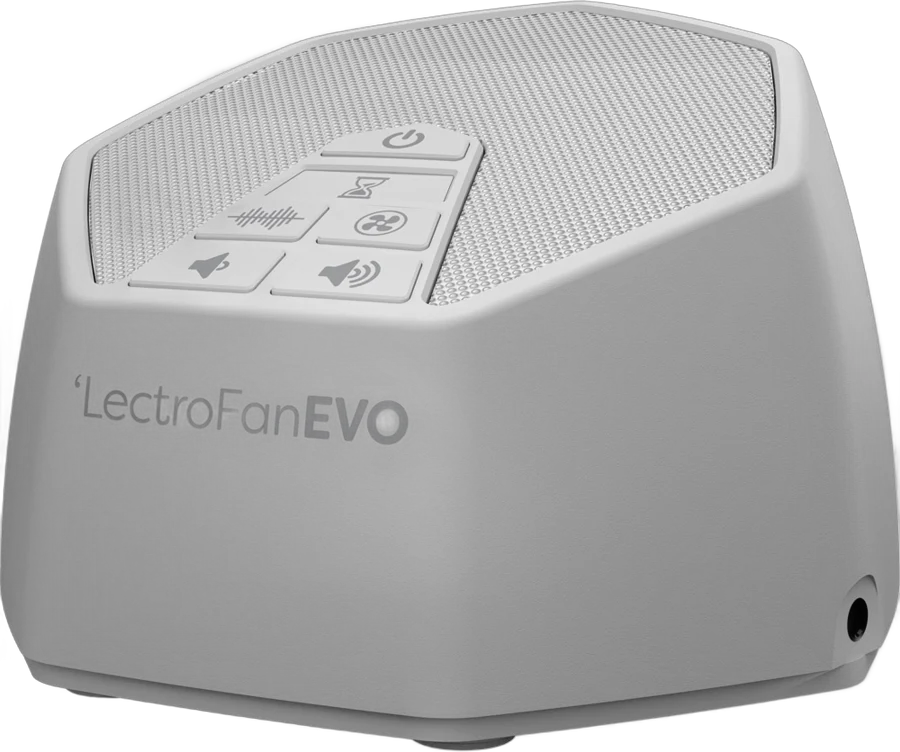
The LectroFan EVO is an electronic white noise and fan sound machine for a bedroom, an office or a nursery. It suits anyone who wants steady masking sound without a spinning fan. The owner's manual lists 22 unique sounds, precise volume control and a built-in timer manual.
LectroFan EVO at a glance
22unique sounds
Sounds
UP TO
8hours
Sleep timer
3.5mm jack
Audio output
1.2lbs
Weight
Adaptive Sound Technologies lists these details on its LectroFan EVO page and in the owner's manual Sound of Sleepmanual.
Sounds
22 unique sounds
Sleep timer
Up to 8 hours
Audio output
3.5mm jack
Weight
1.2 lbs
Fan sounds
10
Noise variations
10, white through to brown
Ocean sounds
2 (Ocean and Surf)
Moving parts
None, the sound is electronic
Dimensions
4.4 x 2.2 x 4.4 in
Product dimensions
4.7 x 4.7 x 3.3 in
Power
AC adapter, or a powered USB port
Buttons
Power, Volume Up, Volume Down, Timer, Noise, Fan
Model number
ASM1020-WW
Warranty
One year limited
How big is the LectroFan EVO?
The product page lists the LectroFan EVO at 4.4 x 2.2 x 4.4 inches and 1.2 lbs Sound of Sleep. The same page also lists product dimensions of 4.7 x 4.7 x 3.3 inches. It is a seven-sided shape with an angled speaker grille FAQ.
→You travel light: pick the LectroFan Micro2 Sound of Sleep.
→You want Bluetooth: pick the LectroFan Micro2 Sound of Sleep.
→You want a timer with no limit: pick the LectroFan Classic FAQ.
Good to know before you buy
!
The USB cable carries power only. The manual says it does not support USB audio, so send sound out through the 3.5mm jack instead manual.
!
It turns on by itself when you plug it in. That lets a wall timer switch it on. To stop it, turn it off, hold Volume Down, then press Powermanual.
!
It saves your sound only when you use the power button. Pulling the plug or switching off a power strip loses the last setting manual.
!
An external speaker switches the built-in speaker off. Unplug the 3.5mm cable to bring the machine's own speaker back manual.
!
The power socket is on the bottom, and the side jack is the audio output. For another country, use a plug adapter with the EVO's power adapter, or a country-specific USB adapter FAQ.
Before you start
The manual says not to operate heavy machinery or motor vehicles while using this device manual.
How the LectroFan EVO compares
LectroFan EVO vs LectroFan Classic
Both machines carry the same 20 fan and noise sounds. The EVO adds two ocean surf sounds, a 3.5mm audio jack and controls on the top Sound of SleepFAQ.
The EVO is the mains machine, with 22 sounds and a bigger speaker. The Micro2 is a 2 inch Bluetooth speaker with 11 built-in sounds and a battery Sound of Sleep.
The EVO makes its sound electronically, with no motor or other internal moving parts. Yogasleep's Dohm Classic uses a real fan motor, with two speeds and a tone dial you turn Yogasleep.
By our maths, the EVO is 12.3 oz lighter than the Dohm Classic, about 39% less.
What sounds does the LectroFan EVO have?
The manual lists 10 fan sounds on the Fan button and 12 sounds on the Noise button manual. The 10 fan sounds are Large Fan, Industrial Fan, Mellow Fan Low, Mellow Fan High, Exhaust Fan, Attic Fan, Circular Fan, Vent Fan, Box Fan and Oscillating Fan.
The Noise button steps from the lowest pitch to the highest: Brown, Chestnut, Cinnamon, Tan, Amber, Cream, Pink, Coral, Champagne and Pure White. Ocean and Surf sit at the end of that list. That makes 22 sounds in total.
Tip
Hold the Noise or Fan button for 3 seconds to step through the sounds in reverse order manual.
Does the LectroFan EVO have brown and pink noise?
Yes. Brown is the first sound on the Noise button and Pink is the seventh manual. The product page lists white, pink and brown noise among the sounds Sound of Sleep.
What is the difference between white, pink and brown noise?
ASTI explains all three on its FAQ FAQ. White noise spreads across the whole sound spectrum. Pink noise is louder at the low end, which ASTI compares to light to medium rainfall. Brown noise is deeper again, closer to air flowing through a large duct.
Do the LectroFan EVO sounds loop?
No. ASTI describes the 20 fan and noise sounds as "unique, digitally synthesized and non-looping" Sound of Sleep. The same page says the EVO carries those 20 sounds plus the two new surf sounds.
How does the LectroFan EVO timer work?
The timer is optional, and the EVO plays continuously without it manual. Tap Timer once and you hear a short rising tone, which sets one hour. Each further tap adds an hour.
A short falling tone means you have reached the maximum of 8 hours FAQ. To cancel the timer, turn the EVO off and then on again.
Can you use headphones with the LectroFan EVO?
Yes. The EVO has a 3.5mm analog audio jack on the side for a pillow speaker, a portable speaker, headphones or any device that takes a 3.5mm plug manual. ASTI lists the EVO, the Sound+Sleep SE and the Sound+Sleep Aquarius as the models with that jack FAQ.
The manual asks you to keep the volume at a comfortable level with headphones or ear buds. The jack is an output only, so it sends sound out and does not take sound in.
What changed from the LectroFan Classic
ASTI calls the two machines very similar, and lists these changes FAQ:
No. ASTI lists no Bluetooth, WiFi or app on the LectroFan EVO page Sound of Sleep. You set the sound, the volume and the timer with the 6 buttons on the top.
The LectroFan Micro2 is the Bluetooth model in the range. It pairs with a phone for streaming audio and calls Sound of Sleep.
How to set up and use it
Plug the USB cable into the AC power adapter.
Connect the cable to the power socket on the bottom of the EVO.
Plug the adapter into an AC outlet. The EVO turns on by itself.
Press Noise for the noise sounds, or Fan for the fan sounds.
Press the same button again to step to the next sound.
A short tone means you are back at the first sound in that list.
Press Volume Up or Volume Down to set the level.
Tap Timer once for one hour, and again for each extra hour.
Press Power to turn it off, so it saves the sound you chose manual.
You can also run the EVO from a PC or any powered USB hub instead of the AC adapter. It needs a power source to work, because there is no battery in it.
Care and quick fixes from the manual
How to clean the LectroFan EVO
Unplug the power adapter from the outlet.
Wipe the unit with a soft, dry cloth. The manual asks for this regularly.
Vacuum the grill to lift dust or particle build-up.
Keep liquids, sprays, solvents, chemicals, alcohol and abrasives away from it manual.
The manual lists no filter to clean or replace. It also asks you to keep the unit away from water, damp air, direct sunlight and heat sources.
If it will not turn on
Check that the USB cable is firmly in the power adapter.
This sets the EVO back to turning on automatically, and resets the default sounds and volume level. The manual suggests it for any other unexpected behavior.
LectroFan EVO FAQ
Can you use the LectroFan EVO in another country?
ASTI says you can use a plug adapter with the EVO's own power adapter FAQ. A country-specific USB adapter works as well, because the EVO draws its power over the USB cable.
Does the LectroFan EVO run on batteries?
No. The manual says the EVO needs to be connected to a power source to operate, and the USB cable provides that power manual. The box holds an AC adapter and a USB cable, and no batteries.
Can you use the LectroFan EVO in a baby's room?
ASTI says many customers report using a LectroFan in a baby or toddler's room, to block distracting noises Sound of Sleep. ASTI publishes no decibel figure for the EVO, so set the volume where you want it.
What does the LectroFan EVO warranty cover?
ASTI warrants the product against defects in materials or workmanship for one year from the date of purchase by the original buyer manual. It covers the LectroFan unit, the power cable and the power adapter. A purchase receipt must come with any return.
Where can I find the LectroFan EVO manual?
ASTI posts the owner's manual as a PDF on its support page manual. The serial number sits on the bottom of the unit, under the barcode Sound of Sleep.
How much is the LectroFan EVO?
See today's price with the link above.
The verdict
4/4 PASS
No. 071 · LectroFan EVO
Steady sound that never loops.
The LectroFan EVO suits a bedroom, an office or a nursery where you want steady sound and no spinning fan. ASTI builds the sound electronically, with no motor or other internal moving parts, and lists 22 unique sounds across the 2 buttons. Plan around the 8 hour timer limit, and use the Power button to keep the sound you picked.
 4/4 PASS