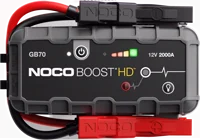
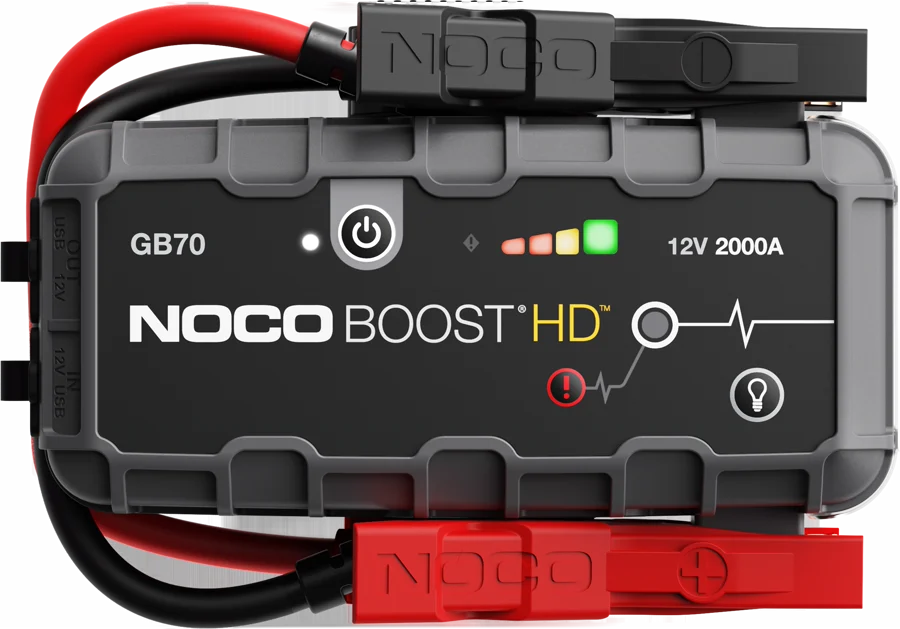
The NOCO Boost HD GB70 is a 12-volt lithium jump starter rated at 2,000 peak amps. It suits drivers with gas engines up to 8.0 liters or diesel engines up to 6.0 liters. NOCO lists up to 40 jump starts from one charge NOCO.
Noco GB70 at a glance
2,000amps
Starting current
UP TO
8.0liters
Gas engine rating
UP TO
6.0liters
Diesel engine rating
UP TO
40
Jump starts per charge
NOCO lists these figures on its GB70 tech specs page NOCO.
Starting current
2,000 amps (peak)
Gas engine rating
Up to 8.0 liters
Diesel engine rating
Up to 6.0 liters
Jump starts per charge
Up to 40
Battery types
12-volt lead-acid
Internal battery
56 Watt-Hour lithium-ion
USB input
USB-C, 5 volts 2.1 amps max
USB output
5 volts 2.1 amps max
12V XGC input
12 volts, 3 amps (3 hour recharge)
12V XGC output
12 volts, 15 amps
LED flashlight
400 lumens, 7 modes
Size
8.74 x 5.98 x 2.76 in (222 x 152 x 70 mm)
Weight
4.18 lbs (1.9 kg)
IP rating
IP65
How big is the Noco GB70?
NOCO lists the GB70 at 8.74 in wide, 5.98 in high and 2.76 in deep, or 222 x 152 x 70 mm NOCO. That is a little larger than a hardback book.
How much does the Noco GB70 weigh?
NOCO lists the product weight at 4.18 lbs, or 1.9 kg NOCO. NOCO's data sheet lists 5 lbs with the clamps and accessories, and 4 lbs for the unit data sheet.
NOCO lists a 1 year hassle-free warranty NOCO. The user guide states one year from the date of retail purchase or delivery, and says the period may extend to at least two years in the EU, the EFTA and the United Kingdom user guide.
Who the Noco GB70 is for
Good fit if
You drive a gas engine up to 8.0 liters.
You drive a diesel engine up to 6.0 liters.
You want up to 40 starts per charge.
You want a 400-lumen work light.
You want a USB power bank too.
Pick another model if
→You want up to 7.0 liters of diesel: pick the GB150, rated at 3,000 amps NOCO.
→You want a 1.7 hour recharge: pick the GBX75, with 60-watt USB-C NOCO.
→You want a 2.45 lb pack for a car: pick the GB40, rated at 1,000 amps NOCO.
Good to know before you buy
!
NOCO rates the GB70 for 12-volt lead-acid batteries. The user guide says the GB70 is not suitable for any other type of battery. Read your battery label before you connect it user guide.
!
The box holds cables and adapters, not an AC wall plug. The user guide asks for a NOCO 10W 12V power adapter, or a third-party 5W or 10W adapter that meets the standards it lists. Use a USB adapter you already have, or add one NOCO.
!
The housing is rated IP65 with the ports closed. The user guide says do not submerge the product in water or get it wet. Store and use it in dry places user guide.
!
NOCO sets a limit of five starts in a row. The guide says do not attempt more than 5 consecutive jump starts in a 15 minute period. Let the GB70 rest for 15 minutes, then try again user guide.
!
Manual override turns off the two safety features. The guide says both spark proof and reverse polarity protection are disabled in that mode. Check the battery polarity closely before you use it user guide.
How the Noco GB70 compares
Noco GB40 vs GB70
The GB70 doubles the peak amps of the GB40 and raises the engine ratings, at 4.18 lbs against 2.45 lbs. The GB40 covers gas engines up to 6.0 liters and diesel up to 3.0 liters NOCO.
The GBX75 adds 500 peak amps and a 60-watt USB-C port that NOCO says recharges it in 1.7 hours. The GB70 holds the 12-volt XGC output for 12-volt gear such as tire inflators NOCO.
Pick the GB150 for gas engines up to 9.0 liters or diesel up to 7.0 liters, at 6.39 lbs. The GB70 covers 8.0 liters of gas and 6.0 of diesel at 4.18 lbs NOCO.
NOCO designs the GB70 for gas engines up to 8 liters and diesel engines up to 6 liters. It names cars, SUVs, trucks, boats, RVs and more NOCO. The data sheet also lists lawn and garden and powersport use, with wet, gel, MF, EFB, AGM and lead-acid batteries data sheet.
A 6.7 liter diesel sits above NOCO's 6.0 liter diesel rating for the GB70. NOCO rates the GB150 for diesel engines up to 7.0 liters NOCO.
Will the GB70 start a flat battery?
Yes, down to 2 volts. The user guide says the GB70 jump starts 12-volt lead-acid batteries down to 2 volts user guide. Below 2 volts the Boost LED stays off, because the GB70 cannot detect a battery.
The manual override button forces the boost function on for a battery under 2 volts. Hold it for three seconds, until the Boost LED flashes white.
Before you start
Manual override disables spark proof and reverse polarity protection, and uses up to 2000 amps.
Is the Noco GB70 waterproof?
No. NOCO rates the housing at IP65 with the ports closed, which means water resistant NOCO. The GB70 page describes a rugged and water-resistant enclosure, with a rubberized over-molded casing NOCO.
The user guide says do not submerge the GB70 in water or get it wet. It also says store the product indoors and operate it in dry locations user guide.
How long does the Noco GB70 take to charge?
That depends on the port you use. NOCO lists a 3 hour recharge from the 12-volt XGC input at 3 amps NOCO. From USB, the data sheet lists 7 hours at 2 amps, 14 hours at 1 amp and 28 hours at 0.5 amps data sheet.
The USB IN port is rated at 2.1 amps. The guide says the GB70 arrives partly charged and needs a full charge before use user guide.
How do you know when the GB70 is fully charged?
The green 100% LED turns solid, and the 25%, 50% and 75% LEDs turn off user guide. The guide adds that the green LED pulses from time to time during maintenance charging.
Note
The guide asks you not to charge and discharge the GB70 at the same time.
Does the Noco GB70 charge a phone?
Yes. NOCO lists up to 6 smartphone recharges from the internal battery, through a 5 volt 2.1 amp USB output NOCO. The GB70 page names smartphones, tablets, e-watches and other USB devices NOCO.
The 12-volt XGC output carries 12 volts at 15 amps. NOCO names tire inflators and power inverters as 12-volt gear you can run from it NOCO.
How bright is the GB70 work light?
NOCO rates the built-in LED flashlight at 400 lumens, with seven light modes NOCO. The light mode button steps through 100%›50%›10%›SOS›Blink›Strobe›Offdata sheet.
NOCO says the wash light helps you see the engine or change a tire at night. SOS and strobe modes warn oncoming traffic NOCO.
In what temperatures does the GB70 work?
NOCO designs the GB70 for -4°F to +122°F, or -20°C to +50°C data sheet. The charging range is narrower, at 32°F to +104°F, or 0°C to +40°C.
The user guide says do not operate the GB70 outside those ranges, and do not jump start a frozen battery user guide. Cooling is by natural convection, so the guide says do not cover the product.
How to set up and use it
NOCO sets out these steps in the user guide user guide.
Charge the GB70 fully. Connect the USB-C cable to the USB IN port and a powered USB port.
Read your vehicle manual and your battery manual. Confirm you have a 12-volt lead-acid battery.
Turn off the vehicle's power loads, such as headlights, radio and air conditioning.
Connect the positive red HD clamp to the positive terminal, marked POS, P or +.
Connect the negative black clamp to the negative terminal, marked NEG, N or -, or to the chassis.
Press the POWER button. All LEDs flash, then the white Boost LED lights when you are connected correctly.
Start the vehicle. Some vehicles need the GB70 connected for up to 30 seconds first.
If it does not start, wait 20 to 30 seconds and try again. Stop after 5 starts in 15 minutes.
Once the engine runs, disconnect the negative clamp first, then the positive clamp.
To power a 12-volt device, connect the 12V cable to the 12V OUT port and the female 12V plug. Plug in any standard 12-volt device up to 15 amps, then turn the GB70 on.
Care and quick fixes from the manual
How to clean the Noco GB70
Power the GB70 off before any cleaning user guide. The guide says:
Switch the unit off.
Wipe it with a soft, lint-free microfiber cloth.
Keep moisture out of the openings.
Clean and dry it at once if it meets liquid or a contaminant.
If the error LED is solid red
That means reverse polarity. The guide says reverse the battery connections user guide.
If the error LED blinks red with the cables connected correctly
The internal battery is too hot. The guide says let the unit cool, and move it into a cooler place user guide.
If the boost light does not come on with the cables connected correctly
The connected battery is below 2 volts. The guide says remove all loads and try again, or use manual override mode user guide.
How to store the GB70
Store the GB70 indoors, on a flat and secure surface, in a dry place user guide. The storage range is -20°C to +50°C, with a daily average of 0°C to +25°C. The guide adds that an unused pack discharges over time and needs a recharge before use.
Noco GB70 FAQ
What do the GB70 buttons and LEDs do?
NOCO lists a power button, a light mode button and a manual override button data sheet. Four charge LEDs show the internal battery level, the Boost LED lights white when boost is active, and the error LED reports faults.
Can you replace the GB70 battery yourself?
No. The user guide says NOCO should replace the built-in lithium-ion battery, and asks you not to attempt it yourself user guide. It must be recycled apart from household waste.
Is the Noco GB70 a battery charger?
No. NOCO describes the GB70 as a jump starter for 12-volt lead-acid batteries and a USB power bank NOCO. NOCO sells its Genius range for battery charging, such as the GENIUS10 10-amp charger NOCO.
How much does the Noco GB70 cost?
See today's price with the link above.
Where can I find the GB70 manual?
NOCO posts the GB70 user guide and warranty as a PDF user guide. The GB70 support page carries the same guide and how-to pages NOCO.
The verdict
4/4 PASS
No. 011 · NOCO Boost HD GB70
A dead battery, any engine, anywhere.
The Noco GB70 suits drivers who want one pack for a big gas or diesel engine. NOCO rates it at 2,000 peak amps, for gas up to 8.0 liters and diesel up to 6.0 liters, with up to 40 starts per charge. The 400-lumen light, the USB power bank and the 12-volt 15-amp output make it useful between breakdowns.
 4/4 PASS