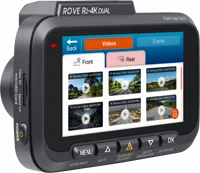
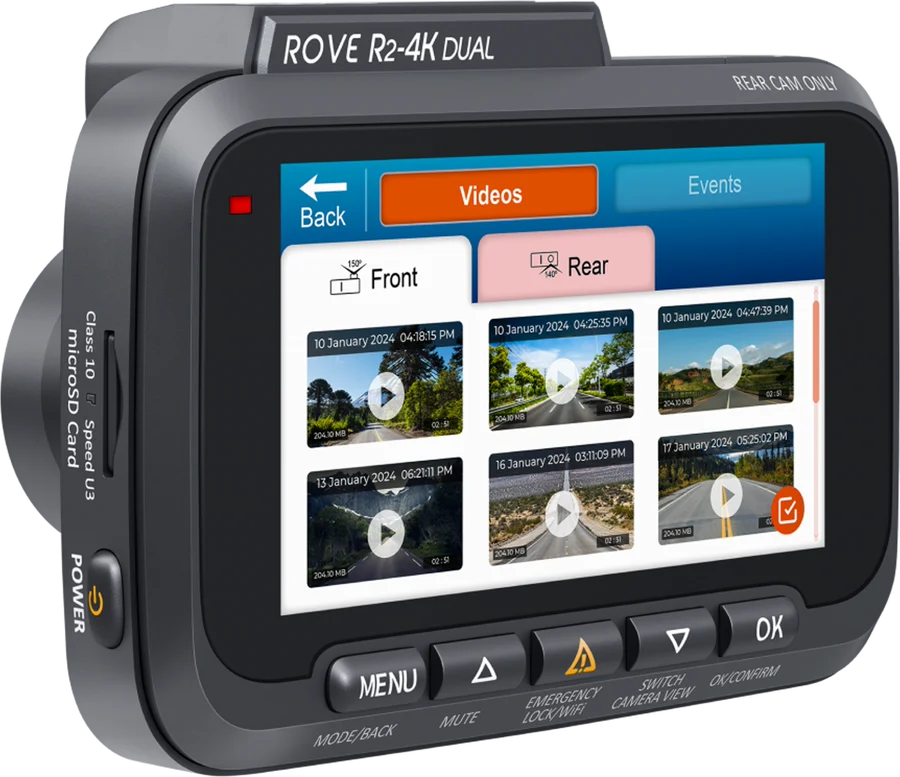
The ROVE R2-4K Dual is a two camera dash cam for cars. It records 2.5K native video that ROVE upscales to 4K 2160P at the front, with 1080P at the rear, from a Sony STARVIS 2 IMX675 sensor ROVE. It suits drivers who want a record of what happened at both ends of the car.
Rove R2-4K Dual at a glance
4K 2160P at 30fps + 1080P at 30fps
Front and rear video
Sony STARVIS 2 IMX675
Image sensor
3inch IPS wide display
Screen
128GB included
Memory card
ROVE lists these figures in the Camera Specifications pages of the user manual manual.
Front and rear video
4K 2160P at 30fps + 1080P at 30fps
Image sensor
Sony STARVIS 2 IMX675
Screen
3 inch IPS wide display
Memory card
128GB included, up to 1TB
Other video modes
2.5K 1440P, 1080P 60fps, 1080P 30fps
Lens view
150 degrees front, 140 degrees rear
Lens aperture
F/1.5 front, F/1.8 rear
GPS
Built in, with geo-tagging
Wi-Fi
Dual band 5GHz and 2.4GHz, up to 20 MB/s
Power input
5V, 1.5A over USB Type-C
Power reserve
Supercapacitor, no internal battery
Operating temperature
14F (-10C) to 131F (55C)
Warranty
1 year limited
What is in the Rove R2-4K Dual box?
ROVE lists the front dash cam and the rear camera, plus these parts manual:
A 360 degree suction mount and a spare 3M sticky mount
A ROVE dual USB car charger with a spare Type-C port
A free ROVE PRO 128GB microSD card and adapter
A 12FT Type-C power cable and a 6.5M rear camera cable
A 1M Type-C data cable for a PC or Mac
5 cable clips, 2 sticky tapes and a wire trim tool
2 cleaning pads, 2 electrostatic films and a sticker
What memory card does the Rove R2-4K Dual need?
A branded Class 10, U3 or faster microSD card, up to 1TB manual. ROVE includes a 128GB ROVE PRO card and recommends its own ROVE PRO or ROVE Ultimate cards. The manual says ROVE does not recommend SanDisk or Samsung cards.
How long is the Rove R2-4K Dual warranty?
One full year of limited warranty from the date of purchase, against defects in materials and craftsmanship manual. It covers the first buyer and is not transferable.
Rove R2-4K Dual or Dual Pro?
The Dual Pro adds a second STARVIS 2 sensor at the rear, a sharper 2K rear picture and faster transfers. The Dual keeps the same 3 inch screen, lens angles and free 128GB card ROVE.
→You want a cabin camera too: pick the R3, a 3 channel model ROVE.
→You want a true 4K front and 2K rear: pick the R2-4K Dual Pro ROVE.
→You want a front camera on its own: pick the R2-4K Pro ROVE.
Good to know before you buy
!
The 24 hour parking monitor needs the ROVE Ultimate USB Type-C hardwire kit. The kit is sold apart from the camera and wires to the fuse box. Add it if you want the camera to watch the parked car manual.
!
The rear camera is made to mount inside the car. ROVE states that it is not waterproof. Fit it on the inside face of the rear window, over the electrostatic film manual.
!
There is no internal battery, so the camera stays plugged in. A supercapacitor holds charge for about 2 seconds, enough to save the last file. Use ROVE's car charger or a 5V 1.5A USB charger, and never wire the camera straight to the battery manual.
!
Connect the rear camera while the front camera is turned off. ROVE warns that plugging it in with the front camera on may damage the rear camera manual.
!
Format the card in the camera before the first drive. ROVE asks for this to prevent errors, and suggests a fresh format every 3 months manual.
Before you start
ROVE says a camera that freezes, lags or stops recording points to the memory card, not the camera.
How the Rove R2-4K Dual compares
Rove R2-4K Dual vs Rove R2-4K Pro
The Dual adds the rear camera, a bigger screen and the STARVIS 2 sensor. The R2-4K Pro covers the road ahead with a 2.4 inch screen and the earlier STARVIS IMX335 sensor ROVE.
Both are front and rear cameras built on a Sony STARVIS 2 sensor, with 4K front and 1080P rear video. REDTIGER lists a wider 170 degree front lens, a 3.18 inch screen and card support up to 256GB REDTIGER.
Does the Rove R2-4K Dual record when the car is off?
Yes, with the ROVE Ultimate USB Type-C hardwire kit fitted. That kit feeds the camera from the fuse box after the engine stops, which is what the 24 hour parking monitor runs on manual.
ROVE offers three parking modes in Video Settings›24HR Auto Parking Mode. Time lapse records at 1 frame per second, motion detection records when something moves in view, and collision detection waits with the camera off. In every mode, a hit above your set G-sensor level saves a locked 1 minute video in the Events folder.
The parking G-sensor has 9 levels, where 1 reacts to the smallest knock and 9 waits for a larger one. Next time you start the car, the camera says "parking mode got activated while you were away".
Will the Rove R2-4K Dual drain the car battery?
The hardwire kit watches the battery voltage and cuts power to the camera at the level you pick hardwire kit manual. For a 12V battery the four settings are 12.4V, 12.2V, 12.0V and 11.8V.
The kit detects a 12V or a 24V supply on its own and carries a 2A fuse.
Note
ROVE says to wire the kit to the fuse box, never straight to the battery terminals.
Does the Rove R2-4K Dual record audio?
Yes. The camera has a built in microphone and speaker, and Record Audio is on by default manual.
Press UP while the camera records to mute or unmute the microphone. Set Record Audio to off in the video settings for silent video every time.
Does the Rove R2-4K Dual have GPS?
Yes, the GPS module sits inside the camera, so nothing lives in the mount ROVE. It writes your route, location and speed into the video, and drives the live speed and compass on the home screen.
Four stamps sit at the bottom of the picture, and all are on by default: date and time, speed, GPS location and logo. Speed shows in MPH by default, and KM/H is in the same menu.
ROVE's free GPS Player for PC and Mac plays the video beside the route on a map, with the speed, the direction and the G-sensor trace manual.
How do the Wi-Fi and the ROVE app work?
The camera makes its own Wi-Fi network for your phone, so it pairs the way a speaker pairs over Bluetooth manual. Hold Emergency Lock for 2 seconds to turn Wi-Fi on, then join the network named ROVE_R2-4K-DUAL_****** with the password 12345678.
Install the ROVE Dash Cam app for iOS or Android and register a free account while your phone still has internet. The app then gives you live preview, settings, playback, downloads and over the air firmware updates.
The 5GHz band is the default and carries files faster. ROVE lists 2.4GHz for older phones, and a range of about 10M.
Is the Rove R2-4K Dual good at night?
ROVE builds the night picture around the Sony STARVIS 2 IMX675 sensor and an F/1.5 front aperture. ROVE says the sensor improves low light clarity, for sharper night details such as license plates and road signs ROVE.
High Dynamic Range is the second half of it, and it is on by default. HDR merges an overexposed and an underexposed frame, which widens the range of light held in one picture manual.
How to set up and use it
ROVE sets out these steps in the installation pages of the manual manual.
Stop the engine and remove the key. Pick a spot next to the rear view mirror, on the far side from the driver.
Clean the windshield, then clip the camera onto the suction mount.
Press the mount to the glass and turn the locking knob clockwise. Keep clear of the dot matrix pattern.
Rotate the camera to aim it. Loosen the screw to set the tilt, then tighten it again.
With the camera off, insert the microSD card with the gold contacts facing the lens, until it clicks.
Clean the rear window, apply the electrostatic film, and press the bubbles out with a credit card.
Stick the rear camera onto the film and set its view. Pick a spot away from the defroster lines.
With the front camera still off, plug the 6.5M cable into the rear camera, then into the rear cam port.
Run the 12FT power cable into the trim and hold it with the clips. Keep it away from side curtain airbags.
Plug the power cable into the ROVE dual USB car charger, then into the cigarette lighter socket.
Remove the plastic protector from the lens. Start the engine, and the camera powers up and records on its own.
Format the card in System Settings›Format, then set the clock in System Settings›GPS Time Zone Setting.
To turn the camera on by hand, press power once. To turn it off, hold that button for 2 to 3 seconds. Hold M for 2 seconds to swap between video mode and playback mode.
Care and quick fixes from the manual
How to clean the camera and the lens
Use a soft, moist cloth manual. ROVE says to keep chemicals and solvents away, and to take care on the lens, because scratches there show up in the video.
If the camera freezes, lags or stops recording
ROVE puts this down to the memory card manual. The steps are:
Fit a branded Class 10, U3 card from a trusted shop.
Back up the videos you want to keep.
Format the card in the camera's system settings.
Hold the power button to restart the camera.
If the camera will not turn on
Swap in the other included USB cable and a phone charger in a wall outlet.
Press the power button once to see if it starts.
Take the card out, leave the camera plugged in, and press RESET once with a paper clip.
How to reset the Rove R2-4K Dual
There are two resets manual. Press the RESET hole on the bottom once with a pen tip to restart a frozen camera. To clear every setting, use System Settings›Default Setting.
If the date and time will not stay
Set the zone instead of the clock. Go to System Settings›GPS Time Zone Setting, pick your GMT value and confirm it manual. The camera then sets the date and time itself each time it gets a GPS lock.
If the camera locks many videos by itself
Raise the G-sensor level in the video settings manual. How much vibration reaches the camera depends on the vehicle and the road.
Rove R2-4K Dual FAQ
What is the Rove R2-4K Dual Wi-Fi password?
The default password is 12345678, and the camera shows it on screen manual. The network name starts with ROVE_R2-4K-DUAL_.
Is the Rove R2-4K Dual wireless?
No. The camera takes power from a cable all the time, because it holds no internal battery manual. The Wi-Fi moves files to your phone, and does not power the camera.
Can I watch my car from far away?
No. ROVE states that this is not a cloud camera and not an IP camera, so it does not send video over the internet manual. Live video reaches the app inside about 10M.
Does the Rove R2-4K Dual need a subscription?
No. Video sits on the microSD card, and the ROVE app and the GPS Player are free downloads manual.
Where does the Rove R2-4K Dual save videos?
On the card, in a folder named R2-4K DUAL manual. Locked clips sit in a read-only folder named Protect. Loop recording splits files at 1, 3, 5 or 10 minutes and writes over the oldest unlocked clips when the card fills.
How much does the Rove R2-4K Dual cost?
See today's price with the link above.
Where can I find the Rove R2-4K Dual manual?
ROVE posts the R2-4K Dual user manual as a PDF on its downloads page, next to the hardwire kit and CPL filter manuals ROVE.
The verdict
4/4 PASS
No. 014 · ROVE R2-4K Dual
Proof of what happened, front and rear.
The Rove R2-4K Dual suits a driver who wants a record from the front and the back of the car in one setup. ROVE pairs a Sony STARVIS 2 IMX675 sensor and an F/1.5 lens with 4K 2160P front video, 1080P rear video and a 3 inch screen for playback in the car. Add the hardwire kit as well if you want the 24 hour parking monitor.
 4/4 PASS