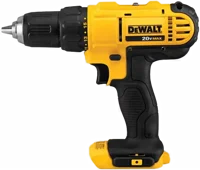
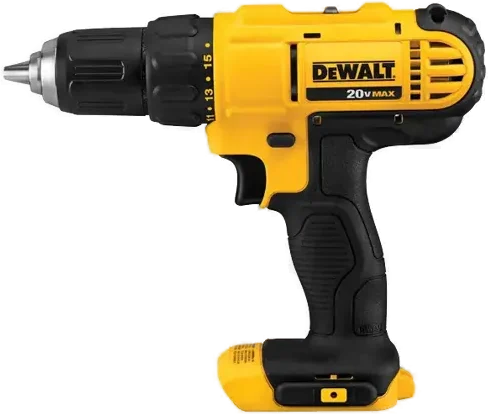
The DEWALT DCD771 is a 20V MAX cordless drill/driver, sold in a kit with two batteries and a charger. It suits everyday drilling and driving around the house. DEWALT lists a 300 unit watts out (UWO) motor and two speeds, 0 to 450 and 0 to 1,500 rpm DEWALT.
Dewalt DCD771 at a glance
300UWO
Power output
0to 450 and 0 to 1
Speeds
1/2 in single sleeve ratcheting
Chuck
2batteries
In the box
DEWALT lists these specs on its DCD771C2 kit page, and the rest come from the DCD771 instruction manual DEWALTmanual.
Power output
300 UWO
Speeds
0 to 450 and 0 to 1,500 rpm
Chuck
1/2 in single sleeve ratcheting
In the box
2 batteries, charger, contractor bag
Full name
20V Max Cordless Compact 1/2 in (13 mm) Drill/Driver
Kit number
DCD771C2
Motor type
Brushed
Voltage
20V
Gears
2, set by a gear shifter
Clutch
Numbered torque collar plus a drill symbol
Worklight
Yes, off 20 seconds after you release the trigger
Max hole in wood
1 in (25 mm)
Max hole in steel
1/2 in (13 mm)
Warranty
3 year limited, 1 year free service, 90 day money back
Is the Dewalt DCD771 brushless?
No, DEWALT lists the motor type of the DCD771 as brushed DEWALT. DEWALT's DCD777 drill/driver uses a brushless motor, which DEWALT says delivers more run time over brushed DEWALT.
How many rpm is the Dewalt DCD771?
DEWALT lists two speeds, 0 to 450 rpm and 0 to 1,500 rpm DEWALT. Speed 1 is the high torque setting. Speed 2 is the low torque setting manual.
What size holes can the DCD771 drill?
The manual lists maximum recommended capacities of 1 in (25 mm) in wood and 1/2 in (13 mm) in steel manual. The chuck itself takes bits up to 1/2 in (13 mm) DEWALT.
Who the Dewalt DCD771 is for
Good fit if
You drill and drive around the house.
You want two batteries included.
You change bits one handed.
You drive screws to a set torque.
You work in tight spaces.
Pick another model if
→You want a brushless motor: pick the DCD777 DEWALT.
→You drill concrete or masonry: pick a DEWALT hammer drill DEWALT.
→You already own 20V MAX batteries: pick the DCD777 as a tool only DEWALT.
Good to know before you buy
!
DEWALT lists the DCD771 motor as brushed. Brushes wear, and the manual says brush inspection and replacement belong with a DEWALT service center DEWALTmanual.
!
The manual caps holes at 1 in in wood and 1/2 in in steel. Plan wider holes with a bigger tool manual.
!
The DCD771 is a drill/driver, not a hammer drill. DEWALT says its hammer drills are the line for fast drilling in concrete and masonry DEWALT.
!
DEWALT's kit list names two batteries, a charger, a contractor bag and the drill. It does not name drill bits or driver bits, so add the bits for your job DEWALT.
!
The battery pack is not fully charged out of the carton. Charge it first, and charge it in air between 40 °F and 105 °F manual.
How the Dewalt DCD771 compares
Dewalt DCD771 vs DCD777
The DCD771 lists a brushed motor, 300 UWO and two batteries in the kit. The DCD777 lists a brushless motor, 340 UWO and a 7.52 in front to back body, and DEWALT sells it as a tool only DEWALT.
The DCD771 arrives as a kit, with two 20V MAX batteries and a charger DEWALT. Milwaukee lists the M18 2606-20 as a tool only, with 500 in-lbs of torque, an all-metal gear case and a 7-1/4 in length Milwaukee.
DEWALT measures power in unit watts out and Milwaukee quotes torque in in-lbs, so those two numbers do not compare directly.
Which speed should you use?
Use speed 1 for screws and speed 2 for drilling, because speed 1 is the high torque setting and speed 2 is the low torque setting manual. DEWALT lists 0 to 450 rpm in speed 1 and 0 to 1,500 rpm in speed 2 DEWALT.
The gear shifter sits on top of the drill. Slide it forward, toward the chuck, for speed 1. Slide it back, away from the chuck, for speed 2 manual.
Before you start
Do not change gears while the tool is running. Let the drill stop first manual.
What do the numbers on the collar do?
The numbers set the clutch, which decides how much torque the drill gives before it slips manual. The higher the number, the higher the torque, and the larger the fastener you can drive. Turn the collar until the number you want lines up with the arrow.
The collar also carries a drill bit symbol. Turn the collar to that symbol for drilling manual.
For screws, the manual says to use the lowest torque setting that seats the fastener at the depth you want. Start low, then work up. Make practice runs in scrap, or on a part of the work nobody sees manual.
How the one-handed chuck works
The DCD771 has a keyless chuck with one rotating sleeve, so you can open and close it with one hand manual. An automatic spindle lock holds the spindle while you turn the sleeve. DEWALT lists the chuck as a 1/2 in single sleeve ratcheting chuck DEWALT.
The manual says to push the bit about 3/4 in (19 mm) into the chuck before you tighten it manual. Hold the tool in one hand and the sleeve in the other for the tightest grip.
Before you start
Never tighten a bit by gripping the chuck and switching the tool on. That can damage the chuck and hurt you manual.
Can the DCD771 drill metal and concrete?
The manual lists a maximum recommended capacity of 1/2 in (13 mm) in steel, so metal is on the list manual. Wood runs to 1 in (25 mm). The manual also says accessories and the tool can get hot when you drill metal, and suggests gloves.
For concrete, DEWALT points to a different line. DEWALT says its hammer drills deliver fast drilling in concrete and masonry DEWALT. The DCD771 is a drill/driver DEWALT.
Batteries, the charger and the worklight
The kit holds two 20V MAX compact lithium-ion battery packs, a compact charger, a contractor bag and the DCD771 drill DEWALT. A fuel gauge is not listed for these packs.
On the charger, a blinking red light means the pack is charging. A red light that stays on means the pack is full manual. You can leave the pack in the charger once it reads charged.
The worklight sits just above the trigger. It comes on when you squeeze the trigger, and goes off 20 seconds after you let go manual. The manual says it lights the work surface and is not a flashlight.
How long does a cold battery take to charge?
A cold pack charges at about half the rate of a warm one, and keeps that slower rate for the whole cycle manual. The manual says charging works best in air between 65 °F and 75 °F.
How to set up and use it
Charge a battery pack first. The manual says the pack is not fully charged out of the carton manual.
Plug the charger into the outlet before you put the pack in.
Push the pack into the charger until it is fully seated. The red light blinks while it charges.
Wait for the red light to stay on. The pack is then full.
Line the pack up with the rails inside the drill handle, and slide it in until it seats firmly.
Set the direction. Press the forward/reverse button on the right side of the tool for forward, and on the left side for reverse.
Slide the gear shifter forward for speed 1, or back for speed 2.
Turn the collar to the drill symbol to drill, or to a number to drive screws.
Open the chuck sleeve counterclockwise, push the bit in about 3/4 in (19 mm), then tighten the sleeve clockwise.
Squeeze the trigger to start, and release it to stop. The brake stops the chuck as soon as you fully release it manual.
Tip
The center position of the forward/reverse button locks the drill off manual. Use it before you change a bit.
Care and quick fixes from the manual
How to clean it
Switch the tool off and take the battery pack out.
Blow dirt and dust out of all the air vents with clean, dry air, at least once a week.
Wear ANSI Z87.1 eye protection while you do it.
Wipe the body with a cloth dampened with water and mild soap only manual.
The manual says never to use solvents or harsh chemicals on the non-metal parts, and never to let liquid inside the tool.
How to clean the charger
Unplug the charger from the outlet.
Wipe dirt and grease off the outside with a cloth or a soft non-metallic brush.
Keep water and cleaning solutions away from it manual.
If the battery will not charge
Plug a lamp or another appliance into the outlet to check it has power.
Check whether that outlet turns off with the room light switch.
Move the charger and pack somewhere the air sits around 65 °F to 75 °F.
If it still will not charge, take the tool, pack and charger to your local service center manual.
The manual also notes that this charger will not charge a faulty pack, and that the fault can sit with the charger instead.
The manual says not to pull the trigger on and off to restart a stalled drill, because that can damage it. Expect a sudden twist when a drill stalls, and keep a firm grip with both hands.
If the gears will not change
Let the drill come to a complete stop, then move the shifter again manual. Make sure the shifter is pushed fully forward or fully back, not left in between.
How to get it serviced
Send repairs, maintenance and adjustment to a DEWALT factory service center, a DEWALT authorized service center or other qualified service staff manual. That includes brush inspection and replacement. The manual says the charger and battery pack are not serviceable, and always to use identical replacement parts.
Dewalt DCD771 FAQ
Does the Dewalt DCD771 come with a battery?
Yes, the DCD771C2 kit holds two 20V MAX compact lithium-ion battery packs and a compact charger DEWALT. A contractor bag comes with them.
What is the difference between the DCD771 and the DCD771C2?
The DCD771 is the drill. DCD771C2 is DEWALT's number for the kit, which holds the DCD771 drill, two battery packs, a charger and a contractor bag DEWALT.
Can I use other batteries and chargers with it?
DEWALT says to charge the packs only in designated DEWALT chargers, and to use the tool only with its designated battery packs manual. The manual carries a chart of which chargers suit which packs.
Why does the drill click when I change direction?
The manual says you may hear a click on start up the first time you run the tool after you change the direction of rotation manual. It calls this normal.
Where can I find the Dewalt DCD771 manual?
DEWALT posts the DCD771 instruction manual as a PDF, part number N457137 manual. It covers the tool, the battery packs and the chargers.
How long is the warranty?
DEWALT lists a 3 year limited warranty, 1 year of free service and a 90 day money back guarantee DEWALT. The manual repeats all three, and adds 2 years of free service on DEWALT battery packs manual.
How much is the Dewalt DCD771?
See today's price with the link above.
The verdict
4/4 PASS
No. 017 · DEWALT Drill Driver DCD771
Everyday drilling and driving around the house.
The DCD771 suits everyday drilling and driving around the house, and the kit covers a first cordless drill in one box. DEWALT lists a 300 UWO brushed motor, two speeds of 0 to 450 and 0 to 1,500 rpm, a 1/2 in one-handed chuck, two batteries and a 3 year limited warranty. For concrete, or for a brushless motor, DEWALT points to its hammer drills and to the DCD777.
 4/4 PASS