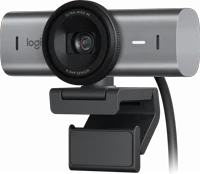
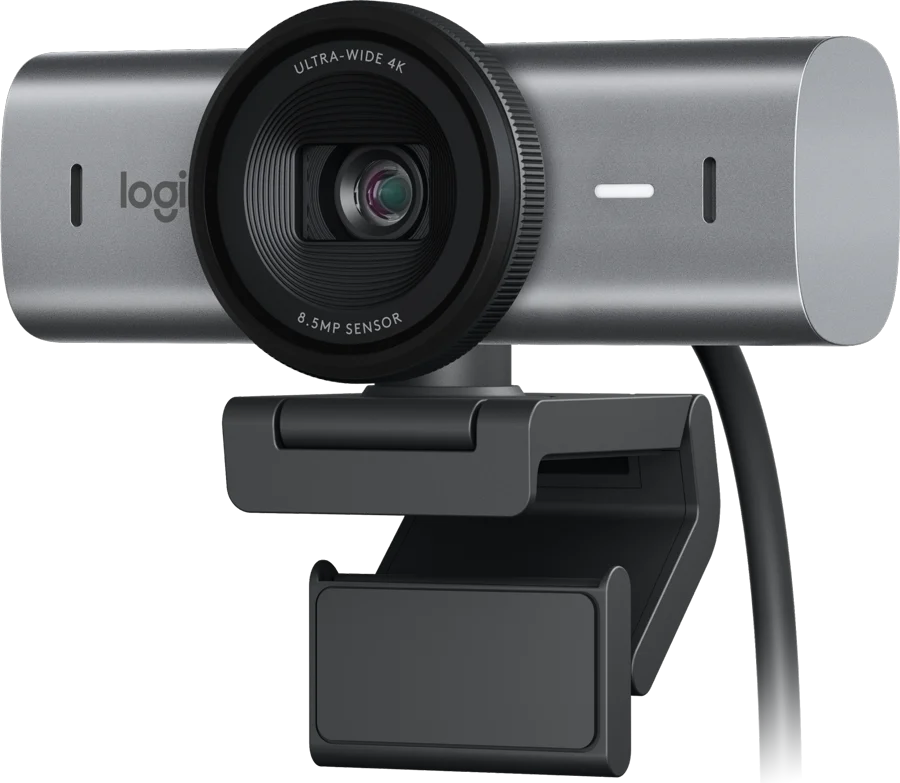
The Logitech MX Brio is a wired USB-C webcam for desk calls and streams. It films UHD 4K at 30 frames per second, or 1080p at 60. Logitech lists a Sony Starvis sensor with 70% larger pixels than the Brio 4K Logitech.
Logitech MX Brio at a glance
4K at 30 fps
Max video
90degrees
Field of view
2beamforming
Microphones
234.3g with mount clip and cable
Weight
Logitech lists these numbers on the MX Brio specification page and the product page MX Brio specsLogitech.
Max video
4K at 30 fps, 1080p at 60 fps
Field of view
90 degrees
Microphones
2 beamforming, noise canceling
Weight
234.3 g with mount clip and cable
Model number
VU0066
Sensor
Sony Starvis IMX415, 1/2.8 inch
Pixel size
1.45 um
Connection
Wired USB-C to USB-C, USB 3.0
Cable length
1.5 m (5 ft), detachable
Size
61.6 mm high, 98.0 mm long, 52.2 mm deep
Indicator lights
1
RightSight auto-framing
Yes, in Logi Tune
Software
Logi Options+ or G Hub
Operating systems
Windows 10 or later, macOS 10.15 or later
How wide is the MX Brio field of view?
Logitech lists a 90 degree field of view MX Brio specs. The app can crop that view in. You pick the field of view, the zoom and the position of the frame Getting Started.
No, Logitech lists basic webcam support through the USB Video Class standard MX Brio specs. The camera works as a plain webcam without software. Logi Options+ or G Hub add the image controls.
MX Brio or MX Brio 705 for Business?
Logitech sells two versions of the same camera. The MX Brio goes to shops, and the MX Brio 705 for Business goes to companies. The 705 runs in Logi Tune, and IT teams manage it in Logitech Sync Logitech.
→You sign in with your face: pick the Brio 4K, which supports Windows Hello MX Brio vs Brio 4K.
→Your company manages cameras centrally: pick the MX Brio 705 for Business, which works with Logitech Sync Logitech.
→You want a set 78 or 65 degree view: pick the MX Brio 705 for Business Logitech.
Good to know before you buy
!
The MX Brio does not support Windows Hello. Logitech states this plainly, and says the older Brio 4K does support it MX Brio vs Brio 4K. Sign in another way, or pick the Brio 4K.
!
It needs a USB-C port that carries power and video. Logitech says some adapters pass power but no video, and then the camera is not recognized connection help. Plug it straight into the computer, or into a dock that passes video.
!
RightSight auto-framing needs the Logi Tune app. The specification page lists RightSight as yes with Logi Tune MX Brio specs. Logi Options+ and G Hub carry the Fine Controls for the picture instead Logitech.
!
ChromeOS and Linux get basic webcam support. Logitech lists both as USB Video Class support MX Brio specs. The two apps ask for Windows 10 or later, or macOS 10.15 or later, so expect default camera settings elsewhere.
!
No tripod comes in the box. The box holds the camera, the cable and the mount clip Getting Started. Logitech says the camera fits any camera tripod with the same standard screw.
How the Logitech MX Brio compares
Logitech MX Brio vs Brio 4K
Both cameras reach 4K at 30 fps and list a 90 degree view. Logitech says the MX Brio uses a Sony Starvis sensor with 70% larger pixels. It also says the Brio 4K supports Windows Hello, and the MX Brio does not MX Brio vs Brio 4K.
The MX Brio adds 4K and a wider view. Logitech lists the C920 at 1080p and 30 fps, with a 78 degree diagonal view C920 specs. The C920 page lists no privacy shade.
The Facecam Pro reaches 4K at 60 fps and lists a larger 1/1.8 inch sensor with an f/2.0 lens Elgato. The MX Brio lists 2 beamforming mics, and the Facecam Pro leaves sound to another device.
Yes, Logitech lists UHD 4K at 30 frames per second, and 1080p at 60 frames per second Logitech. The sensor is a Sony Starvis IMX415, 1/2.8 inch across, with 1.45 um pixels MX Brio specs.
Logitech calls this its most advanced webcam sensor yet, with 70% larger pixels for sharp image quality. It also claims up to 2x finer image detail and face visibility against the Brio 4K Logitech.
AI face-based image adjustment, not a centered adjustment.
More precise software controls, including tint and vibrance.
An integrated privacy shutter, not an attachable one.
No Windows Hello support, which the Brio 4K has.
How does the privacy shutter work?
You rotate the built-in shutter, and it blocks the camera completely Logitech. The ring sits around the lens, so nothing clips on and nothing goes missing. Logitech asks you to close the shutter when the camera is not in use Getting Started.
Tip
Open the shutter before a call. A closed shutter looks the same as a camera fault.
Do the microphones cut background noise?
Yes, Logitech lists 2 integrated beamforming mics that suppress background noise with the aid of AI Logitech. The specification page lists microphone noise canceling as yes MX Brio specs.
Beamforming means the pair of mics listens towards your voice. Logitech says the goal is to make sure you are clearly heard.
Is the MX Brio set up for streaming?
Yes, Logitech supports the camera in G Hub as well as Logi Options+ MX Brio specs. Fine Controls in both apps set lighting, white balance, ISO, shutter speed, tint and vibrance Logitech.
For fast movement, 1080p at 60 frames per second is the mode to pick. 4K runs at 30 frames per second MX Brio specs.
What is Show Mode?
Show Mode shares what sits on your desk. You tilt the webcam down, and it sends your notes or sketches to the call Logitech. Logitech describes the same move in its launch notes, for sketches and other physical objects Logitech news.
Download Logi Options+ for calls, or G Hub for streaming.
How to adjust the picture in the app
Open Logi Options+ or G Hub.
Set the field of view, the zoom and the position of the frame.
Leave auto exposure on and move exposure compensation for brightness.
Or switch auto exposure off, then set shutter speed and ISO by hand.
Set color temperature, tint, brightness, contrast, saturation, vibrance and sharpness.
Turn HDR on to blend several exposures into a wider range of light Getting Started.
Note
Logitech says to switch HDR off in low light for the best picture Getting Started.
Care and quick fixes from the manual
If the MX Brio is not recognized
Connect the camera straight to a USB-C port on the computer.
If you use an adapter, check that it carries power and video. Some pass power but no video connection help.
Push every cable and plug in firmly.
Move the cable to another USB port on the computer.
Take any hub or extender out of the chain, then plug in direct.
Try the camera on a second computer to see how it behaves.
If the camera shows a yellow mark in Device Manager
Open Device Manager in Windows and find the camera.
Right click it, then pick Update Driver.
Pick Let me pick from a list of available drivers on my computer.
Check Show compatible hardware.
Pick USB Video Device rather than the Logitech BRIO entry connection help.
How to take the mount off the monitor
The mount holds on with a micro suction pad. Logitech designs that pad to leave no mark when it comes off mount guide. Lift the webcam off the mount first, then peel the pad away from the screen back. Keep the removable mount adaptor, because the camera also fits a camera tripod Getting Started.
Logitech MX Brio FAQ
Is the MX Brio Bluetooth or wireless?
No, Logitech lists the connection as wired, with a USB-C to USB-C cable MX Brio specs. The cable is 1.5 m (5 ft) long and detaches from the camera.
Does the MX Brio have a microphone?
Yes, it holds 2 beamforming mics with noise canceling MX Brio specs. Logitech lists no speaker on the camera, so call sound comes out of your computer or headset.
Does the MX Brio work on a Mac?
Yes, Logitech lists Logi Options+ and G Hub for macOS 10.15 or later MX Brio specs. The computer needs a USB-C port that meets the USB 3.0 standard.
Does the MX Brio work with Windows 11?
Yes, Logitech lists Windows 10 or later for its apps MX Brio specs. Windows 11 sits inside that range.
When did the MX Brio come out?
Logitech introduced the MX Brio in March 2024, and lists it in Graphite and Pale Grey Logitech news.
Can the MX Brio go on a tripod?
Yes, Logitech says it mounts to any camera tripod with the same standard screw Getting Started. The mount clip in the box also has a removable mount adaptor.
How much is the Logitech MX Brio?
See today's price with the link above.
The verdict
4/4 PASS
No. 051 · Logitech MX Brio
Sharp 4K calls and streams from your desk.
The Logitech MX Brio suits a desk worker or streamer with a USB-C computer and one main monitor. Logitech pairs UHD 4K at 30 fps with 1080p at 60 fps and a 90 degree view. The Sony Starvis sensor carries 70% larger pixels than the Brio 4K. The shutter rotates on the lens ring, and the 2 beamforming mics work on background noise.
 4/4 PASS