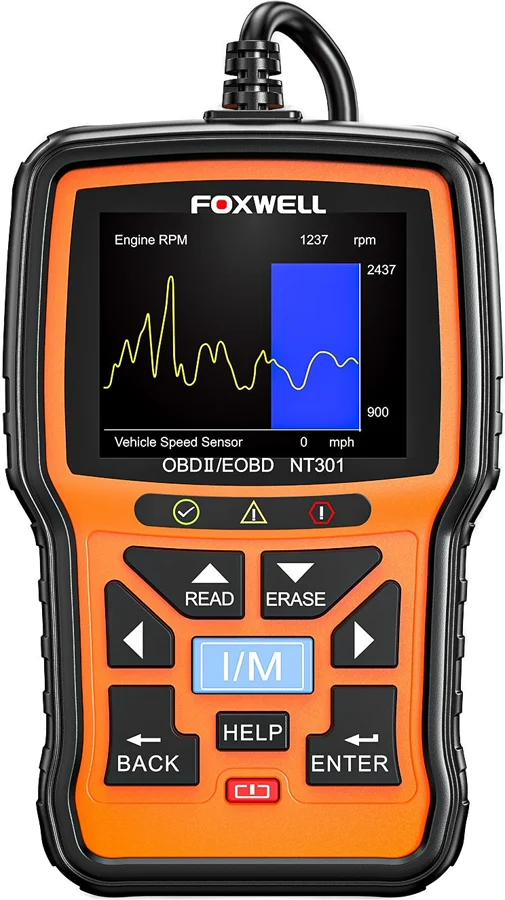
The Foxwell NT301 is a wired OBD2 code reader with a 2.8 inch color screen. It suits the car owner who wants to read and clear a check engine light at home. Foxwell designed it to support all 10 OBDII service modes, including live data and the O2 sensor test manual.
Foxwell NT301 at a glance
2.8inch TFT color display
Display
All 10
OBD2 service modes
OBDII/EOBD vehicles since 1996
Vehicle coverage
Lifetime free
Software updates
Foxwell lists these figures in the NT301 user guide and on its store product page manualFoxwell.
Display
2.8 inch TFT color display
OBD2 service modes
All 10
Vehicle coverage
OBDII/EOBD vehicles since 1996
Software updates
Lifetime free
Power supply
8 to 18V vehicle power
Working temperature
0 to 60 C (32 to 140 F)
Storage temperature
-20 to 70 C (-4 to 158 F)
Supported protocols
J1859-41.6, J1850-10.4, ISO9141, KWP2000 (ISO 14230), CAN (ISO 11898)
Dimensions (L x W x H)
145 x 94 x 32 mm
Weight
0.6 kg
In the box
User's guide, USB cable, software CD
Warranty
One year limited
How big is the Foxwell NT301?
The user guide lists the NT301 at 145 x 94 x 32 mm, and the weight at 0.6 kg manual. The screen is a 2.8 inch TFT color display.
What languages does the NT301 show?
The Setup menu holds a Language option, and you pick a language with the UP/DOWN keys manual. Foxwell posts the NT301 user guide in English, Spanish, French and German Foxwell.
Foxwell NT301 or NT301 Plus?
Both tools share the same body, screen and OBD2 feature set. The NT301 Plus adds a 12V battery tester and a pair of battery clips Foxwell.
→You want a 12V battery test: pick the NT301 Plus Foxwell.
→You need ABS, airbag or transmission codes: pick the NT604 Elite Foxwell.
Good to know before you buy
!
The NT301 works through the car's OBD2 port, so it covers the emission systems. The 10 OBD2 services it supports cover emission related trouble codes, live data, freeze frame and O2 sensor results. Foxwell lists engine, transmission, ABS and airbags for the NT604 Elite instead manualFoxwell.
!
Which functions appear depends on the car. The manual says available options vary by the year, model and make, and the tool shows "The selected mode is not supported!" when a car does not answer. Expect the menu to be shorter on some cars manual.
!
The O2 Monitor Test does not run on cars that use the CAN protocol. The manual sends you to the On-Board Monitor Test for O2 data on those cars. Most newer cars use CAN, so plan to use that menu manual.
!
Updates run on a Windows PC through a program called NT Wonder. The guide lists Windows 98 through Windows 7 as the minimum, with a USB port and 30 MB of disk space. Have a Windows computer ready if you want the free updates manual.
!
Power comes from the car, at 8 to 18V. The tool also draws power over USB for updates and file transfers. The manual says never to power it from USB while it is communicating with a vehicle manual.
How the Foxwell NT301 compares
Foxwell NT301 vs Ancel AD410
Both tools read and clear OBD2 codes, graph live data and check I/M readiness. Foxwell lists a 2.8 inch screen and all 10 OBD2 service modes. Ancel lists a 2.4 inch screen, an EVAP system test and eight menu languages FoxwellAncel.
Both tools support all 10 OBD2 test modes, graph live data and carry a one click readiness key. Autel lists a longer body and a carry case. Foxwell lists lifetime free updates FoxwellAutel.
KWP2000, ISO2000, ISO9141, J1850 VPW, J1850 PWM, CAN
Dimensions
145 x 94 x 32 mm
175 x 96.6 x 37 mm
Weight
0.6 kg
0.3 kg without wire, 0.68 kg with wire
Software updates
Lifetime free
Internet updateable
Warranty
One year limited
1 year
The NT301 body is 30 mm shorter than the AL519, about 17% shorter, by our maths.
Foxwell NT301 vs OBDLink EX
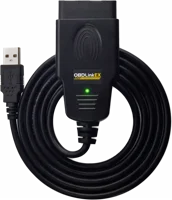
The NT301 is a handheld tool that works on its own in the car. The OBDLink EX is a USB adapter with no screen, and it needs a Windows PC running software such as FORScan OBDLink.
Does the Foxwell NT301 read ABS, airbag and transmission codes?
No. The NT301 reads the 10 generic OBD2 services, and those cover emission related trouble codes manual. Foxwell names engine, transmission, ABS and airbags for the NT604 Elite Foxwell.
Within the emission systems, the Read Codes menu reads stored codes, pending codes and permanent codes. The manual calls pending codes maturing codes, which point to intermittent faults. Permanent codes stay in memory until the monitor decides the fault has gone.
Note
If the car has more than one module, the tool names each one by its maker ID, such as Engine or Module $A4.
How does live data on a graph work?
The Live Data menu views, records and plays back real time PID data from the control module manual. Complete Data Set shows every PID the car under test supports.
Press the ENTER key on a line to draw that reading as a graph. The manual sets one condition: the PID has to give a numeric reading. Foxwell says a graph lets you follow trends and check whether figures like temperature and speed sit in the normal range Foxwell.
Custom Data List cuts the list down to the readings you want to watch, picked with the RIGHT key. Record Data catches faults that come and go. It records when you press ENTER, or on a DTC trigger when the car sets a code.
Before you start
Foxwell says never to operate the code reader while driving. Take two people, one to drive and one to work the tool.
How does the one click I/M readiness key work?
Press the I/M rubber button for 3 seconds and the tool reports readiness for a smog check Foxwell. A colored LED and the built-in beeper give the result together.
Green means the engine systems are OK, no stored or pending codes exist, and the car is ready for an emissions test. Yellow means pending codes exist, or some emission monitors have not run. Red means a problem exists in one or more systems, the dash warning lamp is lit, and the car is not ready manual.
The beeper matches the light. Green is two long beeps, yellow is short, long, short, and red is four short beeps. Foxwell says the tones help when the light is hard to see in a bright place.
The full I/M Readiness menu goes deeper. It marks each monitor OK, INC for incomplete or N/A for not applicable, and splits the result into Since DTCs Cleared and This Drive Cycle.
Emissions rules differ by area, so Setup›Configure Monitors›Allowed INC Monitors lets you allow 0, 1, 2 or 3 incomplete monitors.
Which cars does the Foxwell NT301 work with?
The user guide covers OBDII/EOBD compliant cars, SUVs, light-duty trucks and mini-vans sold worldwide since 1996 manual. The tool detects the communication protocol on its own once it links to the car.
Five protocol families are listed: J1859-41.6, J1850-10.4, ISO9141, KWP2000 (ISO 14230) and CAN (ISO 11898). Foxwell's store page lists the makes it covers, and names BMW, Toyota, Ford, Honda, VW and Land Rover among them Foxwell.
Modules Present is the menu that settles it for your own car. It shows the module IDs and the communication type the tool found.
How do the lifetime free updates work?
Foxwell lists lifetime free updates and lifetime tech support for the NT301 Foxwell. Updates load over the USB cable from a Windows PC, through the NT Wonder program Foxwell.
Hold the HELP key while you connect the USB cable, and the tool starts in update mode manual. NT Wonder then finds it on its own.
Update online compares your software version with the server and loads anything newer. Update offline installs a file from an earlier download. NT Wonder also prints saved test data, searches DTC definitions and opens the manuals in PDF.
Before you start
Do not disconnect the tool or power off the computer during an update.
Find the data link connector. It generally sits under the dash on the driver side.
Plug the code reader into the connector. It powers on from the car.
Switch the ignition key to the ON position. The tool boots up on its own.
Press the UP key from the home screen to read codes. The slower route is Diagnostics›Read Codes.
Pick Stored Codes, Pending Codes or Permanent Codes and press ENTER. A list of code numbers and descriptions appears.
For live readings, open Diagnostics›Live Data›View Data and pick Complete Data Set.
Press ENTER on any numeric line to see that reading as a graph. Press BACK to return.
Correct the fault, then press the DOWN key to erase codes, with the ignition ON and the engine off.
Read the codes again, and repeat the erase steps if any remain.
Care and quick fixes from the manual
How to clean it
Keep water out of the keypad. The manual gives one instruction here: do not soak the keypad, as water might find its way inside manual. Store the tool between -20 and 70 C.
If it will not link to the car
Check the three things the manual names for power manual.
The plug is fully seated in the data link connector under the dash.
The ignition key is in the ON position.
The USB cable is unplugged. Never power the tool from USB while it talks to a vehicle.
If the screen says "The selected mode is not supported!"
That car does not answer that service. The manual says available options vary by the year, model and make of the vehicle under test manual. Use another menu, such as On-Board Monitor Test for O2 data on CAN cars.
If codes come back after you erase them
Erasing does not repair the fault. The manual says to erase codes after you correct the condition that set them manual. Erasing also clears the freeze frame, so read that first.
If a key or a light looks faulty
Run the built-in checks at Setup›Tool self-testmanual. Display Test looks for missing spots on the screen. Keypad Test shows each key name as you press it. LED Test turns each light on and off.
Foxwell NT301 FAQ
What is the difference between the NT301 and the NT201?
Foxwell lists the NT301 with a 2.8 inch TFT color screen and hot keys for the I/M readiness test and for reading and clearing codes Foxwell. It lists the NT201 with a 2.4 inch TFT color screen and a hot key for the I/M test Foxwell.
Can the NT301 send a command to a part on the car?
The Component Test menu controls the operation of vehicle components, tests or systems, and the tool reports "Command Sent!" manual. The manual adds that some makers do not allow tools to control their systems.
Can the NT301 show transmission temperature?
The live data list holds every PID that the car under test supports, so the readings you get depend on the car manual. Open Live Data›View Data›Complete Data Set and read the list your own car returns.
Can the NT301 print a report?
Yes. Connect the tool to a PC with the USB cable, open NT Wonder and click Printmanual. Pick Print Data on the tool, choose a record, and the text loads into an edit box you can print or copy.
How do I look up a code without the car?
DTC Lookup sits on the home screen, and it reads the definitions stored in the tool manual. Set each character with the LEFT/RIGHT and UP/DOWN keys. NT Wonder has the same search on the PC.
How much does the Foxwell NT301 cost?
See today's price with the link above.
The verdict
4/4 PASS
No. 054 · Foxwell NT301
Reading your own check engine light.
The Foxwell NT301 suits the owner who wants to read, understand and clear a check engine light without a phone or a laptop in the car. All 10 OBD2 service modes, live data on a graph and the one click readiness key cover the jobs a home mechanic meets most. It reads the emission systems through the OBD2 port, so owners who also want ABS, airbag or transmission codes should look at the NT604 Elite.
 4/4 PASS