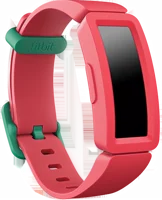
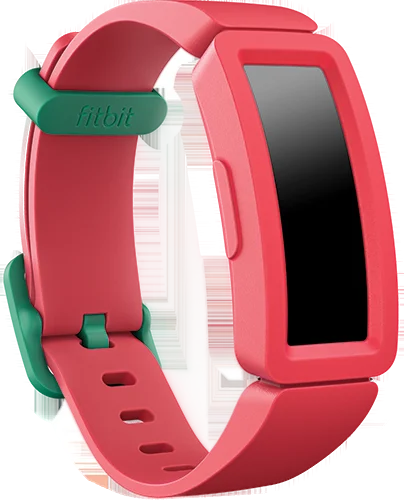
The Fitbit Ace 2 is an activity tracker Fitbit designed for kids ages 6 and up. It suits a family that wants steps, active minutes and sleep on a child's wrist, managed from a parent's phone. Fitbit lists water resistance up to 50 meters and a battery life of up to 5 days manual.
Fitbit Ace 2 at a glance
UP TO
5days
Battery
Water resistant up to 50 meters
Water resistance
4.6to 6.6 inches
Wrist fit
Designed for kids ages 6+
Age
Fitbit lists these specs in the Fitbit Ace 2 User Manual, version 1.0 manual.
Battery
Up to 5 days
Water resistance
Water resistant up to 50 meters
Wrist fit
4.6 to 6.6 inches (116mm to 168mm)
Age
Designed for kids ages 6+
Display
OLED touchscreen
Controls
Touchscreen plus 1 button
Sensor
MEMS 3-axis accelerometer
Wireless
Bluetooth 4.0 radio transceiver
Charge time
About 1 to 2 hours
Memory on the tracker
7 days of stats
In the box
Tracker and charging cable
Band material
Flexible silicone with a plastic buckle
Operating temperature
14F to 113F (-10C to 45C)
Maximum operating altitude
28,000 feet (8,534m)
What wrist size does the Fitbit Ace 2 fit?
The one-size wristband fits a wrist between 4.6 and 6.6 inches, which is 116mm to 168mm around manual. Measure your child's wrist with a tape before you order.
What is in the Fitbit Ace 2 box?
The box holds the tracker and a charging cable. Fitbit says the detachable wristband comes in a variety of colors, sold separately manual.
Who the Fitbit Ace 2 is for
Good fit if
Your child is 6 or older.
You want steps, minutes and sleep.
They go in the pool.
You manage it from your phone.
You want a one-size silicone band.
Pick another model if
→You want 8 days of battery: pick the Fitbit Ace 3 Ace 3 manual.
→You want a wider band: pick the Fitbit Ace 3 Ace 3 manual.
→You want calling and GPS: pick the Fitbit Ace LTE Ace LTE specs.
Good to know before you buy
!
Setup runs through a Google Account and the Google Health app. Fitbit says a parent needs a Google Health profile, and must be the family manager of a Google family group setup. Set that group up first.
!
Reminders to move start turned off on the Ace 2. Fitbit says they are off by default on Ace and Ace 2 kids guide. Turn them on in the Google Health app for the hourly 250 step nudge.
!
The band is one size, 4.6 to 6.6 inches around. That is 116mm to 168mm manual. Fitbit says Ace 2 also takes Inspire series classic accessory wristbands, so a bigger wrist has a route.
!
Fitbit asks you to keep the tracker out of the shower, hot tub and sauna. It says soaps, shampoos and conditioners can cause long-term damage water. Rinse the band with fresh water instead.
!
New child accounts register with Google. Fitbit says it has required this since June 2023, and that child registration is not supported in Quebec at this time setup. Check your region first.
Note
Fitbit says Ace 2 is not intended to provide medical or scientific data manual.
How the Fitbit Ace 2 compares
Fitbit Ace 2 vs Fitbit Ace 3
Both trackers carry the same 50 meter water resistance and the same 9 hour sleep goal. The Ace 3 adds 3 more days of battery, a wider band, a second button and a water lock setting.
The Ace LTE is a kids smartwatch with its own 4G connection, calling and GPS. The Ace 2 is a tracker that syncs over Bluetooth, and needs no data plan.
Both trackers hold a 50 meter water rating and track sleep. The Garmin runs on a coin cell you replace yourself, and Garmin quotes up to 1 year between changes.
Yes for swimming, in Fitbit's own words. Fitbit rates the Ace 2 as water resistant up to 50 meters, and lists it at 50 meters beside the Charge and Inspire families manualwater.
Fitbit says water resistance may diminish over time. It names dropping the device, high-velocity water, and soaps, perfume, insect repellent, lotions and sunscreen as the causes.
The Ace 2 has no water lock setting, so taps and swipes still register in water. Fitbit lists water lock on the Ace 3 kids guide.
Before you start
Fitbit advises against wearing the tracker in the shower, hot tub or sauna, to limit contact with soaps and shampoos water.
Battery and charging
Fitbit says a fully charged Ace 2 has a battery life of up to 5 days. It adds that battery life varies with use and other factors, and that animated clock faces require more frequent charging manual.
Charging fully takes about 1 to 2 hours. The cable holds on magnetically, and the pins on the cable must line up with the port on the back of the tracker.
While it charges, press the button to check the battery level. A fully charged tracker shows a solid battery icon with a smile.
Tip
Plug the tracker into the charger before you start a firmware update. Fitbit says an update takes several minutes and may be demanding on the battery manual.
What changed from the Fitbit Ace
The first Fitbit Ace is showerproof, with an IPX7 rating and water resistance up to 1 meter, and Fitbit says not to swim with it Ace manualwater. The Ace 2 moves that to 50 meters.
Fitbit designed the first Ace for kids ages 8 and up, and the Ace 2 for ages 6 and up. The Ace shipped with two bands in the box, in extra small and large; the Ace 2 ships with one size that spans 116mm to 168mm.
What the Fitbit Ace 2 tracks
Ace 2 continuously tracks stats whenever your child wears it. Swipe up from the clock face for steps taken, active minutes, steps this hour and sleep duration manual.
The daily goal starts at 10,000 steps, and you can raise it, lower it or switch it to active minutes. Fitbit also builds in a 60 minute active minutes goal, matching the CDC figure it quotes kids guide.
Reminders nudge the wearer to walk at least 250 steps each hour. The tracker vibrates 10 minutes before the hour if they have not, then again with a congratulatory message once they do.
Does the Fitbit Ace 2 track sleep?
Yes. Fitbit says to wear Ace 2 to bed to automatically track time asleep and movement during the night manual. Sync the tracker in the morning and the stats appear in the app.
The default sleep goal is 9 hours of sleep per night, and you can change it. Ace 2 also records when your child goes to bed, how long they are asleep, and how long they spend awake or restless.
The app can recommend consistent bedtimes and wake times, and it can remind your child nightly when it is time to get ready for bed kids guide.
Notifications, alarms and timers
Ace 2 shows call notifications from a paired phone. The phone and tracker must be within 30 feet of each other, and a call makes the tracker vibrate while the caller's name or number scrolls once manual.
You can set up to 8 alarms in the app, to go off once or on several days of the week. Press the button to dismiss an alarm, or swipe down to snooze it for 9 minutes.
The Timers app holds a stopwatch and a countdown timer. Fitbit suggests using them for homework time or timing a race to the end of the block kids guide.
How to set up and use it
Confirm you are the family manager of a Google family group.
Connect the Ace 2 to the charging cable before you start setup.
Install the Google Health app from the Apple App Store or Google Play Store.
Tap Sign in with Google and sign your child in with their Google Account.
Read the note on managing a child account, then tap Agree and continue.
Add a Google Health profile for your child, then tap Next.
Tap Continue and follow the on-screen steps to pair Ace 2 to the profile.
To use your own phone instead, open Google Health settings›Add a child account.
Put the tracker a finger's width above the wrist bone manual.
Set the Wrist setting to dominant if your child wears it on their writing hand.
Press and hold the button for quick settings: battery, Screen Wake and Notifications.
Care and quick fixes from the manual
How to clean the Fitbit Ace 2
Wash the band when it is dirty or has a noticeable odor.
Use fresh water only, or a hypoallergenic soap if you need one water.
Dry the band and the wrist well before putting it back on.
Clean the charging contacts on the back with a toothbrush and fresh water, so they stay bronze or gold in color cleaning.
Dry the contacts with a cloth or tissue before charging.
Clean the pins on the charging cable with a cotton swab and rubbing alcohol.
Fitbit says not to scrape the contacts with anything metal, because metal can damage the plating and cause corrosion.
If it will not sync, respond or track
Connect the Ace 2 to the charging cable.
Press and hold the button for 5 seconds, then release it.
Wait for a smiley face and a vibration, which mean the tracker restarted manual.
Fitbit lists this restart for a tracker that will not sync, will not respond to taps, swipes or the button, or will not track steps. Restarting reboots the device and does not delete any data.
How to change the wristband
Hold the tracker with the screen facing you and the button on the left.
Gently push the top of the tracker through the back opening in the band.
To fit a new band, hold the tracker with the back facing you and the button on the right.
Hold the band with the back opening facing you and the button insert on the right.
Place the top of the tracker into the flexible opening and push the bottom into place.
Check that all edges of the band lie flat against the tracker manual.
How to erase it before passing it on
Connect the Ace 2 to the charging cable.
Open Settings›Clear User Data on the tracker.
Press the screen for 3 seconds, then release.
Wait for the vibration and the clock screen, which mean the data is erased.
Fitbit adds that if Clear User Data does not appear, close the Settings app and reopen it while the tracker is on the charger.
How to change the clock face
With the tracker nearby, open the app and go to the Ace 2 tile.
Animated clock faces require more frequent charging.
Fitbit Ace 2 FAQ
Does the Fitbit Ace 2 have GPS?
No. Fitbit lists one sensor on the Ace 2, a MEMS 3-axis accelerometer that tracks motion patterns manual. The Fitbit Ace LTE specs list GPS with Google Location Accuracy Ace LTE specs.
Does the Fitbit Ace 2 track heart rate?
No. The only sensor Fitbit lists is the 3-axis accelerometer manual. Fitbit lists an optical heart rate sensor on the Ace LTE Ace LTE specs.
Does the Fitbit Ace 2 get text messages?
No. Fitbit says Ace 2 can display call notifications from your phone, and that call notifications are turned on automatically once you pair it manual.
Does the Fitbit Ace 2 have a stopwatch?
Yes. The Timers app on the tracker holds a stopwatch and a countdown timer manual.
Does the Fitbit Ace 2 come with a charger?
The box holds the tracker and a charging cable manual. Plug that cable into a USB port on your computer or a UL-certified USB wall charger, which is not in the box.
Is the Fitbit Ace 2 still supported?
Yes. Fitbit's current setup page covers Ace, Ace 2 and Ace 3 with the Google Health app, and the Ace 2 User Manual is still listed on Fitbit's manuals page setupmanuals.
Does the Fitbit Ace 2 work with an iPhone?
Yes. Fitbit lists an iPhone or iPad, or an Android phone or tablet, for setting up your child's Google Health profile and Ace tracker setup.
How much is the Fitbit Ace 2?
See today's price with the link above.
The verdict
4/4 PASS
No. 077 · Fitbit Ace 2
Getting kids moving every day.
The Fitbit Ace 2 suits a family with a child aged 6 or older who wants steps, active minutes and sleep on the wrist, with the detail in a parent-managed app. Fitbit lists water resistance up to 50 meters, up to 5 days of battery, a 9 hour sleep goal and a nudge to walk 250 steps an hour. If you want longer battery and a wider band, the Ace 3 specs list 8 days and a 121mm to 172mm fit.
 4/4 PASS