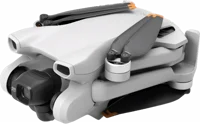
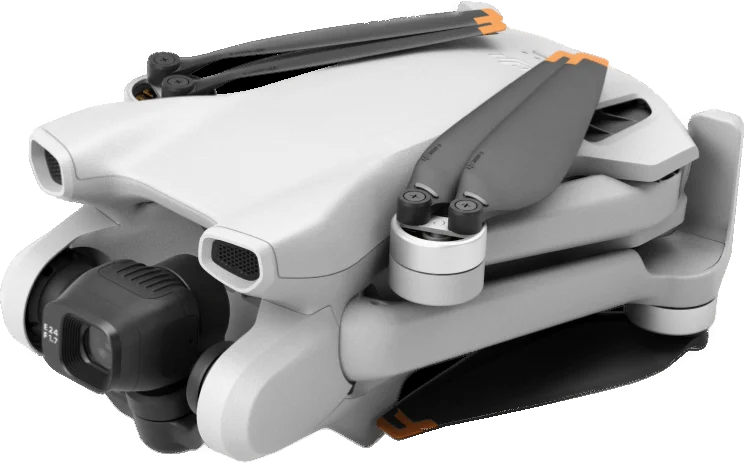
The DJI Mini 3 is a folding camera drone with a takeoff weight of 248 g. It suits travelers and hobby filmmakers who want 4K footage from a drone that stays under the 249 g mark. DJI lists up to 38 minutes of flight on the standard battery DJI.
DJI Mini 3 at a glance
248g
Takeoff weight
38minutes
Max flight time
1/1.3-inch CMOS
Camera
4K at 3840 x 2160
Video
DJI lists these specs on its DJI Mini 3 specs page DJI.
Takeoff weight
248 g
Max flight time
38 minutes (standard battery)
Camera
1/1.3-inch CMOS, 48 MP
Video
4K at 3840 x 2160, 24/25/30 fps
Lens
f/1.7, 24 mm equivalent, 82.1 degree view
Max video bitrate
100 Mbps
ISO range
100 to 3200
Gimbal
3-axis mechanical (tilt, roll and pan)
Video transmission
DJI O2, up to 10 km (FCC)
Max horizontal speed
16 m/s in Sport mode
Wind resistance
10.7 m/s (Level 5)
Sensing
Downward vision system
Folded size
148 x 90 x 62 mm
Internal storage
N/A
What megapixel is the DJI Mini 3?
The camera takes 48 MP photos from a 1/1.3-inch CMOS sensor DJI. The largest image size DJI lists is 8064 x 6048 pixels.
How much does the DJI Mini 3 weigh?
The standard takeoff weight is 248 g, including the battery, propellers and a microSD card DJI. With the Intelligent Flight Battery Plus, DJI says the aircraft weighs more than 249 g, at about 290 g.
What is the DJI Mini 3 top speed?
DJI lists a max horizontal speed of 16 m/s DJI. By flight mode, the manual lists 16 m/s in Sport, 10 m/s in Normal and 6 m/s in Cine manual.
DJI Mini 3 standard battery or Plus battery?
Pick the standard battery to stay at 248 g. Pick the Intelligent Flight Battery Plus for up to 51 minutes of flight, at about 290 g DJI.
→You want all-round obstacle sensing: pick the DJI Mini 4 Pro DJI.
→You want 4K at 100 frames a second: pick the DJI Flip DJI.
→You want a simpler 2.7K drone at 246 g: pick the DJI Mini 2 SE DJI.
Good to know before you buy
!
DJI guarantees software updates for the Mini 3 until 2026/12/31. That date sits on DJI's specs page, so read it before you buy DJI.
!
DJI lists internal storage as N/A. Fit a microSD card before you fly. With the DJI RC and no card fitted, you cannot shoot photos or video DJImanual.
!
The Remote ID system activates with the Intelligent Flight Battery Plus. With the standard battery, the manual says the aircraft does not activate Remote ID. Check the FAA rules for your flights manual.
!
The Plus battery is sold separately, in selected countries. It takes the aircraft over 249 g, so check your local rules first DJI.
!
DJI says the Mini 3 is not waterproof. If it rains in flight, land as soon as you can, then dry the aircraft inside and out DJI.
How the DJI Mini 3 compares
DJI Mini 3 vs Mini 3 Pro
Both weigh 248 g and share a 1/1.3-inch 48 MP sensor. The Mini 3 flies for up to 38 minutes. The Mini 3 Pro manual lists 34 minutes, plus forward and backward vision systems manual.
The Mini 3 holds the longer flight time, at 38 minutes against 34. The Mini 4 Pro lists all-round vision sensing, 4K at 100 fps and 20 km under FCC DJI.
The Mini 3 records 4K video at 3840 x 2160, at 24, 25 or 30 frames a second DJI. It also records 2.7K and 1080p, both up to 60 fps. DJI lists a max bitrate of 100 Mbps in MP4, using H.264.
The sensor is a 1/1.3-inch CMOS behind an f/1.7 lens with a 24 mm equivalent view DJI. DJI calls the result 4K HDR video DJI.
Tip
DJI says 4K at 30 fps takes care of both dynamic range and image detail DJI.
Does the DJI Mini 3 shoot HDR?
Yes. DJI says photo mode has HDR on by default, and so does video at 30 fps or lower DJI. DJI also lists dual native ISO values of ISO 100 and ISO 800.
How do I shoot vertical video?
Tap the Landscape/Portrait Mode Switch in DJI Fly manual. The camera rotates 90 degrees for portrait video and photos. DJI calls this True Vertical Shooting, and says it needs no digital cropping DJI.
What changed from the DJI Mini 2?
DJI says the Mini 3 improved the imaging system and the battery life DJI. It lists a 1/1.3-inch sensor with dual native ISO, chip-level HDR and 4K HDR video. DJI also says the new gimbal design allows True Vertical Shooting and large-angle tilt.
Battery and charging
The Mini 3 flies for up to 38 minutes on the 2453 mAh Intelligent Flight Battery DJI. DJI measured that in a wind tunnel, flying forward at 21.6 kph. Hovering time is 33 minutes.
How long does the DJI Mini 3 take to charge?
A standard battery takes 64 minutes on the aircraft, with the DJI 30W USB-C Charger DJI. In the Two-Way Charging Hub it takes 56 minutes. The Plus battery takes 101 minutes on the aircraft, or 78 minutes in the hub.
Which chargers work with the DJI Mini 3?
Other USB-C chargers work, and DJI recommends its 30W USB-C Charger for speed DJI. The manual rates the battery for 200 charge cycles, and does not recommend use after that manual.
How far can the DJI Mini 3 fly?
DJI lists up to 10 km of video transmission under FCC, and 6 km under CE DJI. Those figures need an unobstructed outdoor area free of interference. In a city DJI lists about 1.5 to 3 km.
Max flight distance is a separate figure: 18 km on the standard battery, and 25 km with the Plus DJI.
What is the maximum flight altitude?
DJI sets the maximum flight altitude at 500 m for safety DJI. Local laws may set a lower figure, so check them first. Max takeoff altitude above sea level is 4000 m DJI.
Does the DJI Mini 3 have obstacle avoidance?
No. DJI lists a Downward Vision System as the sensing type DJI. The manual adds an Infrared Sensing System of two 3D infrared modules manual. It helps the aircraft hold position and fly indoors.
The Downward Vision System works best at 0.5 m to 10 m manual. Landing Protection uses it during Smart Return to Home. For all-round sensing, DJI lists an omnidirectional binocular vision system on the Mini 4 Pro DJI.
Does the DJI Mini 3 have follow me?
DJI lists QuickShots and Panorama as the intelligent flight modes for the Mini 3 manual. The 5 QuickShots are Dronie, Rocket, Circle, Helix and Boomerang. Each one flies a set path around a subject you tap in DJI Fly, then makes a short video.
Does the DJI Mini 3 have Remote ID?
Yes. The manual says the aircraft carries a Remote ID system that meets 14 CFR Part 89 manual. The system activates when you use the Intelligent Flight Battery Plus. With the standard Intelligent Flight Battery, the aircraft does not activate the Remote ID system.
Note
The aircraft runs a pre-flight self-test of the Remote ID system, and will not take off if the test fails manual.
How to set up and use it
Remove the gimbal protector from the camera.
Connect a USB charger to the aircraft USB-C port to charge and activate the battery.
Unfold the rear arms, then the front arms, then all the propeller blades.
Mount the control sticks on the remote controller.
With the DJI RC-N1, pull out the phone holder and fit the cable that matches your phone port.
Press the power button once, then press and hold it to power on.
Follow the prompts in DJI Fly to activate the aircraft. An internet connection is needed manual.
Update the firmware when DJI Fly prompts you.
How to take off and land
Place the aircraft on an open, flat area, with its rear facing you.
Power on the remote controller and the aircraft.
Launch DJI Fly and enter the camera view.
Wait for the aircraft self-diagnostics to finish.
Push the throttle stick up slowly to take off.
To land, hover over a level surface and push the throttle stick down gently.
Power off the aircraft before the remote controller manual.
Auto Takeoff puts the aircraft in a hover about 1.2 m up manual. The manual says not to launch it from your palm.
How to download photos and videos
Power on the aircraft and wait for the self-diagnostics to finish.
Press the power button 3 times quickly to switch to QuickTransfer mode.
DJI lists QuickTransfer speeds of up to 25 MB/s over Wi-Fi 5 DJI.
Care and quick fixes from the manual
How to clean the DJI Mini 3
Remove the battery before you clean the aircraft.
Wipe off dirt and dust with a soft cloth.
Clean the camera lens with a lens cleanser.
Clean the infrared and vision sensors with a soft cloth manual.
Before you start
Do not clean the aircraft with a wet cloth or a cleanser that contains alcohol. Liquid can get into the housing and damage the electronics manual.
How to change the propellers
Turn the battery off before you check or change propellers.
Use the screwdriver from the aircraft package to loosen the screws.
Remove the 2 blades and screws from that motor and discard them.
Fit new propellers from one package, marked blades to the marked arm.
Keep the screws vertical as you tighten them, then check they sit flush manual.
Check the propeller screws after every 30 hours of flying time, about 60 flights manual. Check for cracks, wear, warp and loose screws before each flight DJI.
If it will not charge or power on
Charge the battery first. Batteries ship in hibernation mode and need charging to activate manual.
Press the power button once to read the battery level LEDs.
Remove the battery, refit it, and check it is mounted securely.
Warm the battery if it is cold. It charges at 5 to 40 degrees C.
Contact DJI Support if it still will not start.
If the gimbal drifts in flight
Calibrate the IMU and the compass in DJI Fly manual. Contact DJI Support if the drift continues.
If a firmware update fails
DJI lists 4 causes: a battery below 20%, a power-off mid-update, a dropped network, or switching away from the app DJI. Restart the aircraft and the remote controller, then try again. To reset the aircraft to factory default, use the DJI Fly app manual.
DJI Mini 3 FAQ
Which app does the DJI Mini 3 need?
DJI says the Mini 3 works with the DJI Fly app DJI. The DJI RC remote controller comes with DJI Fly preinstalled. For the DJI RC-N1 you download DJI Fly to your own phone.
Which remote controllers work with the DJI Mini 3?
DJI lists 2: the DJI RC-N1 Remote Controller and the DJI RC DJI. DJI lists 6 hours of operating time for the RC-N1 without charging a phone, and 4 hours while charging one DJI.
Which microSD cards does DJI recommend?
DJI asks for a UHS-I Speed Grade 3 card or above manual. Its list names SanDisk Extreme, Kingston Canvas Go!Plus and Samsung PRO Plus cards, from 32 GB to 256 GB DJI.
Can the DJI Mini 3 fly in rain?
No. The manual says not to fly when it is rainy, smoggy or when you do not have clear sight manual. DJI says to land and dry the aircraft fully if rain starts in flight DJI.
How much is the DJI Mini 3?
See today's price with the link above.
Where can I find the DJI Mini 3 manual?
DJI posts the DJI Mini 3 User Manual v1.2 as a PDF, with the quick start guides, on its downloads page DJI.
The verdict
4/4 PASS
No. 046 · DJI Mini 3
Big aerial shots from a tiny drone.
The DJI Mini 3 suits travelers and social-media filmmakers who want 4K HDR video from a 248 g drone. DJI pairs a 1/1.3-inch 48 MP sensor with up to 38 minutes of flight and 10 km of transmission. Buyers who want all-round obstacle sensing should look at the Mini 4 Pro.
 4/4 PASS