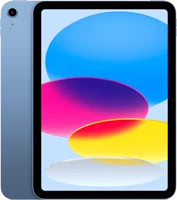
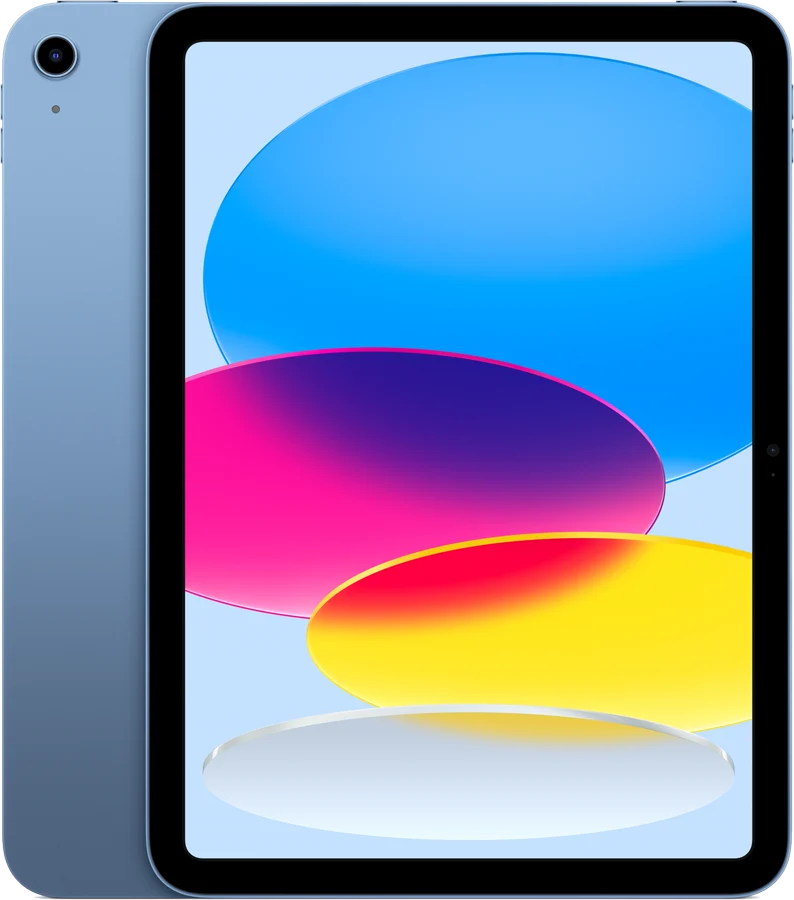
The iPad A16 is Apple's 11-inch iPad with the A16 chip, introduced in 2025 support. It suits notes, movies, schoolwork and everyday browsing. Apple lists up to 10 hours of web or video on Wi-Fi, and storage that starts at 128GB Apple.
iPad A16 at a glance
11-inch Liquid Retina
Screen
UP TO
10hours of web or video on Wi-Fi
Battery life
128GB
Storage
1.05pounds
Weight
Apple lists these specs on its iPad 11-inch (A16) page and on the iPad (A16) support page Applesupport.
Apple Pencil (USB-C), Apple Pencil (1st generation)
Back camera
12MP Wide, f/1.8, 4K video up to 60 fps
Front camera
Landscape 12MP Center Stage, 1080p video
Unlock
Touch ID in the top button
Port
USB-C, with DisplayPort and USB 2.0 up to 480Mb/s
Wireless
Wi-Fi 6, Bluetooth 5.3, 5G on cellular models
Size
9.79 by 7.07 by 0.28 inches
In the box
iPad, USB-C cable, 20W power adapter
How big is the iPad A16?
Apple lists 9.79 inches tall, 7.07 inches wide and 0.28 inch deep. The Wi-Fi model weighs 1.05 pounds (477 grams), and the cellular model 1.06 pounds (481 grams) Apple.
What screen size is the iPad A16?
Apple calls it an 11-inch display. Measured diagonally as a rectangle the screen is 10.86 inches, and the viewable area is less, because the corners are rounded Apple.
What generation is the iPad A16?
Apple names this model by its chip: iPad (A16), or iPad 11-inch (A16) on the store page. Apple lists the year introduced as 2025 support.
Apple sells both versions in the same body, with the same screen, chip and storage sizes. The cellular version adds mobile data, GPS and an eSIM, and Apple lists it as 4 grams heavier Apple.
THIS REPORTWi-Fi
Wi-Fi + Cellular
Wireless
Wi-Fi 6, Bluetooth 5.3
Wi-Fi 6, Bluetooth 5.3, 5G sub-6 GHz, Gigabit LTE
SIM
Not listed by Apple
eSIM, not compatible with physical SIM cards
Battery life
Up to 10 hours of web or video
Up to 9 hours of web on cellular data
Weight
1.05 pounds (477 grams)
1.06 pounds (481 grams)
Location
Digital compass, Wi-Fi, iBeacon
Adds GPS/GNSS
Who the iPad A16 is for
Good fit if
Good fit if:
You want notes with an Apple Pencil.
You watch video and browse daily.
You want 128GB or more storage.
You prefer Touch ID to Face ID.
You charge it most nights.
Pick another model if:
You want Apple Pencil Pro: pick the iPad Air support.
You want Apple Intelligence: pick an M-series iPad Air support.
You want a 13-inch screen: pick the iPad Air 13-inch Apple.
Good to know before you buy
!
Apple lists two pencils for this iPad: Apple Pencil (USB-C) and Apple Pencil (1st generation). The first-generation pencil needs the USB-C to Apple Pencil Adapter to pair and charge, so check the pencil name before you buy support.
!
Apple lists Apple Intelligence for iPad mini (A17 Pro) and iPad models with M1 or later. The iPad (A16) sits outside that list, so choose an M-series iPad if you want those features support.
!
Apple lists no water resistance rating for the iPad (A16). Apple gives an IP67 rating to the iPad mini (A20 Pro), and asks you to keep liquids away from other iPad models guide.
!
The USB-C port runs at USB 2.0 speed, up to 480Mb/s. Big photo and video copies over a cable take longer than on a faster port. Apple lists support for one external display at up to 4K and 60Hz Apple.
!
The box holds no Apple Pencil and no keyboard. Apple lists the iPad, a 1 meter USB-C cable and a 20W power adapter, and sells the Magic Keyboard Folio for iPad (A16) on its own Applesupport.
Note
Apple lists the iPad (A16) among the models that run iPadOS 27.2 guide.
How the iPad A16 compares
iPad A16 vs iPad Air
The iPad A16 and the 11-inch iPad Air share the same 2360 by 1640 screen at 264 ppi and 500 nits. Apple lists the Air with an M-series chip, a fully laminated antireflective screen, Apple Pencil Pro support and Apple Intelligence Apple.
All three list up to 10 hours of web or video. The A16 is 0.04 inch deeper and 13 grams heavier than the Air (M4), by our maths.
iPad A16 vs iPad 10th generation
Apple says the updated iPad with A16 is "nearly 30 percent faster" than the previous generation Newsroom. Both models share the same body size, the same 1.05 pound Wi-Fi weight and the same pencil list support.
Apple lists two: Apple Pencil (USB-C) and Apple Pencil (1st generation) support. With this iPad, the first-generation pencil needs the USB-C to Apple Pencil Adapter to pair and charge. The Apple Pencil (USB-C) pairs through the USB-C cable that came with the iPad guide.
Does the Apple Pencil Pro work with the iPad A16?
No. Apple lists Apple Pencil Pro for the iPad Pro 11-inch and 13-inch (M4 and M5). That list also covers the iPad Air 11-inch and 13-inch (M2, M3 and M4) and the iPad mini (A17 Pro) support.
Tip
A paired pencil stays paired until you restart the iPad, turn off Bluetooth, or pair it with another iPad guide.
Battery and charging
Apple lists a built-in 28.93-watt-hour battery, and up to 10 hours of surfing the web on Wi-Fi or watching video. Cellular models list up to 9 hours on cellular data. Charging runs through the power adapter or a USB-C cable to a computer Apple.
Apple says iPad batteries are designed to keep 80 percent of their original capacity at 1000 complete charge cycles support. To cut that wear, you can cap charging at 80 percent in Settings›Battery›Battery Healthguide.
What changed from the iPad 10th generation
Apple moved the chip from the A14 Bionic to the A16, and calls the result nearly 30 percent faster than the previous generation Newsroom. Storage now starts at 128GB rather than 64GB, and 512GB is new.
The battery grew from 28.6 to 28.93 watt-hours, about 1 percent more, by our maths, and both models list the same 10 hours. Bluetooth moved from 5.2 to 5.3, and photos moved from Smart HDR 3 to Smart HDR 4 supportApple.
Can the iPad A16 do split screen?
Yes. Apple says you can use windowed apps on iPad in iPadOS 26 or later, and the iPad (A16) runs iPadOS 27.2 support. Turn the feature on in Settings›Multitasking & Gestures›Windowed Apps.
With an app full screen, drag a second app to the left or right edge of the screen. Apple says you can drag it from the Dock, App Library or Spotlight. Drag any corner, or the handle in the bottom right, to resize a window. In Safari or Notes, hold the app icon and tap New Window for a second window.
Is the iPad A16 water resistant?
No. Apple lists an IP67 rating for the iPad mini (A20 Pro), and lists no water resistance rating for the iPad (A16). Apple asks you to keep soap, acidic foods and liquids such as salt water, pool water, sunscreen and solvents away from iPad guide.
Before you start
If iPad gets wet, wait at least 5 hours before you charge it, Apple says guide.
How to set up and use it
Press and hold the top button until the Apple logo appears guide.
Plug the 20W USB-C Power Adapter and the 1 meter cable into the USB-C connector at the bottom to charge it Apple.
For an Apple Pencil (USB-C): slide open the end of the pencil and connect it to the USB-C charge cable that came with the iPad.
Connect the other end of that cable to the USB-C connector on the iPad, then tap Tap to Connectguide.
For an Apple Pencil (1st generation): remove the cap and plug the pencil into the USB-C to Apple Pencil Adapter.
Connect the adapter to the iPad with the USB-C charge cable, then tap Pairguide.
Check the pencil battery in Settings›Apple Pencil.
Turn on side-by-side apps in Settings›Multitasking & Gestures›Windowed Appssupport.
For a screenshot, press the top button and either volume button, then release both quickly support.
To turn it off, hold the top button and either volume button until the slider appears, then drag it guide.
Care and quick fixes from the manual
How to clean it
Disconnect all cables.
Hold the top button and either volume button until the sliders appear, then drag the top slider. Or go to Settings›General›Shut Down.
Wipe it with a soft, slightly damp, lint-free cloth, such as a lens cloth.
Keep moisture out of the openings.
Use no cleaning products and no compressed air guide.
Apple says the front glass carries a fingerprint-resistant oleophobic coating that wears with normal use, and that cleaning products and abrasive materials wear it faster. For disinfecting, Apple allows a 70 percent isopropyl alcohol wipe, a 75 percent ethyl alcohol wipe or Clorox Disinfecting Wipes on hard, nonporous surfaces. Apple asks you to avoid bleach and hydrogen peroxide support.
If it will not turn on or respond
Press and quickly release the volume button closest to the top button.
Press and quickly release the volume button farthest from the top button.
Press and hold the top button until you see the Apple logo support.
Apple says you might need to charge it for up to an hour before it turns on.
If it got wet
Unplug all cables, and leave it off charge until it is completely dry.
Tap it gently against your hand with the USB-C connector facing down.
Leave it in a dry area with enough airflow.
Wait at least 5 hours before charging or connecting a USB-C accessory guide.
How to erase it and start over
Back up the iPad first.
Go to Settings›General›Transfer or Reset iPad.
Tap Erase All Content and Settings.
Enter the iPad passcode or Apple Account password.
On a cellular model you can erase the eSIM or keep it. Apple says an erased eSIM needs your carrier to reactivate the plan.
iPad A16 FAQ
When did the iPad A16 come out?
Apple announced it in March 2025, and said it would begin arriving to customers starting March 12 Newsroom. The tech specs page lists the year introduced as 2025 support.
Does the iPad A16 have Face ID?
No. Apple lists Touch ID in the top button. It unlocks the iPad, secures data inside apps, and makes purchases in the App Store Apple.
Does the iPad A16 come with a charger?
Yes. The box holds the iPad, a 1 meter USB-C Charge Cable and a 20W USB-C Power Adapter Apple.
Does the iPad A16 come with a pencil?
No. Apple lists 3 items in the box, and an Apple Pencil is not among them Apple.
Does the iPad A16 have a SIM card slot?
No. Apple says iPad "uses advanced eSIM technology for more convenience and security (not compatible with physical SIM cards)" Apple.
Does the iPad A16 work with a keyboard?
Yes. Apple lists the Magic Keyboard Folio for iPad as compatible with the iPad (A16) and the iPad (10th generation). It has a trackpad, a 14-key function row and a detachable two-piece design. It needs iPadOS 18.3 or later support.
How much is the iPad A16?
See today's price with the link above.
The verdict
4/4 PASS
No. 061 · Apple iPad A16
Notes, movies and everyday use.
The iPad A16 suits notes, movies, schoolwork and everyday browsing on an 11-inch screen. Apple lists it as nearly 30 percent faster than the previous iPad, with storage from 128GB to 512GB. Buyers who want Apple Pencil Pro or Apple Intelligence should look at an M-series iPad Air instead.
 4/4 PASS