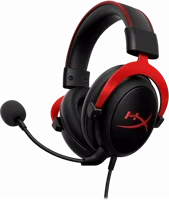
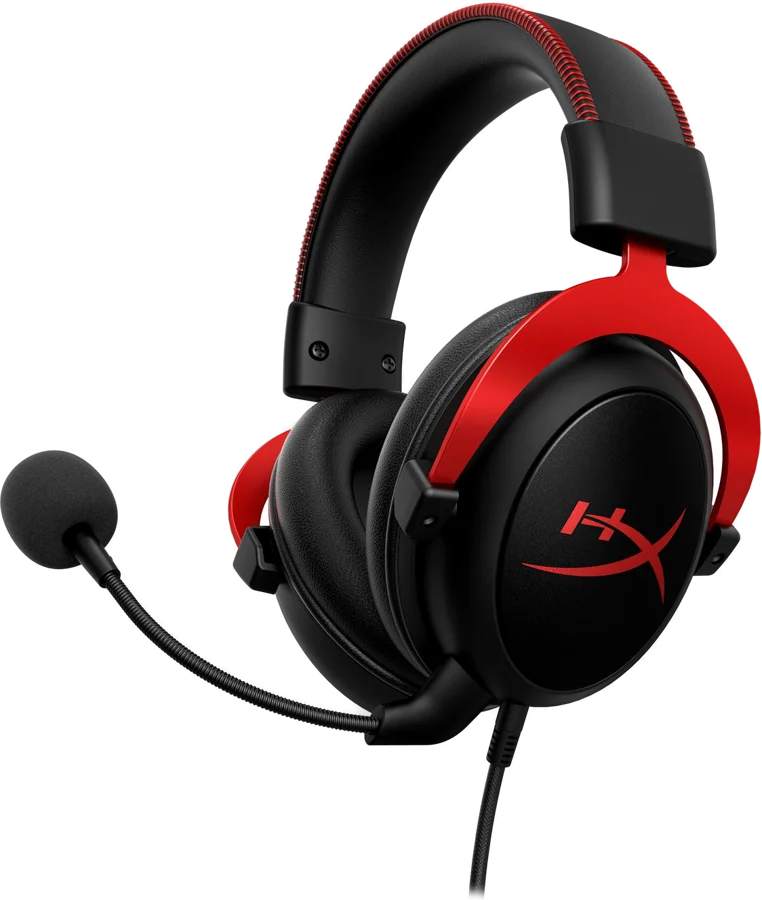
The HyperX Cloud II is a wired gaming headset for PC and console team chat. It carries 53 mm dynamic drivers, and a USB audio control box that switches virtual 7.1 surround sound on HyperX. HyperX lists it for PC, PS5, PS4, Xbox Series X|S, Xbox One, Nintendo Switch and mobile.
HyperX Cloud II at a glance
53mm dynamic
Drivers
Virtual 7.1
Surround sound
Detachable electret condenser
Microphone
0.7lb
Weight
HyperX lists these numbers on the Cloud II product page, the Cloud II specifications article and the user manual HyperXspecificationsmanual.
Drivers
53 mm dynamic, neodymium magnets
Surround sound
Virtual 7.1, switched on the control box
Microphone
Detachable electret condenser, uni-directional
Weight
0.7 lb (320 g with microphone and cable)
Sensitivity
98 dBSPL/mW at 1kHz
Impedance
60 ohm per system
Total harmonic distortion
Less than 2%
Power handling
150 mW
Ambient noise attenuation
About 20 dBA
Headband pressure
5 N
Connection
3.5 mm jack, or USB 2.0 through the control box
Ear cushions and frame
Memory foam and premium leatherette, aluminum frame
Cable
3.28 ft (1 m) attached headset cable, 2 m control box cable
Warranty
2 year
Is the HyperX Cloud II wireless?
No, HyperX lists the headset connection as a mini stereo jack plug, 3.5 mm manual. The USB control box adds the USB side and the 7.1 button. For a 2.4GHz version, HyperX sells the Cloud II Wireless HyperX.
What frequency response does HyperX list?
HyperX lists two figures for the Cloud II. The product page lists 10Hz to 23kHz HyperX. The user manual and the specifications article list 15Hz to 25kHz for the earphones manual. We list both so you can match the figure you see on a shop page.
The user manual also lists a mesh bag with the headset manual.
HyperX Cloud II or Cloud II Wireless?
HyperX sells a wireless model under the same Cloud II name. The wired Cloud II keeps the USB control box and the virtual 7.1 button. The wireless model drops the cable, lists 30 hours of battery, and lists PC, PS5 and PS4 HyperX.
PC, PS5, PS4, Xbox Series X and S, Xbox One, Switch, mobile
PC, PS5, PS4
In the box
Control box, spare velour cushions
USB adapter, charge cable, mic pop filter
Who the HyperX Cloud II is for
Good fit if
You game on a PC with USB.
You want virtual 7.1 surround sound.
You talk to a team every session.
You want a detachable microphone.
You move between PC and consoles.
Pick another model if
→You want no cable: pick the Cloud II Wireless, which lists 30 hours of battery HyperX.
→You want a USB-C plug: pick the Cloud III, which ships USB-A and USB-C HyperX.
→You want dual chamber drivers: pick the Cloud Alpha HyperX.
Good to know before you buy
!
The headset cable is attached, not detachable. The manual names part C as the attached cable with a 3.5 mm input jack, and lists 1 m plus a 2 m extension manual. Plan a cable route to your desk. For a cable that unplugs from the cup, HyperX lists the Cloud Alpha with a detachable 4.26 ft cable HyperX.
!
Virtual 7.1 lives on the USB control box. HyperX lists the audio control box as the audio control, with the 7.1 audio button on it, and the USB side as USB 2.0 HyperXmanual. Keep the box plugged into the computer when you want the 7.1 button.
!
Xbox One use needs an adapter sold separately. HyperX says the Xbox One adapter plugs into the controller, and that the USB control box comes out of the chain Xbox One usage. Check your controller for a 3.5 mm jack first, then buy the adapter if it has none.
!
Two firmware lines exist for this headset. HyperX lists Rev. 0010 for Kingston sets with part number KHX-HSCP-xx, and Rev. 4103 for HP sets numbered 4P5M0AA, 4P5L9AA or 4P5E0AA firmware. Read the inner buckle for Kingston or HP Inc. before you download anything.
!
The headset carries 2 years, accessories carry 6 months. HyperX gives most headsets a two year limited warranty, and gives accessories bought from its own online store six months warranty. Keep your proof of purchase with the mesh bag.
Note
The spare cushions in the box are velour. The pair on the headset is memory foam with premium leatherette HyperX.
How the HyperX Cloud II compares
HyperX Cloud II vs Cloud III
Both headsets use 53 mm dynamic drivers with neodymium magnets, an aluminum frame, and memory foam with leatherette cushions. The Cloud II puts its controls on a USB control box, and the Cloud III puts them on the cup HyperX. The Cloud III adds USB-C and 24 bit audio.
Electret condenser, uni-directional, LED mute light
Weight
0.7 lb with microphone
0.67 lb, 0.70 lb with microphone
Works with
PC, PS5, PS4, Xbox Series X and S, Xbox One, Switch, mobile
The same list, plus Mac
Warranty
2 year
2 years
HyperX Cloud II vs Cloud Alpha
The Cloud Alpha runs on 3.5 mm alone, so the virtual 7.1 button is a Cloud II part. HyperX builds the Alpha on custom 50 mm dual chamber drivers, which it says separate the bass from the mids and highs HyperX. The Alpha cable unplugs from the cup, and the Cloud II cable stays attached.
HyperX puts the words noise-cancelling on the microphone, not on the ear cups. The specification lists the microphone polar pattern as uni-directional and noise-cancelling, so the capsule works towards your mouth HyperX.
The cups block sound by shape instead. HyperX lists a closed design with circumaural ear coupling, and ambient noise attenuation of about 20 dBA specifications. The manual adds that the closed cup design cuts sound leakage out of the headset as well.
How good is the HyperX Cloud II microphone?
The microphone is a detachable back electret condenser on a 150 mm gooseneck boom manual. HyperX lists a 6 mm capsule, a cardioid polar pattern, and a frequency response of 50 to 18,000 Hz.
Sensitivity is -42dBV at 1kHz on the product page, and the manual lists microphone output at -39 plus or minus 3 dB HyperX. Maximum SPL is 105dB. The boom unplugs for music, which the manual names as the reason it detaches.
Does the HyperX Cloud II work on PS5 and Xbox?
Yes, HyperX lists PC, PS5, PS4, Xbox Series X|S, Xbox One, Nintendo Switch and mobile HyperX. Consoles use the 3.5 mm jack, so the USB control box comes out of the chain.
For PS4, HyperX says to plug the headset jack straight into the game controller PS4 usage. For Xbox One, HyperX says you need the Xbox One adapter, sold separately, which plugs into the controller and carries its own volume controls Xbox One usage.
For a phone or tablet, HyperX says to unplug the control box and put the 3.5 mm jack into the audio jack on the device mobile usage.
What does the USB control box do?
The control box holds the volume controls and the 7.1 audio button, and it carries the USB connector at the far end manual. HyperX lists the box at 71 g, with a 2 m cable specifications.
On the computer the box appears as HyperX 7.1 Audio. HyperX lists USB 2.0, a stereo format, 16 bit depth, and sampling rates of 8kHz, 16kHz, 32kHz, 44.1kHz and 48kHz.
Tip
The headset also runs with the control box unplugged. HyperX calls that direct connect direct connect.
How to set up and use it
Plug the detachable microphone into the headset.
Plug the headset 3.5 mm jack into the input jack on the USB control box.
Plug the USB connector on the end of the control box into the computer control box setup.
On Windows, open Control Panel›Hardware and Sound›Sound.
Right click HyperX 7.1 Audio and pick Set as Default Device. A green check mark lands next to it.
Do the same under the Recording tab for the microphone.
On a Mac, open System Preferences›Sound, then pick HyperX 7.1 Audio on the Input tab and the Output tab.
Press the 7.1 audio button on the control box for virtual 7.1 surround sound.
Set the level on the volume controls of the control box manual.
How to connect it to a PS4
Unplug the headset jack from the USB control box.
Plug the headset audio jack into the PS4 game controller.
Turn the console on.
Open Settings›Devices›Audio Devices.
Pick Output to Headphones, then pick All AudioPS4 usage.
Care and quick fixes from the manual
If the microphone is not working
Push the microphone boom fully into the jack on the headset.
Open Control Panel›Hardware and Sound›Sound on Windows.
Open the Recording tab.
Right click HyperX 7.1 Audio and pick Set as Default Device.
Check that a green check mark sits next to it manual.
On a Mac, open System Preferences›Sound and pick HyperX 7.1 Audio on the Input tab.
If the computer does not pick the headset
Move the control box to a different USB port on the computer.
Open the sound settings again and set HyperX 7.1 Audio as the default device for playback control box setup.
To take the control box out of the chain, plug the 3.5 mm jack straight into the computer or device direct connect.
How to find and update the firmware
Read the inner buckle of the headband for Kingston or HP Inc.
For a Kingston set, part number KHX-HSCP-xx, pick firmware Rev. 0010. HyperX describes it as improved firmware to enable PS4 compatibility.
For an HP set, numbered 4P5M0AA, 4P5L9AA or 4P5E0AA, pick firmware Rev. 4103.
Run the updater on Windows 10, 8.1 or 7 SP1 firmware.
How to swap the ear cushions
The box holds a spare set of velour cushions beside the memory foam and leatherette pair on the headset HyperX. The manual lists that extra set as part F of the headset kit. Accessories bought from the HyperX online store carry a six month warranty, which is shorter than the two years on the headset warranty.
HyperX Cloud II FAQ
Does the HyperX Cloud II have Bluetooth?
No, HyperX lists the connection as a 3.5 mm mini stereo jack plug, with USB 2.0 on the control box manual. For a cable-free HyperX headset, the Cloud II Wireless runs on 2.4GHz HyperX.
Is the HyperX Cloud II microphone detachable?
Yes, the manual lists a detachable microphone with an adjustable arm and condenser capsule manual. HyperX says the boom plugs and unplugs quickly for music.
Does the HyperX Cloud II work on a Mac?
Yes, HyperX gives macOS steps for the control box, under System Preferences›Soundcontrol box setup. Pick HyperX 7.1 Audio on both the Input tab and the Output tab.
Does the HyperX Cloud II have software?
The support pages for the Cloud II list one download, the firmware updater firmware. Volume and the 7.1 switch sit on the control box instead of in an app manual.
Which part number is the HyperX Cloud II?
The manual lists KHX-HSCP-GM in gun metal, KHX-HSCP-PK in pink and KHX-HSCP-RD in red manual. HP-built sets carry 4P5M0AA, 4P5L9AA or 4P5E0AA firmware.
How long is the HyperX Cloud II warranty?
HyperX lists a 2 year warranty on the Cloud II page HyperX. The warranty statement covers defects in materials or workmanship, and excludes damage from accident, misuse, liquid spills or contamination warranty.
How much is the HyperX Cloud II?
See today's price with the link above.
The verdict
4/4 PASS
No. 065 · HyperX Cloud II
Long gaming sessions with clear team chat.
The HyperX Cloud II suits a PC gamer who talks to a team and wants virtual 7.1 surround sound from a plug-in box rather than an app. HyperX pairs 53 mm drivers with a detachable uni-directional microphone, memory foam and leatherette cushions, and an aluminum frame. The 3.5 mm jack carries it to PS5, PS4, Nintendo Switch and a phone, and Xbox One needs the adapter sold separately.
 4/4 PASS