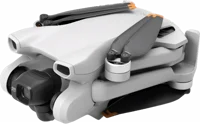
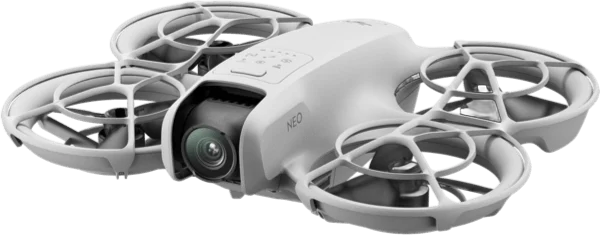
The DJI Neo is a 135 g camera drone that takes off from your palm with no remote controller. It suits people who want flying video of themselves while they run, ride or walk. DJI calls it its lightest and most compact drone to date DJI.
DJI Neo at a glance
Approx. 135 g
Takeoff weight
Approx. 18 mins
Max flight time
4K at 3840 x 2160
Video
22GB
Internal storage
DJI lists these specs on its DJI Neo specs page DJI.
Takeoff weight
Approx. 135 g
Max flight time
Approx. 18 mins, approx. 17 mins with propeller guards
Video
4K at 3840 x 2160, 30 fps
Internal storage
22 GB
Dimensions
130 x 157 x 48.5 mm
Image sensor
1/2-inch, 12 MP photos
Lens
f/2.8, 14 mm equivalent, 117.6 degree view
Max video bitrate
75 Mbps
Gimbal
Single-axis mechanical (tilt)
Stabilization
RockSteady, HorizonBalancing, or off
Max horizontal speed
6 m/s Normal, 8 m/s Sport, 16 m/s Manual
Wind resistance
8 m/s (Level 4)
Battery
1435 mAh, 7.3 V, Li-ion
Video transmission
O4, up to 10 km (FCC), 6 km (CE)
How much does the DJI Neo weigh?
Takeoff weight is about 135 g, and the battery alone is about 45 g DJImanual. The manual gives 135 g as the certified takeoff mass for EU class C0.
How big is the DJI Neo?
The aircraft measures 130 x 157 x 48.5 mm DJI. The arms do not fold. The guards wrap all 4 propellers and clip off with hooks manual.
DJI Neo standard, Fly More Combo or Motion Fly More Combo?
Pick the standard aircraft to fly from your palm and your phone. The 2 combos add control hardware manual.
→You want a memory card slot: pick the DJI Mini 3 DJI.
Good to know before you buy
!
DJI says the Neo has no obstacle sensing. DJI says to fly in an open area and keep the aircraft in sight DJI.
!
Palm and app control cap the aircraft at 30 m high and 50 m away. The manual says these 2 limits cannot be changed in DJI Fly, and that the longer figures need a remote control device manual.
!
Storage is 22 GB inside the aircraft, with no card slot. DJI's specs page lists no external SD card expansion, so plan to copy footage off often DJI.
!
Takeoff turns off if the Neo goes 90 days without the app. Reconnect it to DJI Fly on a phone that has internet to switch takeoff back on manual.
!
The manual says not to fly over water, or in rain, snow or fog. It also says wind above 8 m/s is out, so check the forecast first manual.
How the DJI Neo compares
DJI Neo vs DJI Neo 2
The Neo is the lighter of the 2, at about 135 g against 151 g DJI. The Neo 2 adds omnidirectional vision sensing with a forward LiDAR, 49 GB of storage and 4K up to 100 fps.
Omnidirectional vision, forward LiDAR, 0.5 to 15 m
Internal storage
22 GB
49 GB
Wind resistance
8 m/s (Level 4)
10.7 m/s (Level 5)
DJI Neo vs DJI Flip
The Neo weighs about 135 g against the Flip's figure of under 249 g, so 249 minus 135 leaves about 114 g, by our maths DJI. The Flip holds the longer flight time, at 31 minutes, and adds forward infrared sensing.
The DJI Mini 3 weighs 248 g, so the Neo at about 135 g is 113 g lighter, by our maths DJI. The Mini 3 carries a larger 48 MP sensor, a 3-axis gimbal and up to 38 minutes of flight.
Yes. DJI lists 5 control methods: palm, mobile app, voice, remote controller and immersive motion control DJI. Palm control needs nothing but the aircraft itself.
In palm control you press and hold the mode button, and the Neo counts down and lifts off your hand manual. It flies a set shot, records it, then hovers so you can catch it. It must have connected to DJI Fly over Wi-Fi at least once first.
Before you start
Return to Home does not work in palm control or app control. Keep the Neo in sight inside a controlled area manual.
Which shots can it fly on its own?
The mode button steps through Follow, Dronie, Circle, Rocket, Spotlight and Custom manual. Custom starts as DirectionTrack, and the app can switch it to Helix or Boomerang.
Does the DJI Neo follow you?
Yes. In Follow mode the Neo tracks the subject from behind while it records manual. DJI lists a maximum tracking speed of 8 m/s, and says only people can be tracked DJI.
If the subject leaves the camera view, the Neo hovers until it finds them again manual. You set the follow distance and height in DJI Fly.
Camera and 4K video
The Neo records 4K at 3840 x 2160 and 30 frames a second DJI. A 4:3 mode runs at 3840 x 2880, also at 30 fps. The 1080p mode reaches 60 fps.
Behind the glass sits a 1/2-inch sensor with an f/2.8 lens and a 117.6 degree view DJI. Photos come out at 12 MP in JPEG. Max video bitrate is 75 Mbps in MP4.
DJI calls the result 4K ultra-stabilized video DJI. Stabilization is RockSteady or HorizonBalancing, on a single-axis tilt gimbal.
How do you get the footage off it?
Open QuickTransfer in DJI Fly to pull clips straight to the phone over Wi-Fi manual. You can also plug the Neo into a computer with a data cable.
Battery and charging
The Neo flies for about 18 minutes on its 1435 mAh Intelligent Flight Battery DJI. With the propeller guards fitted that figure is about 17 minutes. Hovering time matches the flight time.
Charging through the aircraft takes about 50 minutes DJI. The optional Two-Way Charging Hub fills 3 batteries in about 60 minutes with the DJI 65W Portable Charger manual.
Note
The USB-C port on the Neo takes a maximum of 15 W, and the battery will not charge while the aircraft is powered on manual.
How long does the battery last overall?
The manual rates the battery for 100 cycles, and does not recommend use after that manual. Fully charge it once every 3 months during storage.
How far and how high can the DJI Neo fly?
With a remote control device, DJI lists a max flight distance of 7 km and O4 transmission out to 10 km under FCC DJI. Under CE the transmission figure is 6 km. Max takeoff altitude is 2000 m above sea level.
With palm or app control the numbers are much smaller on purpose: 30 m high and 50 m away DJI. The manual says those 2 caps are fixed manual.
Does it hold position indoors?
The Neo carries a downward vision system and an infrared sensing system manual. They position best between 0.5 m and 10 m over patterned surfaces. They do not work over water, glass, mirrors or plain floors.
Is the DJI Neo waterproof?
No. The manual says do not fly in rain, snow or fog, and do not fly over water manual. It also says to keep the camera out of water, and to wipe it dry with a soft cloth if it gets wet.
The downward vision system may not read water below the aircraft, so keep control at all times manual. Operating temperature runs from -10 to 40 degrees C DJI.
How to set up and use it
Press down to remove the gimbal protector from the camera.
Connect a USB charger to the USB-C port to activate the battery. Batteries ship in hibernation mode.
Download DJI Fly to your phone and sign in.
Press, then press and hold the power button to switch the Neo on.
Tap Connection Guide at the bottom right of the DJI Fly home screen.
Select the device model, then follow the on-screen steps to activate. An internet connection is needed.
Update the firmware when DJI Fly prompts you manual.
How to connect the DJI Neo to your phone
Power on the Neo and wait for the self-diagnostics to finish.
Turn on Bluetooth, Wi-Fi and location services on the phone.
Tap Connection Guide in DJI Fly, pick the model, then pick Connect via Mobile Device.
Select the Neo in the search results.
On a first connection, press and hold the power button on the Neo to confirm manual.
How to do a palm takeoff and landing
Power on the Neo, keep it still, and wait for the self-diagnostics to finish.
Press the mode button to pick the shot you want.
Place the Neo on your flat palm with the camera facing you.
Extend your arm, keep your fingers out of the guards, and hold still.
Press and hold the mode button, then wait for the spoken countdown.
To land, wait until the Neo hovers, walk to it, and hold your palm under it.
Keep your hand still with your fingers spread. Palm landing works within 0.7 m below the aircraft manual.
The Neo flies backward a short way right after a palm takeoff, so keep the space behind it clear manual. Press the mode button once during the countdown to cancel.
Care and quick fixes from the manual
How to clean the DJI Neo
Remove the battery before you clean the aircraft or touch the propellers.
Wipe dirt and dust off the body and propellers with a soft cloth.
Clean the vision and infrared sensor glass with a soft cloth.
Do not clean the Neo with a wet cloth or a cleanser holding alcohol, benzene or thinners. Liquid can reach the electronics and short them out manual.
How to change the propeller guards and propellers
Power the Neo off and remove the battery.
Release the hooks on a propeller guard, then push it off from the center.
Remove the second guard the same way.
Use the screwdriver from the box to unscrew a propeller from its motor.
Fit marked propellers to the marked arms and unmarked ones to the unmarked arms.
Keep the screws vertical as you tighten them, then check they sit flush.
Push each guard back on until the middle hook snaps in, then press the other 4 hooks home manual.
Check the propeller screws after every 15 hours of flying, about 60 flights manual. Discard a broken propeller with its screws.
If it will not charge or power on
Charge the battery first. A new battery must be activated by charging manual.
Press the power button once to read the battery level LEDs.
Remove the battery, refit it, and listen for the click of the latch.
Warm a cold battery first. It charges between 5 and 40 degrees C.
Contact DJI Support if 4 LEDs blink together, which points to a damaged battery.
If the gimbal drifts in flight
Calibrate the IMU and the compass in DJI Fly manual. Contact DJI Support if the drift stays.
If a firmware update fails
Restart every device and run the update again manual. Keep the aircraft above 20% charge and leave the cable in. An update takes about 10 minutes, and the gimbal going limp is normal.
How to reset the DJI Neo
Use the DJI Fly app to reset to the factory default manual.
DJI Neo FAQ
Which app does the DJI Neo need?
DJI Fly, on an iPhone or an Android phone manual. The app runs the live view, the shot settings, voice commands and footage transfer DJI.
Which goggles and controllers work with it?
DJI lists DJI Goggles 3 and DJI Goggles N3 DJI. The specs page lists the DJI RC-N3 remote controller, with 3.5 hours of operating time DJI.
Can the DJI Neo record sound?
Yes, through your phone or a DJI Mic 2 DJI. DJI lists audio recording with the app or the RC-N3 and RC-N2 controllers.
Where can I find the DJI Neo manual?
DJI posts the DJI Neo User Manual v1.2 as a PDF on its downloads page, with the quick start guides DJI.
How much is the DJI Neo?
See today's price with the link above.
The verdict
4/4 PASS
No. 083 · DJI Neo
Hands-free flying video of yourself.
The DJI Neo suits people who want flying video of themselves without learning to fly a drone. DJI pairs palm takeoff and 6 automatic shots with 4K video, 22 GB of storage and about 18 minutes in the air. Buyers who want obstacle sensing, a card slot or longer flights should look at the Neo 2 or the DJI Flip.
 4/4 PASS